How to Change the Time on an Audi A4 Quick and Easy
Changing the time on your Audi A4 is a simple process that anyone can do in just a few minutes. Whether you drive a newer model with a touchscreen or an older version with physical buttons, this guide walks you through every step. You will learn how to adjust the clock, switch between 12-hour and 24-hour formats, and fix common issues. Knowing how to change the time on an Audi A4 saves you from relying on your phone for the correct time. Keep reading for the full breakdown!
Have you ever jumped into your Audi A4 and noticed the clock on your dashboard is wrong? It happens to all of us. Maybe you forgot to adjust it after daylight saving time, or perhaps the battery died and reset everything. Whatever the reason, knowing how to change the time on an Audi A4 is a basic skill every owner should have.
The good news is that this task is much simpler than you might think. You do not need a mechanic or expensive tools. With just a few button presses or menu taps, you can have the correct time showing on your dash in minutes. This guide covers every Audi A4 model and display type so you can find the exact steps that work for your car.
We will walk you through the entire process from start to finish. You will learn about different clock types, step-by-step instructions, common problems, and pro tips to keep your clock accurate year-round. Let us get started!
Key Takeaways
- Easy Process: Changing the time on your Audi A4 takes just a few minutes using the dashboard or steering wheel controls.
- Multiple Methods: The steps vary slightly depending on your model year and whether you have a digital or analog display.
- Time Format Matters: You can switch between 12-hour and 24-hour formats to match your preference.
- Daylight Saving Time: Your Audi A4 has a built-in DST setting that can save you from manual adjustments twice a year.
- Common Issues Are Fixable: Most clock problems, like incorrect time or a blank display, have simple solutions.
- Regular Maintenance Helps: Checking your clock settings periodically keeps your dashboard accurate and reliable.
- Owner Manual Is Key: Always refer to your specific Audi A4 owner manual for model-specific instructions.
📑 Table of Contents
- Understanding Your Audi A4 Clock System
- Step-by-Step Guide to Changing the Time on Your Audi A4
- Changing the Time Format: 12-Hour vs 24-Hour
- Adjusting Time for Daylight Saving Time
- Troubleshooting Common Audi A4 Clock Issues
- Tips for Keeping Your Audi A4 Clock Accurate
- Why Accurate Timekeeping Matters in Your Audi A4
- Conclusion
Understanding Your Audi A4 Clock System
Before you dive into changing the time, it helps to understand how your Audi A4 clock works. Audi has used different clock systems across various model years, and each one has its own way of accessing the settings. The two main types are digital displays and analog displays. Both are straightforward to adjust once you know where to look.
The clock on your Audi A4 is part of the instrument cluster or infotainment system. In newer models, it lives inside the multimedia screen. In older models, it sits right on the dashboard behind the steering wheel. Either way, the process to update the time follows a similar logic. You navigate to a settings menu, find the clock option, and make your changes.
Types of Audi A4 Clock Displays
Audi A4 models come with two primary clock display types. The first is the digital clock display, which shows numbers for the hour and minutes. This type is common in Audi A4 models from the mid-2000s onward. The second is the analog clock display, which uses traditional clock hands on a small dial. This style was more common in older Audi A4 generations, particularly pre-2005 models.
Some newer Audi A4 models also feature a multi-display instrument cluster where the clock can be customized. You might see the time in the lower corner of the driver information screen. Understanding which type your car has is the first step to adjusting the time correctly.
Where to Find Clock Settings
The location of the clock settings depends on your Audi A4 model year. For vehicles with the MMI infotainment system, you typically find clock options under the “Settings” or “Vehicle” menu on the central screen. For models with simpler dashboards, the controls are often located on the turn signal stalk or the steering wheel buttons.
If you are unsure where to look, check your Audi A4 owner manual. The manual provides a detailed map of every button and menu option. It also includes model-specific diagrams that make navigation much easier. You can also find this information in the index under “Clock” or “Time Settings.”
Step-by-Step Guide to Changing the Time on Your Audi A4
Now that you understand the basics, let us get into the actual steps. Below, we cover the most common methods for adjusting the clock on different Audi A4 generations. Follow the instructions that match your vehicle.
For Models with a Digital Display
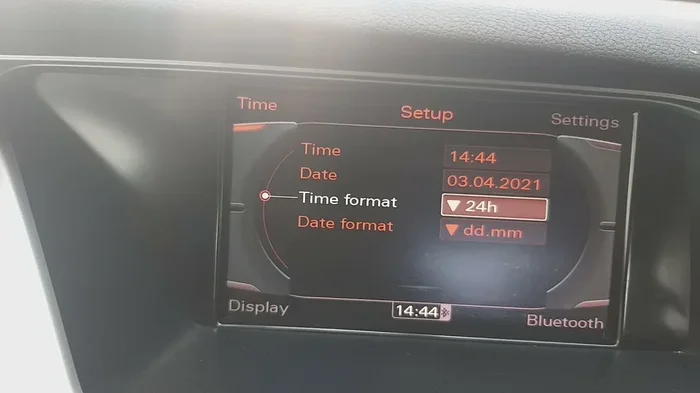
Changing the time on an Audi A4 with a digital display is a straightforward process. Start by pressing the “Menu” or “Setup” button on your infotainment system. Use the rotary dial or touchscreen to navigate to the “Vehicle” or “Settings” section. Scroll down until you see “Clock” or “Time Settings.”
Once you are in the clock menu, select “Edit” or the adjust icon. Use the up and down buttons to change the hour, and left and right to adjust the minutes. Some models let you toggle between AM and PM as well. After you set the correct time, press “Save” or “Confirm” to lock in your changes.
Quick tip: If your Audi A4 has a touchscreen, you can simply tap the clock display directly in some models. A small edit icon will appear, allowing you to type in the new time. This is the fastest method for touchscreen-equipped vehicles.
For Models with an Analog Display
Adjusting the clock on an older Audi A4 with an analog display requires a slightly different approach. Start by locating the trip reset stalk on the left side of the steering column. Pull the stalk toward you to access the menu. Use the turn signal lever to scroll through the options until you see the clock setting.
Press the reset button at the end of the stalk to enter the clock adjustment mode. Use the same stalk to scroll through hours and minutes. Push the reset button again to confirm each change. Once you have set the correct time, release the stalk and the new time will be saved automatically.
On some Audi A4 models from the early 2000s, you may need to hold the “Sel” or “Set” button on the instrument cluster for a few seconds. This activates the clock adjustment mode. Then use the arrow buttons to change the time. Release the button when you are done.
Quick Tips for Navigating the Clock Menu
- Be patient: Some Audi A4 menus have multiple layers. Take your time scrolling through each option.
- Use the manual: Your owner manual has diagrams that show exactly which buttons to press.
- Check the display brightness: If you cannot see the clock menu, adjust your screen brightness first.
- Restart the system: If the menu freezes, turn the ignition off and on again to reset the infotainment system.
- Note your model year: Different Audi A4 generations have slightly different menu layouts, so always verify your specific model.
Changing the Time Format: 12-Hour vs 24-Hour
Once you have set the correct time, you might want to adjust the format. Some drivers prefer the 12-hour format with AM and PM indicators, while others like the cleaner look of the 24-hour format. Good news: your Audi A4 lets you switch between both options easily.
To change the time format, go back to the clock settings menu you used earlier. Look for an option labeled “Format,” “Display,” or “12/24 Hour.” Select your preferred option and confirm. The clock will immediately update to show the time in your chosen format.
This setting is especially useful if you travel internationally or prefer the military-style 24-hour clock. The 24-hour format eliminates any confusion between morning and evening times. It is also the standard format used in most European countries, which aligns well with Audi’s German engineering roots.
Keep in mind that changing the format does not change the actual time. It only changes how the time is displayed. So if it is 2:30 PM, the 24-hour format will show 14:30 instead. Make sure you enter the correct time first before switching formats.
Adjusting Time for Daylight Saving Time
One of the most annoying parts of clock maintenance is adjusting for daylight saving time twice a year. The good news is that many Audi A4 models have an automatic daylight saving time feature built into the system. This means your clock adjusts itself when the time changes in spring and fall.
To enable this feature, navigate to the clock settings menu and look for “DST” or “Daylight Saving Time.” Toggle the switch to “On.” Your Audi A4 will now automatically move the clock forward by one hour in the spring and back by one hour in the fall.
However, not all Audi A4 models have this feature. Older models and some base trim levels may require manual adjustment each time. If your car does not support automatic DST, make a note on your calendar to change the clock the weekend before the time shift. It only takes a couple of minutes once you know the steps.
Also, keep in mind that not all countries observe daylight saving time. If you have recently moved or are driving in a different region, you may need to disable the DST feature to keep your clock accurate.
Troubleshooting Common Audi A4 Clock Issues
Sometimes things do not go as planned. Even after following the steps correctly, you might run into issues with your Audi A4 clock. Here are the most common problems and how to fix them.
Clock Shows the Wrong Time After Starting the Car
If your Audi A4 clock resets to the wrong time every time you start the vehicle, the issue is likely a weak battery or a loose connection. The clock relies on power from the car’s electrical system. When the battery is low or dying, it cannot maintain the correct time settings. Try having your battery tested at a service center. Replacing an old battery often fixes this problem completely.
Clock Display Is Blank or Frozen
A blank or frozen clock display can be frustrating. First, try restarting the infotainment system by holding the power button for about 10 seconds. This performs a soft reset that clears most minor glitches. If that does not work, you may need to perform a full system reset. Consult your owner manual for the specific reset procedure for your model.
In rare cases, a blank display indicates a deeper electrical issue. If restarting does not help, take your Audi A4 to a certified technician. They can check the wiring and replace any faulty components.
Clock Will Not Save Changes
If you change the time but it reverts after you turn off the engine, the problem could be a faulty capacitor in the instrument cluster. This is a known issue in some Audi A4 model years. A technician can replace the capacitor, which is a relatively inexpensive repair. In the meantime, you can manually reset the clock each time you start the car.
Another cause could be a software glitch in the infotainment system. Check for available software updates through your Audi dealer or the myAudi app. Updating the system software often resolves saving issues and improves overall performance.
Tips for Keeping Your Audi A4 Clock Accurate
Keeping your Audi A4 clock accurate does not require constant attention. A few simple habits can make a big difference over time. Here are some practical tips to ensure your clock stays spot-on all year round.
- Check your clock monthly: Take a few seconds each month to compare your dashboard clock with your phone or a wall clock. This quick habit catches small drift issues before they become a problem.
- Replace the battery regularly: A healthy car battery keeps all electronic systems running smoothly, including the clock. Have your battery tested every two years and replace it when needed.
- Update your software: Audi regularly releases software updates that improve system stability. Keeping your infotainment system up to date prevents many clock-related issues.
- Use GPS time synchronization: Some newer Audi A4 models sync the clock with GPS satellites. This provides extremely accurate timekeeping without any manual input. Check if your model has this feature in the settings menu.
- Keep your owner manual handy: It is the best resource for model-specific instructions. Store it in your glovebox so you can reference it anytime.
Following these simple tips means you will rarely have to worry about your clock being wrong. It is one of those small maintenance tasks that pays off in everyday convenience. You will always know the correct time when you are behind the wheel.
Why Accurate Timekeeping Matters in Your Audi A4
You might wonder why getting the time right on your dashboard matters so much. Beyond just convenience, an accurate clock plays a role in several vehicle functions. Your Audi A4 uses the internal clock for various systems, including maintenance reminders, service interval tracking, and even some safety features.
For example, if your car tracks when you last changed your oil, it relies on the internal clock to calculate the correct service date. If the clock is wrong, your maintenance reminders may appear too early or too late. This can lead to missed oil changes or unnecessary trips to the service center.
Additionally, some Audi A4 models use the clock to log trip data and driving patterns. Accurate time stamps make this data more useful for tracking fuel efficiency and driving habits. So keeping your clock set correctly is not just about convenience. It also helps you get the most out of your vehicle’s smart features.
Another reason is simply professionalism and safety. When you are driving and need to know the time quickly, you should be able to glance at your dashboard and get an accurate reading. Fumbling with your phone while driving is distracting and unsafe. A correctly set dashboard clock gives you instant access to the time without taking your eyes off the road for long.
Conclusion
Learning how to change the time on an Audi A4 is one of the simplest yet most useful skills you can develop as a car owner. Whether you have a digital display or an analog clock, the process is quick and straightforward. You just need to know where to look and which buttons to press. We covered every method in this guide, from basic time adjustment to troubleshooting common issues and keeping your clock accurate over time.
Remember to check your time format, enable automatic daylight saving time if your model supports it, and perform regular clock checks. These small habits make a big difference in your daily driving experience. Your Audi A4 is a precision-engineered machine, and keeping its clock accurate is just one way to get the most out of it.
Now that you have all the information you need, go ahead and adjust your clock if it is off. It takes only a few minutes, and you will never have to worry about being late because of a wrong dashboard clock again. Drive safely and enjoy the ride!
Frequently Asked Questions
Can I change the time on my Audi A4 without turning on the ignition?
No, you need to have the ignition turned on or the infotainment system powered up to access the clock settings. The dashboard and screen must be active for you to navigate to the time adjustment menu. Simply turn the key or press the start button without pressing the brake to access accessory mode.
Why does my Audi A4 clock keep resetting after I turn off the car?
This usually happens when the car battery is weak or failing. The clock relies on a stable power supply to retain its settings. If the battery cannot hold a charge, the clock will reset each time you start the vehicle. Have your battery tested and replaced if necessary to fix this issue permanently.
Is it possible to sync my Audi A4 clock with my phone?
Some newer Audi A4 models with Bluetooth connectivity can sync the clock with your paired smartphone. Check the “Phone” or “Device” settings in your infotainment system to see if your phone has a time sync option enabled. This feature is not available on all model years.
How do I switch from 12-hour to 24-hour time on my Audi A4?
Go to the clock settings menu, which you can access through the “Vehicle” or “Settings” section on your infotainment screen. Look for the “Format” or “12/24 Hour” option and toggle it to your preferred setting. The change takes effect immediately.
What should I do if the clock menu is not showing on my Audi A4 screen?
First, try restarting the infotainment system by holding the power button for 10 seconds. If that does not work, check that your software is up to date. You can also try turning the ignition off and back on. If the menu still does not appear, consult your Audi A4 owner manual for model-specific troubleshooting steps.
Can I adjust the Audi A4 clock while driving?
Yes, you can adjust the clock while the car is in motion. However, it is always safer to make adjustments when the vehicle is parked. Some Audi A4 models may limit certain menu functions while the car is moving for safety reasons. Pull over if you need to make complex changes.