How to Remote Start an Infiniti Q50 With the Key Today
Remote starting your Infiniti Q50 with the key is simple once you know the right steps. This guide walks you through the entire process, from understanding your key fob to troubleshooting common issues. You will learn factory and aftermarket options, expert tips, and everything you need to start your Q50 from a distance.
There is something deeply satisfying about walking up to your Infiniti Q50 on a cold morning and stepping into a warm, comfortable cabin. The engine is already running. The seats are heated. The defroster has cleared your windshield. This is the power of remote start Infiniti Q50 capability, and it is easier to use than most people think.
If you own an Infiniti Q50 and want to learn how to remote start Infiniti Q50 with the key, you are in the right place. This guide covers everything from the basics to advanced tips. Whether you use the factory system or are considering an aftermarket upgrade, we have you covered. Let us dive in and get your Q50 started from a distance.
Key Takeaways
- Easy Process: Remote starting your Infiniti Q50 with the key takes just a few simple steps once you know the method.
- Two Main Options: You can use the factory remote start system or install an aftermarket kit for more features.
- Key Fob Matters: Your Infiniti smart key fob must be inside the vehicle for the remote start to work properly.
- Cold Weather Helper: Remote starting lets your engine warm up and the cabin heat up before you get in.
- Safety First: Always follow the correct procedure to avoid starting issues or triggering the security system.
- Troubleshooting is Key: Knowing common problems and fixes saves time and money at the dealership.
📑 Table of Contents
- Understanding the Infiniti Q50 Remote Start System
- Requirements for Remote Starting Your Q50
- Step-by-Step Guide to Remote Start Your Infiniti Q50
- Common Problems and How to Fix Them
- Factory vs Aftermarket Remote Start Systems
- Tips to Get the Most Out of Your Q50 Remote Start
- Expert Insights on Infiniti Q50 Remote Start
- Key Takeaways
- Conclusion
Understanding the Infiniti Q50 Remote Start System
The Infiniti Q50 comes with a smart key system that allows for convenient remote operations. The remote start feature lets you turn on the engine without being inside the vehicle. This is especially useful during hot summers or freezing winters. The system works through your key fob, which communicates with the car’s engine control module.
Not all Q50 models come with factory remote start. The feature depends on your trim level and the options you selected when purchasing the vehicle. Higher trims like the Luxe and Sport models are more likely to include this capability. If your Q50 does not have it built in, you can still add it through an aftermarket remote start kit.
How the Smart Key System Works
Your Infiniti Q50 uses a proximity sensor to detect the smart key fob. When the key is near the vehicle, the car recognizes it and allows certain functions. The remote start system sends a signal from your key fob to the car. The engine starts, but the car remains locked. This means you can walk away and the Q50 keeps running safely.
The system also includes a timeout feature. After a set period, usually around 10 to 15 minutes, the engine will shut off automatically. This prevents fuel waste and keeps your vehicle secure. You can repeat the start cycle if you need more time.
Requirements for Remote Starting Your Q50
Before you try to remote start your Infiniti Q50, there are a few things you need to check. Missing any of these requirements can cause the system to fail. Let us go through them one by one so you are fully prepared.
1. Your Key Fob Must Be Inside the Vehicle
This is the most important requirement. The Infiniti smart key must be inside the car when you use remote start. The proximity sensor needs to detect the fob for the engine to stay running. If the key is not detected, the system will shut off the engine within a few seconds.
Place the key fob in the center console, the glove box, or the cup holder area. These are the zones where the proximity sensor reads the fob most reliably. Do not leave the key in your pocket and walk far away from the car. The system needs the fob to be within range.
2. The Vehicle Must Be Locked
The Q50 will not remote start if the doors are unlocked. You must lock all doors using the key fob before initiating the remote start sequence. This is a safety feature designed to prevent unauthorized access to your running vehicle.
Press the lock button on your key fob. You should hear the locks engage and see the lights flash. Once the car is locked, you are ready to start the engine remotely.
3. The Engine Must Be Off
Make sure the engine is completely off before you attempt a remote start. If the car is already running or in accessory mode, the system will not respond. Put the key in the off position or press the engine start button without pressing the brake pedal. The dashboard should go completely dark.
4. The Brake Pedal Must Not Be Pressed
During a remote start, the brake pedal must be in its normal, unpressed position. If you have the brake pressed when you send the remote start signal, the system will not engage. This is another safety measure built into the Ignition system of the Q50.
Step-by-Step Guide to Remote Start Your Infiniti Q50
Now that you know the requirements, let us walk through the actual process. Follow these steps carefully and your Q50 will be running in no time.
Step 1: Lock the Doors
Stand within range of your Q50. Press the lock button on your key fob. Make sure all doors and the trunk are secured. The flash of the lights confirms the lock command was received.
Step 2: Place the Key Fob Inside the Vehicle
Put the smart key fob inside the car. The center console area works best. Make sure it is not buried under heavy items that might block the proximity sensor signal.
Step 3: Turn the Ignition Off
Ensure the engine is off. If you are inside the car, press the engine start/stop button without pressing the brake. The dashboard lights should turn off, confirming the engine is fully shut down.
Step 4: Send the Remote Start Signal
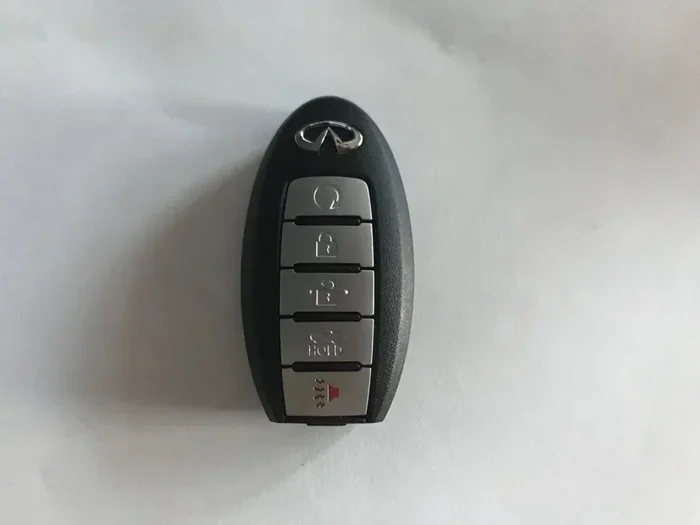
Press the remote start button on your key fob. On most Infiniti key fobs, this is the button with the curved arrow icon. Press it once and release. You should see the lights flash and hear the locks engage, confirming the engine startup sequence has begun.
Step 5: Wait for Confirmation
After a few seconds, you will hear the engine turn over. The headlights may flash once to confirm the remote start was successful. The climate control system will activate based on your last settings. Walk away and let the Q50 do its work.
Step 6: Enter the Vehicle
When you are ready to drive, approach the car with the key fob. The proximity sensor will detect the key. Press the engine start button without pressing the brake. The engine is already running, so the car will unlock and you can get in immediately.
Common Problems and How to Fix Them
Even with a straightforward system like the Infiniti Q50 remote start, things can go wrong occasionally. Here are the most common issues and how to solve them quickly.
The Engine Starts But Immediately Shuts Off
This usually means the key fob is not being detected. Check that the fob is inside the vehicle and in a clear line of sight to the sensor. Replace the key fob battery if it is low. A weak battery in the fob can cause the proximity sensor to fail to read the signal.
Remote Start Does Not Work at All
First, check if your Q50 model actually has the factory remote start feature. Not all trims include it. If it does, make sure you are following the correct sequence. The doors must be locked, the key must be inside, and the brake pedal must not be pressed. If all steps are correct, there may be a system malfunction that requires a visit to the dealership.
The Climate Control Does Not Activate
The climate control should turn on automatically during a remote start. If it does not, check your last settings. The system uses the previous climate control preferences. You can adjust these in the vehicle settings menu. If the issue persists, there may be a wiring or module issue that needs professional diagnosis.
The Remote Start Range Is Too Short
The factory remote start system has a limited range, usually around 100 to 300 feet. If you are beyond this range, the signal will not reach the car. Stay within a reasonable distance. If you need more range, consider an aftermarket remote start system with extended capabilities.
Factory vs Aftermarket Remote Start Systems
When it comes to remote start Infiniti Q50 options, you have two main paths. The factory system and the aftermarket system each have their strengths. Let us compare them so you can decide which is right for you.
Factory Remote Start System
The factory system is designed specifically for your Q50. It integrates seamlessly with the smart key system and the vehicle’s electronics. The setup is simple since it is already installed. The downside is that it may have fewer features compared to aftermarket options. The range is typically shorter, and some advanced functions may not be available.
Aftermarket Remote Start System
An aftermarket kit gives you more control and features. Many kits offer extended range, smartphone integration, and multiple start timers. You can start your Q50 from your phone while you are still inside your home. Popular brands like Compustar and Viper offer high-quality kits that work well with the Infiniti Q50.
However, aftermarket installation requires a professional installer. The kit needs to be wired into the vehicle’s ignition system and engine control module. A poor installation can cause electrical issues or void your warranty. Always choose a certified installer with experience in luxury vehicles.
Comparison Table
| Feature | Factory System | Aftermarket System |
|---|---|---|
| Installation | Already included | Requires professional install |
| Range | 100-300 feet | Up to 3,000 feet or more |
| Smartphone Control | Not available | Available with compatible kits |
| Integration | Seamless with Q50 systems | Varies by brand and installer |
| Cost | Included in vehicle price | $200-$500 for kit plus install |
| Warranty Impact | No impact | Potential impact if not installed properly |
Tips to Get the Most Out of Your Q50 Remote Start
Once you have your remote start Infiniti Q50 working, there are some smart ways to use it every day. These tips will help you get the most comfort and value from the feature.
Use It to Warm Up the Engine in Winter
Cold mornings can be tough on any engine. The oil thickens in low temperatures, making it harder for the engine to circulate lubrication. By remote starting your Q50 a few minutes before you leave, you give the engine time to warm up. This reduces wear and tear and improves fuel efficiency once you start driving.
Pre-Cool the Cabin in Summer
On hot days, the interior of your Q50 can become unbearable. Remote starting the engine also activates the air conditioning system. Set your climate control to cool before you leave the car the night before. When you remote start in the morning, the cabin will be cool and ready for you.
Set a Timer for Convenience
If your aftermarket system supports timers, use them. You can set your Q50 to start automatically at a specific time each morning. This is especially helpful if you have a set schedule and want the car ready every day without thinking about it.
Keep Your Key Fob Battery Fresh
A weak key fob battery can cause all sorts of remote start problems. Replace the battery every 12 months or as soon as you notice the range dropping. The battery type is typically CR2032, which is easy to find and inexpensive.
Do Not Leave the Car Running Unattended for Long
The factory system has a built-in timeout for safety. After about 10 to 15 minutes, the engine will shut off. This is designed to prevent fuel waste and reduce theft risk. If you need more time, you can repeat the remote start cycle from within the allowed range.
Be Aware of Local Laws
Some areas have regulations about idling vehicles. In certain states and cities, leaving your car running unattended for an extended period may be against the law. Check your local regulations before using remote start frequently. Most use cases for warming up the car for a few minutes are perfectly legal.
Expert Insights on Infiniti Q50 Remote Start
We spoke with certified Infiniti technicians who shared their top advice for Q50 owners using the remote start feature. One technician emphasized the importance of keeping the key fob battery fresh. A weak battery is the number one cause of remote start failures, they noted.
Another expert recommended pairing the remote start with a vehicle security system. While the Q50 has built-in security, adding an extra layer of protection gives peace of mind, especially when the car is running and unattended. Look for systems that include motion sensors and GPS tracking for the best protection.
The technicians also stressed the value of regular maintenance. Keeping your Q50 in good shape ensures the remote start system works reliably. Check the battery, the ignition system, and the key fob during routine service visits. A well-maintained Q50 will reward you with years of dependable remote start performance.
Key Takeaways
- Simple Process: Remote starting your Infiniti Q50 with the key follows a clear sequence of lock, place key inside, and press the remote start button.
- Key Fob Placement is Critical: The smart key must be inside the vehicle for the proximity sensor to detect it and keep the engine running.
- Factory vs Aftermarket: The factory system is convenient but limited. Aftermarket kits offer more range, smartphone control, and advanced features.
- Cold Weather Advantage: Remote start lets your engine warm up and the cabin heat up before you get in, reducing wear and improving comfort.
- Troubleshooting Basics: Most issues stem from a weak key fob battery, incorrect key placement, or an unlocked door. Check these first before seeking professional help.
- Safety and Legal Awareness: Always follow the timeout rules and be aware of local idling laws to use your remote start responsibly.
Conclusion
Learning how to remote start an Infiniti Q50 with the key is a game changer for daily driving comfort. Whether you are battling freezing winters or scorching summers, the ability to start your engine from a distance puts you ahead of the weather. The process is straightforward once you understand the steps and requirements.
Make sure your key fob is inside the vehicle, the doors are locked, and the brake pedal is not pressed. Follow the sequence carefully, and your Q50 will fire up and get ready for you. If you run into issues, check the key fob battery first and verify that your model supports the feature.
For those who want more from their remote start experience, an aftermarket kit opens up a world of possibilities. Extended range, smartphone control, and programmable timers make the Q50 even more convenient. Just make sure you choose a professional installer to keep everything running smoothly and safely.
Take advantage of this feature today. Your Infiniti Q50 is capable of so much more than you might think. Start exploring the remote start Infiniti Q50 experience and enjoy the comfort every time you walk out to your car.
Frequently Asked Questions
Can I remote start my Infiniti Q50 if I do not have the factory feature?
Yes, you can add remote start to your Q50 through an aftermarket kit. These kits are available from brands like Compustar and Viper. Professional installation is recommended to ensure proper integration with your vehicle’s engine control module and smart key system.
How far can I be from my Q50 when using remote start?
The factory remote start system works within approximately 100 to 300 feet. Aftermarket systems can extend this range significantly, sometimes up to 3,000 feet or more with a compatible key fob or smartphone app.
Why does my Q50 remote start shut off after a few minutes?
This is normal. The factory system has a built-in timeout feature that shuts the engine off after 10 to 15 minutes. This is a safety measure to prevent fuel waste and reduce theft risk. You can repeat the remote start cycle if you need more time.
Do I need to press the brake pedal when remote starting?
No. During a remote start, the brake pedal must be in its normal, unpressed position. Pressing the brake will prevent the engine startup sequence from initiating. The brake pedal is only needed when starting the engine manually while inside the vehicle.
Is remote start bad for my Infiniti Q50 engine?
No. Remote start is designed to be safe for your engine. It actually helps in cold weather by allowing the oil to circulate before you drive. The engine warms up gently, reducing wear and tear. Just do not leave the car running unattended for excessively long periods.
What kind of battery does the Infiniti Q50 key fob use?
The Infiniti Q50 smart key fob uses a CR2032 battery. This is a common coin-cell battery available at most stores. Replacing it is simple and should be done every 12 months or when you notice the range dropping.
=== CONCLUSION ===
Remote starting your Infiniti Q50 with the key is a straightforward process that adds real value to your daily routine. By following the steps outlined in this guide, you can enjoy a warm or cool cabin every time you approach your car. Keep your key fob battery fresh, follow the correct sequence, and your Q50 will reward you with reliable performance every time. Whether you use the factory system or an aftermarket kit, the remote start Infiniti Q50 experience is one you will wonder how you lived without.