How to Turn On Traction Control on a Volkswagen Jetta
Turning on traction control on a Volkswagen Jetta is simple once you know where to look. This guide walks you through every step, from locating the traction control button to understanding what each dashboard light means. Whether you drive a newer model or an older Jetta, you will find clear instructions that make the process easy and stress-free.
Driving a Volkswagen Jetta feels great. The car handles well, the ride is smooth, and the safety features give you peace of mind. But here is the thing many Jetta owners overlook. They do not fully understand how to use traction control on a Volkswagen Jetta. Maybe you just bought a used Jetta and the previous owner turned it off. Or perhaps you accidentally pressed the wrong button and now the light is on your dashboard. Whatever the reason, this guide will show you exactly how to turn on traction control on a Volkswagen Jetta. We will cover every model year, every button location, and every dashboard signal you need to know.
Traction control is one of the most important safety systems in your car. It helps you keep grip when the road is wet, icy, or uneven. Without it, your wheels can spin freely and you might lose control. With it, the car automatically adjusts engine power and applies brakes to individual wheels. This keeps you stable and safe. The good news is that turning this system on takes only a few seconds once you know where to look.
In this article, we will break everything down into simple steps. You will learn where the button is, what each warning light means, and when it makes sense to turn the system off. We will also cover common problems and give you practical tips for driving safely in bad weather. By the end, you will feel confident and in control every time you get behind the wheel of your Jetta.
Key Takeaways
- Easy Access: The traction control button on a Volkswagen Jetta is usually found near the steering wheel or on the center console.
- Multiple Methods: You can activate traction control through the steering wheel controls, the infotainment system, or a physical button depending on your Jetta model year.
- Dashboard Signals: The traction control warning light tells you whether the system is on, off, or experiencing a problem.
- Safety First: Keeping traction control enabled improves stability on wet, icy, and uneven road surfaces.
- Model Differences: Different Jetta trims and model years may have slightly different activation methods and button placements.
- Quick Reset: You can turn the system back on easily if you accidentally disabled it.
📑 Table of Contents
- What Is Traction Control and Why Does It Matter?
- How to Turn On Traction Control on a Volkswagen Jetta
- Understanding Your Jetta’s Traction Control Dashboard Lights
- When Should You Turn Traction Control On or Off?
- Common Traction Control Problems and How to Fix Them
- Tips for Safe Driving with Traction Control on Your Volkswagen Jetta
- Frequently Asked Questions
- Conclusion
What Is Traction Control and Why Does It Matter?
How Traction Control Works in a Volkswagen Jetta
Traction control is an electronic system that prevents your wheels from spinning out. When you accelerate on a slippery surface, the system detects wheel slippage. It then reduces engine power or applies the brakes to the spinning wheel. This helps the car maintain grip and stability. The system works closely with the anti-lock braking system, or ABS, and the electronic stability control, or ESC. Together, these systems keep your Jetta safe in challenging driving conditions.
On a Volkswagen Jetta, the traction control system uses sensors on each wheel. These sensors monitor the speed of every wheel in real time. If one wheel starts spinning faster than the others, the system kicks in immediately. It adjusts power delivery and braking force to keep all four wheels moving at the right speed. This happens in a fraction of a second. You might not even notice it working, but you will definitely feel the difference when you are driving on ice or wet roads.
Why Every Jetta Owner Should Keep Traction Control Enabled
There are many reasons to keep traction control turned on. The biggest reason is safety. When you drive on wet roads, rain, snow, or ice, traction control helps prevent accidents. It keeps the car from sliding or fishtailing. This is especially important for the Volkswagen Jetta because it is a front-wheel-drive car in most trims. Front-wheel-drive vehicles are more prone to understeer when the front wheels lose grip. Traction control reduces this risk significantly.
Another reason is insurance and warranty protection. Many insurance companies offer discounts for cars with active safety features. Keeping traction control enabled ensures you stay eligible for those discounts. It also means that if something goes wrong, the manufacturer cannot claim you disabled a safety feature intentionally. The Volkswagen Jetta comes with traction control as a standard feature across all model years. This is one of the reasons the Jetta remains such a popular choice for families and daily commuters.
Some drivers wonder if turning off traction control improves performance. In certain situations, like when you are stuck in snow or mud, turning the system off can help. The wheels are allowed to spin more freely, which can dig the car out. But for everyday driving, keeping it on is always the better choice. It gives you more control, not less.
How to Turn On Traction Control on a Volkswagen Jetta
Locate the Traction Control Button
The first step is finding the traction control button. On most Volkswagen Jetta models, the button is located near the steering wheel or on the center console. Look for a symbol that looks like a car with wavy lines behind it. This is the standard traction control icon. On some models, the button is labeled with the words “TCS” or ” traction control.” The exact location depends on your model year and trim level.
For the Volkswagen Jetta models from 2011 to 2018, the button is typically found on the left side of the steering wheel column. You will see it near the turn signal lever. For models from 2019 and newer, Volkswagen moved the button to the center console area, often near the gear shifter or the climate controls. If you are having trouble finding it, check your owner’s manual. The manual will have a diagram showing the exact location for your specific Jetta trim.
Step-by-Step Instructions to Activate Traction Control
Follow these steps to turn on traction control on your Volkswagen Jetta:
- Start the engine. Make sure your Jetta is running and the dashboard lights are illuminated. This ensures the system is ready to activate.
- Find the traction control button. Look for the TCS icon on the steering wheel controls or center console. It usually looks like a car with wavy or squiggly lines behind it.
- Press the button once. A single press turns the system on or off. When the system is on, the dashboard light will be off or show a steady green icon.
- Check the dashboard. Look at the instrument cluster. If the traction control light is off or shows a steady green symbol, the system is active.
- Test the system. Drive on a safe, low-traction surface like a wet parking lot. You should feel the car maintaining grip without wheel spin.
How to Turn On Traction Control Using the Infotainment Screen
Some newer Volkswagen Jetta models allow you to control traction settings through the infotainment screen. This method gives you more options. For example, you can switch between different drive modes like Normal, Snow, and Sport. Each mode adjusts the traction control sensitivity differently.
To access these settings, press the menu button on your infotainment system. Navigate to the “Vehicle” or “Settings” section. Look for “Driving Modes” or “Traction Control Settings.” From there, you can select the mode that suits your current driving conditions. The Snow mode, for instance, reduces wheel spin and gives you smoother acceleration on icy roads. This feature is available on Jetta models equipped with the digital cockpit or the larger infotainment display.
Traction Control Activation for Different Jetta Model Years
The method to turn on traction control can vary slightly depending on your Jetta model year. Here is a quick overview:
- 2011-2014 Jetta: The button is on the left side of the steering column. Press it once to toggle the system on or off.
- 2015-2018 Jetta: Same location as above. Some trims also include a “Sport Mode” button that temporarily reduces traction control intervention.
- 2019-2023 Jetta: The button may be on the center console or accessible through the infotainment screen. Newer models also offer adaptive traction control that adjusts automatically based on road conditions.
- 2024 and newer Jetta: These models feature the latest Volkswagen safety suite. Traction control is integrated with the digital driving assistant and can be adjusted through the touchscreen or steering wheel controls.
No matter which Jetta you drive, the basic process is the same. Find the button, press it, and confirm the system is active through the dashboard display. It really is that simple.
Understanding Your Jetta’s Traction Control Dashboard Lights
What Each Warning Light Means
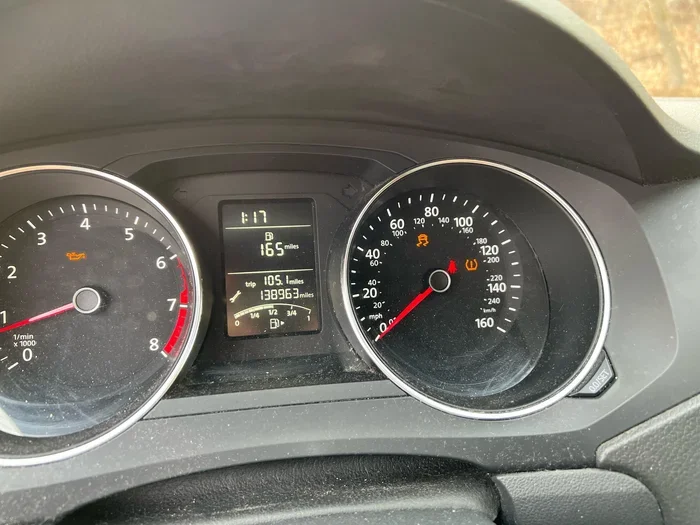
The dashboard lights in your Volkswagen Jetta communicate a lot about the traction control system. Understanding these lights helps you know when something is wrong. Here are the most common traction control indicators you will see:
- Steady yellow or amber light: This means the traction control system is turned off. It could also indicate that the system is not working at full capacity. Check if you accidentally pressed the TCS button.
- Flashing yellow light: This signals that the traction control system is actively working. The system is detecting wheel slippage and making adjustments to keep you stable.
- Red or red-orange light: This is a serious warning. It usually means there is a malfunction in the traction control system or the ABS. You should have the car checked by a mechanic as soon as possible.
- No light at all: This is the normal state when traction control is fully active and functioning correctly.
Common Dashboard Confusion: Traction Control vs. Stability Control
Many Jetta owners confuse the traction control light with the stability control light. These two systems work together but are not exactly the same. Traction control focuses on preventing wheel spin during acceleration. Stability control goes further by correcting the direction of the car during sharp turns or sudden maneuvers. On most Volkswagen Jettas, both systems share the same warning light. If the light comes on, it could mean either system has a problem.
Some Jettas have separate indicators for each system. Check your owner’s manual to understand which light corresponds to which function. When in doubt, a quick visit to a Volkswagen dealership or a trusted mechanic can clear things up. They can run a diagnostic scan and read the error codes from the car’s computer.
When the Traction Control Light Stays On
If the traction control light stays on and does not go away after you press the button, something is wrong. Common causes include a faulty wheel speed sensor, a problem with the ABS module, or low brake fluid. Sometimes the light comes on after a battery change or a jump start. In these cases, the system may need to be reset. Try turning the car off, waiting 30 seconds, and restarting it. If the light persists, do not ignore it. A malfunctioning traction control system puts your safety at risk.
When Should You Turn Traction Control On or Off?
Situations Where You Should Keep Traction Control On
For the vast majority of driving situations, you should keep traction control turned on. Here are the key scenarios where the system provides the most benefit:
- Rainy weather: Wet roads reduce tire grip significantly. Traction control prevents the wheels from spinning when you accelerate from a stop or hill.
- Snow and ice: Driving on snow or ice is one of the most dangerous conditions. Traction control works with the Jetta’s stability system to keep you on your intended path.
- Gravel or dirt roads: Loose surfaces can cause unexpected wheel spin. The system helps maintain control and stability.
- City driving: Even in normal city driving, sudden stops and starts can cause wheel slip. Traction control smooths out these transitions.
- Highway driving: Wind gusts and unexpected road conditions can affect stability. The system provides an extra layer of protection.
When It Is Okay to Turn Traction Control Off
There are a few situations where turning off traction control makes sense. The most common one is when your car is stuck in snow or mud. In these cases, spinning the wheels can actually help you dig out and gain momentum. To do this safely, press the TCS button to turn the system off. Gently apply the gas and let the wheels spin just enough to create traction. Once you are free, turn the system back on immediately.
Another situation is when you are participating in track days or performance driving events. On a closed track, you may want the wheels to spin freely for better acceleration. However, for all everyday driving, keep traction control on at all times.
Understanding the Volkswagen Jetta Drive Modes
Many newer Volkswagen Jetta models come with selectable drive modes. These modes adjust the traction control and throttle response to suit different conditions. The most common modes include:
- Normal Mode: This is the default setting. Traction control operates at full sensitivity for everyday driving.
- Snow Mode: This mode reduces wheel spin and provides smoother, more gradual acceleration. Ideal for icy and snowy conditions.
- Sport Mode: This mode allows more wheel spin before traction control intervenes. It gives you a more responsive feel but reduces safety on slippery surfaces.
- Off Mode: This completely disables traction control. Use this only in specific situations like getting unstuck from snow or mud.
Switching between these modes is easy. On Jettas with drive mode selection, use the dial or buttons near the gear shifter. On models without this feature, the TCS button provides a simple on-off toggle.
Common Traction Control Problems and How to Fix Them
Why Your Traction Control Might Not Turn On
If you press the traction control button and the system does not activate, there could be several reasons. The most common cause is a faulty wheel speed sensor. These sensors are located near each wheel and monitor rotation speed. If one sensor is dirty, damaged, or malfunctioning, the entire traction control system may not work properly. Cleaning or replacing the sensor usually fixes this issue.
Another common problem is a blown fuse. The traction control system shares fuses with the ABS and other electronic systems. Check your owner’s manual for the fuse box location and the specific fuse for the traction control system. Replacing a blown fuse is a simple fix that costs just a few dollars.
Sometimes the problem is software-related. Volkswagen occasionally releases updates for the car’s electronic control unit, or ECU. These updates can fix bugs that prevent traction control from activating correctly. Visit a Volkswagen dealership to check if a software update is available for your model.
Resetting the Traction Control System
If your traction control system is acting up, a reset often helps. Here is how to do it:
- Turn the engine off and remove the key from the ignition.
- Wait at least 30 seconds. This allows the car’s computer to fully power down.
- Restart the engine and press the traction control button to turn the system back on.
- Check the dashboard to confirm the light is off and the system is active.
If the light comes back on after a reset, there is likely a deeper issue that needs professional attention. Do not keep driving with the traction control light on. Get the car inspected by a qualified mechanic.
Cost of Traction Control Repairs
The cost of fixing traction control issues varies depending on the problem. Replacing a wheel speed sensor typically costs between $100 and $250. Fixing a blown fuse costs just a few dollars. More serious issues, like a faulty ABS module, can cost several hundred dollars. Regular maintenance and timely repairs keep the system working properly and protect your wallet in the long run.
Tips for Safe Driving with Traction Control on Your Volkswagen Jetta
Best Practices for Winter Driving
Winter driving demands extra caution. Even with traction control active, you need to drive safely. Here are some tips that every Jetta owner should follow:
- Slow down. Traction control helps, but it cannot defy the laws of physics. Reduce your speed in snow and ice.
- Increase following distance. Give yourself more room to stop. Braking distances increase significantly on slippery roads.
- Avoid sudden movements. Steer smoothly and accelerate gently. Jerky movements can overwhelm the traction control system.
- Use winter tires. Traction control works best when paired with proper winter tires. The tires provide the physical grip while the system manages the electronic grip.
- Keep your fuel tank at least half full. This prevents fuel line freeze and gives you a safety margin if you get stuck.
Maintaining Your Traction Control System
Regular maintenance keeps the traction control system working reliably. Here is what you should do:
- Check tire condition regularly. Worn tires reduce the effectiveness of traction control. Replace tires when the tread depth drops below 4/32 of an inch.
- Keep wheel sensors clean. Mud, snow, and debris can cover the wheel speed sensors. Clean them during routine car washes.
- Address warning lights promptly. Never ignore a traction control or ABS warning light. Early diagnosis prevents bigger problems.
- Follow the maintenance schedule. The Volkswagen Jetta owner’s manual includes a recommended service schedule. Stick to it for optimal system performance.
Quick Tips for Everyday Driving
Here are some quick tips that make a big difference in your daily driving:
- Always check that traction control is on before you start driving.
- Do not rely solely on traction control. Practice good driving habits like smooth steering and gentle braking.
- Familiarize yourself with the dashboard lights. Know what each one means so you can react quickly.
- Keep your owner’s manual in the glove box for quick reference.
- If you buy a used Jetta, ask the previous owner about the traction control system and any past issues.
Frequently Asked Questions
Can I drive my Volkswagen Jetta without traction control?
Yes, you can drive without traction control, but it is not recommended for everyday use. The system helps prevent wheel spin and maintains stability. Driving without it increases the risk of accidents, especially on wet or icy roads. Only turn it off when you need extra wheel spin to get unstuck from snow or mud.
Where is the traction control button on a Volkswagen Jetta?
The traction control button is usually found near the steering wheel on the left side of the steering column. On newer Jetta models from 2019 and up, the button may be located on the center console or accessible through the infotainment screen. Check your owner’s manual for the exact location of your specific model.
Why is the traction control light flashing on my Jetta dashboard?
A flashing traction control light means the system is actively working to prevent wheel slippage. This is normal when driving on wet, icy, or loose surfaces. If the light stays on constantly, it may indicate a system malfunction. In that case, have the car inspected by a mechanic as soon as possible.
Will turning off traction control damage my Volkswagen Jetta?
No, turning off traction control will not damage the car. It simply disables the electronic intervention that prevents wheel spin. However, driving without it reduces safety and control. Always turn the system back on once you are done with the specific situation that required it to be off.
How do I reset the traction control system on my Jetta?
To reset the system, turn off the engine, remove the key, and wait at least 30 seconds. Then restart the engine and press the traction control button to reactivate the system. If the warning light persists after a reset, there may be an underlying issue that requires professional diagnosis.
Does every Volkswagen Jetta come with traction control?
Yes, traction control is a standard feature on all Volkswagen Jetta models across all years. It is part of the car’s core safety package. Some trims may offer additional driving modes or more advanced traction control settings, but the basic system is always included.
Conclusion
Knowing how to turn on traction control on a Volkswagen Jetta is an essential skill for every owner. The process is quick, simple, and can make a huge difference in your driving safety. Whether you are navigating a rainy highway, driving through a snowy neighborhood, or just heading to work on a wet morning, traction control is there to help you stay in control. We have covered every aspect of this topic in this guide. You now know where the button is, how to activate the system, what the dashboard lights mean, and when it is appropriate to turn the system off.
Remember to always keep traction control enabled for your daily driving. Use the Snow mode or Off mode only when conditions truly require it. Take care of your car by maintaining the sensors, checking the dashboard lights, and addressing any issues promptly. Your Volkswagen Jetta is a well-engineered vehicle with excellent safety features. Using them properly ensures you get the most out of every drive.
Share this guide with fellow Jetta owners who might be struggling with their traction control system. A quick read could make a big difference in how safely they drive. Stay safe, stay informed, and enjoy every mile in your Volkswagen Jetta.