Why Wont My Car Bluetooth Connect Quick Fixes Inside
Why won’t my car Bluetooth connect? This is one of the most common car tech problems drivers face every day. Whether your phone refuses to pair or the connection drops mid-drive, the fix is often simpler than you think. In this guide, we walk you through the most common causes and the quickest solutions to get your car Bluetooth working again. You will learn simple reset steps, phone settings tips, and expert tricks that solve 90% of car Bluetooth issues in minutes.
There is nothing more frustrating than getting into your car, ready to hit the road, and realizing your car Bluetooth just will not connect. You try tapping the screen. You toggle the settings. You even turn it off and on again. Nothing works. This is a problem millions of drivers deal with every single day. The good news is that most bluetooth connectivity issues have simple solutions. In this article, we will walk you through every possible reason your wireless connection is failing and show you exactly how to fix it. By the end, you will have the knowledge and confidence to solve this problem yourself.
We keep our phones close to us all day long. They hold our music, our maps, and our calls. So when the car audio bluetooth system refuses to link up, it feels like a big deal. You cannot play your favorite playlist. You miss hands free calling. Your road trip just got a lot less fun. But here is the truth. Most of the time, this is not a serious problem. It is usually a small settings glitch or a memory issue that builds up over time. Let us dig into the reasons and the fixes.
Key Takeaways
- Restart both devices first: A simple reboot of your phone and car system fixes most pairing problems instantly.
- Delete old pairings: Removing saved connections clears up conflicts that stop new bluetooth pairing from working.
- Check your phone settings: Make sure bluetooth is on, your phone is visible, and location services are enabled.
- Update your software: Outdated phone or car firmware is a hidden cause of car bluetooth not connecting issues.
- Watch the distance: Bluetooth range matters. Keep your phone close to the car system during pairing.
- Reset network settings: This powerful fix clears all saved wireless connections and often solves stubborn problems.
- Know when to seek help: If none of the fixes work, the issue may be a hardware problem that needs a professional.
📑 Table of Contents
Why Won’t My Car Bluetooth Connect?
The question why won’t my car Bluetooth connect comes up in every car owner’s life at some point. The answer is usually one of a handful of common causes. Your phone and your car system need to “talk” to each other using radio signals. When something interrupts that conversation, the connection fails. This can happen for many reasons. Sometimes it is a simple settings issue. Other times, it is a deeper software conflict. Let us break down the main reasons so you can understand what is going wrong.
Bluetooth Is Turned Off or Hidden
This sounds obvious, but it happens all the time. Your phone’s bluetooth might be turned off without you noticing. Or your phone might be in a hidden mode where it cannot be seen by other devices. Check your quick settings panel first. Make sure the bluetooth toggle is switched on. Then go into your bluetooth settings and confirm that your phone is set to “visible” or “discoverable.” Without this, your car system cannot find your phone during the pairing process.
Paired Device List Is Full
Most car infotainment systems can only store a limited number of paired devices. When that list fills up, new bluetooth pairing attempts fail. Your car might refuse to connect to a new phone because there is no room left. This is a very common cause of car bluetooth not connecting problems. The fix is simple. Go into your car’s bluetooth settings and delete old or unused devices. Keep only the phones you use regularly on the list.
Software Needs an Update
Both your phone and your car’s infotainment system run on software. When that software gets outdated, bluetooth connectivity can break. Phone updates happen often, and they often include fixes for wireless connection bugs. Your car system may also need a firmware update. Check for updates on both your phone and your car’s settings menu. Keeping everything current is one of the best ways to prevent bluetooth pairing problems.
Too Much Distance Between Devices
Bluetooth range is limited. Most systems work best within about 30 feet of each other. If your phone is in your back pocket or buried in your bag, the signal might be too weak to connect. During the initial pairing process, keep your phone close to the car’s infotainment screen. Once paired, you can move around more freely. But for troubleshooting, proximity matters a lot.
Common Reasons Your Car Bluetooth Won’t Connect
Understanding the root causes of bluetooth connectivity issues helps you fix them faster. Below are the most common reasons drivers experience car Bluetooth problems. Read through this list and see if any of these match your situation.
Interference From Other Devices
Your car is full of electronic devices. Your phone, your tablet, your smartwatch, even your USB cables can cause wireless interference. Some of these devices operate on the same radio frequency as Bluetooth. When too many devices are competing for attention, the signal gets crowded. This can cause your car audio bluetooth system to drop the connection or refuse to pair. Try turning off unnecessary wireless devices and see if the connection improves.
Old or Corrupted Pairing Data
Every time your phone connects to your car, it saves pairing data. Over time, this data can become corrupted. Old pairing records can conflict with new ones. This creates a situation where your phone and car keep trying to connect using outdated information. The result is a failed connection or a connection that drops constantly. Clearing this old data is one of the most effective fixes for bluetooth not working in car issues.
Low Battery on Your Phone or Car System
Low battery can seriously affect Bluetooth performance. When your phone’s battery drops below 20%, it may reduce power to the wireless radio. This weakens the signal and can prevent pairing. Similarly, if your car battery is low, the infotainment system may not have enough power to search for and connect to devices. Make sure both your phone and your car have enough charge before troubleshooting.
Airplane Mode Is On
This is a sneaky cause. If Airplane Mode is accidentally turned on, it disables all wireless connections, including Bluetooth. You might not even realize it is on. Check your phone’s status bar for the airplane icon. If you see it, turn it off and try connecting again. This simple check solves the problem more often than you would think.
Quick Fixes to Try Right Now
Before you dig into complex troubleshooting, try these quick fixes. Most drivers solve their car Bluetooth connection problems with one of these simple steps. Work through them in order for the best results.
1. Toggle Bluetooth Off and On
The oldest trick in the book is still one of the best. Turn Bluetooth off on your phone. Wait about 10 seconds. Then turn it back on. This forces your phone to refresh its wireless connection and can clear minor glitches. On most phones, you can do this from the quick settings panel by swiping down from the top of your screen.
2. Restart Your Phone
A quick restart clears temporary bugs and refreshes all your phone’s systems, including the Bluetooth module. Power your phone completely off. Wait 15 seconds. Then turn it back on. Try pairing again. This simple step fixes a surprising number of bluetooth pairing problems.
3. Restart Your Car’s Infotainment System
Your car’s screen needs a refresh too. Turn off your car completely. Wait at least 30 seconds. Then start it back up. This reboots the infotainment system and clears any temporary errors. Some cars let you soft reset the screen by holding down the power button for 10 seconds. Check your car’s manual for the exact method.
4. Make Sure Your Phone Is Unlocked
On many phones, a locked screen blocks Bluetooth discovery. Your car system cannot see your phone if the screen is locked. Unlock your phone before trying to pair. This is a small detail that trips up a lot of drivers.
How to Reset Your Car Bluetooth
When the quick fixes do not work, a full reset is your next best step. Resetting clears all saved Bluetooth connections and forces a fresh start. This is one of the most powerful tools for fixing car stereo Bluetooth troubleshooting issues.
Reset Your Car’s Bluetooth System
Every car is different, but the general process is similar. Go to your car’s Settings menu. Find the Bluetooth or Phone section. Look for an option to “Reset Bluetooth” or “Clear All Paired Devices.” Confirm the reset. Your car will forget all previously connected phones. Now try pairing your phone again from scratch. This fresh start often solves stubborn connection problems.
Reset Network Settings on Your Phone
If resetting the car does not help, try resetting your phone’s network settings. On iPhone, go to Settings, then General, then Transfer or Reset iPhone, then Reset, and choose Reset Network Settings. On Android, go to Settings, then System, then Reset Options, then Reset Wi-Fi, Mobile, and Bluetooth. Warning. This will erase all saved Wi-Fi passwords and paired devices. Make sure you know your Wi-Fi password before doing this. After the reset, try pairing your phone with your car again.
Factory Reset the Car Infotainment System
As a last resort, you can factory reset your car’s entire infotainment system. This wipes all settings, saved data, and connections back to their original state. Refer to your car’s manual or contact your dealer for instructions. This is a more drastic step, but it can solve deep software issues that nothing else can fix.
When the Problem Is Your Phone
Sometimes the issue is not your car at all. Your phone might be the source of the Bluetooth connectivity fix problem. Here is how to check.
Check for Phone Software Updates
Go to your phone’s settings and check for the latest software update. Install any pending updates. These updates often include bug fixes for Bluetooth connectivity issues. An up to date phone works much better with your car’s system.
Remove Old Pairing Records
Go to your phone’s Bluetooth settings and find your car in the list of paired devices. Tap on it and choose “Forget This Device” or “Unpair.” Do the same on your car’s system. Then pair the devices fresh. This removes any corrupted data that might be causing the problem.
Check for App Conflicts
Some apps can interfere with Bluetooth connections. Apps that control audio, like music players or voice assistants, might conflict with your car’s system. Try closing all background apps and then attempt to pair again. If the connection works, one of your apps was the culprit.
Car Bluetooth Tips for a Better Connection
Once you get your car Bluetooth working again, you want to keep it working. Follow these tips to enjoy a smooth, reliable wireless connection every time you drive.
Keep Your Phone Close During Pairing
Place your phone on the center console or the passenger seat during the initial pairing process. This ensures a strong signal and a successful connection. Once paired, you can move your phone around freely.
Limit the Number of Paired Devices
Keep your car’s Bluetooth device list short. Only pair the phones you actually use. Too many saved devices create clutter and can lead to conflicts. A clean list means fewer problems.
Update Your Car’s Firmware Regularly
Check your car manufacturer’s website or app for firmware updates. These updates improve Bluetooth performance and fix known bugs. Keeping your car system updated is one of the best long term investments you can make.
Avoid Using Bluetooth While Charging
Some phones experience Bluetooth interference when they are charging and connected to Bluetooth at the same time. If you notice connection drops while charging, try unplugging your phone and see if the connection stabilizes.
When to See a Professional
Most car Bluetooth problems are easy to fix at home. But sometimes, the issue is a hardware problem that needs professional attention. If you have tried every fix in this guide and your Bluetooth still will not connect, it is time to see a mechanic or a car audio specialist. A faulty Bluetooth module in your car may need to be replaced. This is not something you can fix with a simple reset. A professional can diagnose the issue and get you back on the road with a working wireless connection.
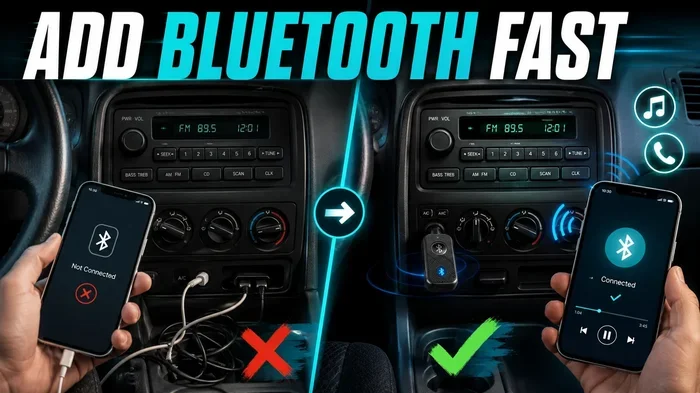
Also, if your car is older and has never supported modern Bluetooth features like audio streaming or hands free calling, an aftermarket Bluetooth adapter can be a great solution. These small devices plug into your car’s audio system and add modern Bluetooth connectivity to older vehicles. They are affordable and easy to install.
Conclusion
Dealing with a car Bluetooth that will not connect is annoying, but it is almost always fixable. Start with the simple steps. Toggle your settings, restart both devices, and delete old pairings. If those do not work, move on to a full reset of your car or phone system. Keep your software updated and your paired device list clean. These habits will keep your wireless connection strong and reliable. The next time you ask yourself why won’t my car Bluetooth connect, you will know exactly what to do. You have the tools, the knowledge, and the confidence to fix it yourself.
Remember, a great driving experience includes seamless music, clear calls, and easy navigation. Your car Bluetooth makes all of that possible. Take care of it, and it will take care of you on every trip.
Frequently Asked Questions
Why does my car Bluetooth keep disconnecting randomly?
Random disconnections are usually caused by interference, low battery, or an outdated software version. Try moving your phone closer to the car’s infotainment system and check for pending updates on both devices. Clearing old paired devices can also stop these annoying drops.
Can too many paired devices cause Bluetooth problems in my car?
Yes. Most car systems have a limit on how many devices they can remember. When that list is full, new pairing attempts fail. Delete any devices you no longer use to free up space and improve Bluetooth connectivity.
Does airplane mode affect car Bluetooth?
Absolutely. When Airplane Mode is on, it turns off all wireless connections, including Bluetooth. Always make sure Airplane Mode is off before trying to connect your phone to your car.
How do I know if my car’s Bluetooth module is broken?
If your car’s Bluetooth will not turn on at all, or if none of the troubleshooting steps work, the module may be faulty. A professional mechanic or car audio specialist can test the module and replace it if needed.
Can I add Bluetooth to an older car that does not have it?
Yes. Aftermarket Bluetooth adapters are a great option for older cars. These small devices plug into your car’s audio system and add modern wireless connectivity. They are affordable and easy to set up.
Why does my phone connect to my car Bluetooth but there is no sound?
This usually means the audio output is set to the wrong source. Check your car’s infotainment settings and make sure the audio output is set to Bluetooth or Bluetooth Audio. Also check your phone’s media volume and make sure it is not muted.