How Do You Reset the Maintenance Light on Your Dashboard
Knowing how to reset the maintenance light on your dashboard is a simple skill every car owner should have. Whether your service light is flashing after an oil change or a routine inspection, the reset process is usually quick and straightforward. This guide walks you through the exact steps for different vehicle brands so you can handle it yourself at home. We also cover common mistakes, brand-specific procedures, and tips to keep your dashboard indicator lights working properly. By the end, you will feel confident tackling this common car maintenance task on your own.
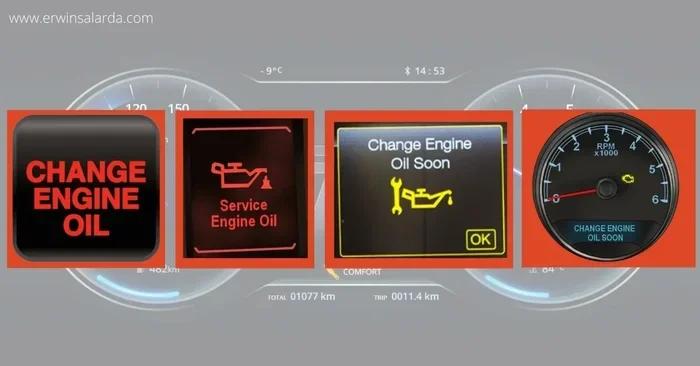
Have you ever looked at your dashboard and noticed a small light that says “Maintenance Required” or shows a wrench icon? It is one of those things that can make you worry, even when everything else seems fine. The good news is that resetting the maintenance light on your dashboard is something you can do at home without visiting a mechanic. In this guide, we will walk you through every method, brand by brand, so you can handle this simple task with confidence.
Your vehicle’s dashboard indicator lights are designed to keep you informed about the health of your car. The maintenance light is different from the check engine light, and understanding that difference is the first step. Once you know what triggers the light and how to reset the service light, you will save time and money. Let us dive into everything you need to know about resetting the maintenance light on your dashboard and keeping your car in great shape.
Whether you drive a Toyota, Honda, Ford, or Chevrolet, the reset procedure is easier than most people think. You do not need any special tools or mechanic skills. A few buttons and a little patience are all it takes. This guide covers the general methods, brand-specific steps, common mistakes, and practical tips to make the process smooth. By the time you finish reading, you will know exactly what to do the next time that maintenance reminder pops up on your dashboard.
Key Takeaways
- Resetting the maintenance light is easy: Most vehicles allow you to reset the maintenance light in under five minutes using buttons on the steering wheel or instrument cluster.
- Brand-specific procedures exist: Toyota, Honda, Ford, and Chevrolet each have unique reset methods that you should follow for best results.
- Address the root cause first: Always complete the required service before resetting the light to avoid the indicator coming back on quickly.
- Common mistakes can cause problems: Avoid disconnecting the battery as a first resort and make sure you follow the correct reset procedure for your vehicle.
- See a professional when needed: If the light persists after resetting or flashes alongside other warnings, consult a certified mechanic.
- Regular maintenance prevents issues: Sticking to your vehicle’s maintenance schedule keeps dashboard lights accurate and your car running smoothly.
📑 Table of Contents
- Understanding What the Maintenance Light Means
- How Do You Reset the Maintenance Light on Your Dashboard — General Methods
- Reset Steps for Popular Car Brands
- Common Mistakes When Resetting the Maintenance Light
- When You Should See a Professional
- Tips to Keep Your Dashboard Lights in Good Shape
- Conclusion
Understanding What the Maintenance Light Means
The maintenance light on your dashboard is a small but important reminder. It tells you that your vehicle is due for routine service. This is usually based on mileage or a time interval set by the manufacturer. Think of it as your car’s way of saying, “Hey, it is time for an oil change or inspection.”
The maintenance required light is part of your vehicle’s vehicle maintenance system. It tracks your driving habits and service history to remind you when the next oil change reminder is due. Ignoring this light for too long can lead to skipped services, which may affect your car’s performance and longevity.
What Triggers the Maintenance Light?
Most modern vehicles use an oil life system or a service interval counter to track when maintenance is due. Here are the common triggers that cause the dashboard warning light to appear:
- Mileage-based reminders: Your car counts the miles since the last service and lights up when you reach the set interval.
- Time-based reminders: Some vehicles also factor in time, reminding you even if you have not driven many miles.
- Oil change cycles: The oil life system monitors driving conditions like temperature, idling, and short trips to determine when an oil change is needed.
- Scheduled inspections: Certain maintenance tasks like tire rotations or fluid checks can trigger the light as well.
- Driving conditions: Severe driving conditions such as towing, heavy traffic, or extreme temperatures can shorten the interval and cause the light to come on sooner.
Maintenance Light vs. Check Engine Light
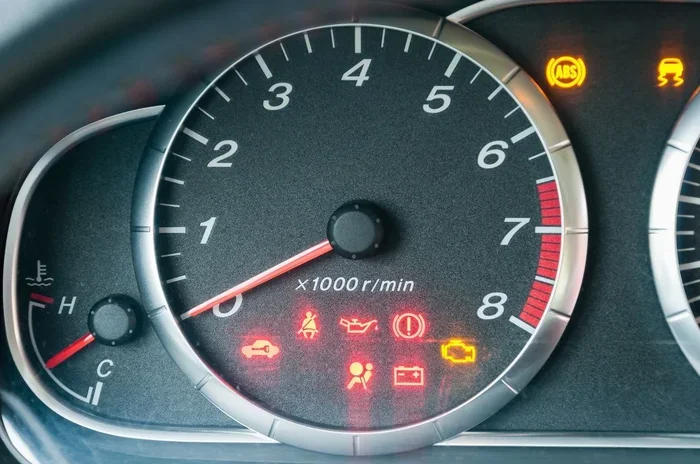
It is easy to confuse the two, but they serve very different purposes. The maintenance light is a routine reminder for scheduled service. The check engine light signals an actual problem with the engine or emissions system. If your check engine light is on, do not just reset it — get your vehicle diagnosed first. The maintenance light is harmless in the short term, but the check engine light needs immediate attention.
How Do You Reset the Maintenance Light on Your Dashboard — General Methods
Resetting the maintenance light is a straightforward process for most vehicles. While the exact steps vary by brand and model, there are a few general methods that work across many cars. Here is what you need to know about the reset maintenance light process.
Before you start, make sure you have completed the required service. If you just changed the oil or performed the scheduled maintenance, you are ready to reset the light. If you have not done the service yet, go ahead and complete it first. Resetting without servicing will just cause the light to come back on within a few hundred miles.
Method 1: Using the Trip Meter Reset Button
This is the most common method for older and many newer vehicles. The trip meter reset method uses the same button you press to reset your trip odometer. Here is how it works:
- Turn the ignition to the “OFF” position.
- Press and hold the trip meter reset button on the instrument cluster or steering column.
- While holding the button, turn the ignition to the “ON” position without starting the engine.
- Continue holding the button for about 10 to 15 seconds until the maintenance light starts to flash or disappears.
- Release the button and turn the ignition off and back on to confirm the reset was successful.
This method is quick and works on many Japanese and European models. The instrument cluster will usually show a confirmation message or the light will simply turn off. If it does not work the first time, try repeating the steps a couple of times.
Method 2: Using the Instrument Cluster Buttons
Some vehicles use buttons directly on the instrument cluster or steering wheel controls to reset the service light. The process typically involves scrolling through a menu on the odometer display and selecting the reset option. Here is the general approach:
- Turn the ignition to the “ON” position.
- Use the steering wheel buttons to navigate to the “Trip” or “Menu” screen.
- Find the “Maintenance” or “Service” option.
- Select “Reset” and hold the button until the light turns off.
- Turn the ignition off and back on to verify the reset.
Always refer to your vehicle owner’s manual for the exact button sequence. The reset procedure can differ even between model years of the same vehicle.
Method 3: Using the Infotainment System
Many newer cars have a vehicle maintenance menu built into the infotainment screen. You can navigate to the service settings, find the maintenance reminder option, and select “Reset.” This method is common in vehicles from brands like BMW, Audi, and Mercedes-Benz. The screen will usually guide you through the steps with clear on-screen instructions.
Reset Steps for Popular Car Brands
Every car brand has its own reset procedure for the maintenance light. Here are step-by-step instructions for the most popular brands.
How to Reset the Maintenance Light on Toyota
Toyota vehicles use a simple sequence to reset the maintenance light. This Toyota maintenance light reset method works for most models including the Camry, Corolla, and RAV4:
- Turn the ignition to the “OFF” position.
- Press and hold the trip meter reset button.
- While holding the button, turn the ignition to the “ON” position.
- Continue holding the button for about 10 seconds until the light flashes and then turns off.
- Turn the ignition off and then back on to verify the reset was successful.
The maintenance light reset on Toyota is one of the easiest among all brands. The trip meter button is usually located on the steering wheel or the bottom of the instrument cluster.
How to Reset the Maintenance Light on Honda
Honda vehicles follow a similar but slightly different process. The Honda service light reset is quick and easy once you get the hang of it:
- Turn the ignition to the “ON” position without starting the engine.
- Press the trip meter reset button until the maintenance light appears on the display.
- Hold the trip meter reset button for about 10 seconds.
- The light should blink and then turn off.
- Turn the ignition off and back on to confirm the reset was successful.
Honda models like the Civic, Accord, and CR-V all use this same basic method. If the light does not turn off, try holding the button a few seconds longer.
How to Reset the Maintenance Light on Ford
Ford vehicles use the steering wheel controls to reset the maintenance reminder. Here is the process:
- Use the steering wheel arrows to navigate to the “Settings” menu on the instrument cluster.
- Select “Vehicle Information” and then “Maintenance Required.”
- Press and hold the “OK” button for several seconds until the light resets.
- Turn the ignition off and back on to confirm the change.
Ford’s service light reset is menu-driven, which makes it a bit different from the button-hold methods used by Toyota and Honda. The exact menu path may vary slightly depending on your Ford model year.
How to Reset the Maintenance Light on Chevrolet
Chevrolet vehicles have a slightly different approach. Here is the standard Chevrolet maintenance light reset:
- Press the “SETUP” button on the steering wheel.
- Scroll to the “Vehicle Info” or “Maintenance” menu.
- Find the “Reset” option for the maintenance reminder.
- Hold the reset button until the light turns off.
- Turn the ignition off and back on to verify the reset.
Chevrolet models like the Silverado, Malibu, and Equinox all follow this general process. The reset procedure may vary slightly between older and newer models.
Comparison Table: Reset Methods by Brand
| Brand | Method | Time Required | Difficulty |
|---|---|---|---|
| Toyota | Trip meter button hold | Under 1 minute | Easy |
| Honda | Trip meter button hold | Under 1 minute | Easy |
| Ford | Steering wheel menu navigation | 1 to 2 minutes | Moderate |
| Chevrolet | Setup button menu navigation | 1 to 2 minutes | Moderate |
| BMW / Audi | Infotainment screen menu | 2 to 3 minutes | Moderate |
Common Mistakes When Resetting the Maintenance Light
Even though resetting the maintenance light is simple, people make mistakes that can cause problems. Here are the most common errors to avoid when you reset the service light on your dashboard.
Forgetting to Address the Root Cause
The biggest mistake is resetting the light without actually completing the service. If your car needs an oil change and you just reset the light, it will come back on in a few hundred miles. Always complete the required maintenance first, then reset the light. This keeps your maintenance schedule accurate and your car running well. Skipping this step defeats the entire purpose of the reminder system.
Using the Wrong Reset Procedure
Every vehicle is different. Using the wrong button sequence can sometimes cause the instrument cluster to freeze or display error messages. Always check your owner’s manual or a reliable source for your specific model before attempting the reset. The reset procedure for a 2015 Honda Civic is not the same as for a 2020 Toyota Camry, even though both are popular models.
Disconnecting the Battery as a Quick Fix
Some people think disconnecting the car battery will reset the maintenance light. While this sometimes works, it can also erase other important settings like radio presets, clock, and even adaptive learning values for the transmission. It should be a last resort, not a first option. The battery disconnect method can also trigger error codes that require a professional to clear.
Not Holding the Button Long Enough
Many people release the reset button too early. The light needs time to register the command. Hold the button for the full recommended duration, usually 10 to 15 seconds, before releasing it. Patience is key when you are working with the instrument cluster buttons.
When You Should See a Professional
Most of the time, resetting the maintenance light is a DIY task. However, there are situations where you should seek professional help for your vehicle service light issues. Knowing when to call a mechanic can save you from bigger problems down the road.
Signs That Something More Serious Is Going On
Watch for these warning signs that go beyond a simple maintenance reminder:
- The maintenance light keeps coming back immediately after you reset it.
- The light flashes instead of staying solid, which may indicate a deeper issue.
- Other dashboard warning lights are also on, such as the oil pressure or temperature light.
- You notice unusual noises, vibrations, or changes in how your vehicle drives.
- The dashboard indicator lights are flickering or behaving erratically without a clear cause.
- The maintenance due message appears even after a recent service.
If you experience any of these symptoms, take your vehicle to a certified mechanic. They can run a diagnostic scan to identify the real problem and fix it properly. Sometimes the reset procedure alone will not work because there is an underlying issue that needs professional attention.
A mechanic can also check whether your oil life system needs a professional-grade reset tool. This is especially common in newer vehicles with advanced monitoring systems. Do not hesitate to seek help if the light is behaving unusually.
Tips to Keep Your Dashboard Lights in Good Shape
Prevention is always better than cure. Here are some practical tips to keep your dashboard warning lights working correctly and avoid unnecessary trips to the mechanic.
Follow Your Vehicle’s Maintenance Schedule
Every vehicle comes with a recommended maintenance schedule from the manufacturer. Sticking to this schedule ensures that your car gets the right service at the right time. This not only keeps the maintenance light accurate but also extends the life of your vehicle. Set a reminder on your phone or calendar for each service interval so you never miss a due date.
Keep Your Instrument Cluster Clean
Dirt and grime can build up around the buttons and displays on your instrument cluster. Periodically clean the area with a soft, damp cloth. This makes it easier to read the lights and press the buttons when you need to reset the maintenance light. A clean cluster also helps you spot new warning lights quickly.
Update Your Vehicle’s Software When Needed
Some newer vehicles have software updates that affect how the maintenance reminder system works. Check with your dealer or a trusted mechanic if you notice the light behaving strangely even after a proper reset. Software updates are usually free at the dealership and can fix quirky dashboard behavior.
Save Your Owner’s Manual in a Safe Place
Your vehicle owner’s manual is the best resource for resetting the maintenance light specific to your model. Keep a physical copy in the glove box or save a digital version on your phone. It will save you time and frustration the next time a dashboard light comes on. You can also search for your specific model online to find video tutorials that walk you through the process step by step.
Address Issues Promptly
Do not ignore dashboard lights, even if they seem minor. A small maintenance reminder today can prevent a major repair bill tomorrow. The longer you wait, the more likely a small issue becomes a big one. Prompt attention to your vehicle maintenance light keeps your car safe, reliable, and running at its best.
Conclusion
Resetting the maintenance light on your dashboard is one of those small car maintenance tasks that anyone can do. Whether you use the trip meter method, the instrument cluster buttons, or the infotainment system, the process is quick and usually takes less than five minutes. The key is to complete the actual service first, then follow the correct reset procedure for your vehicle brand.
Remember that the maintenance light is there to help you stay on top of your car’s health. Ignoring it for too long can lead to bigger problems down the road. By learning how to reset the service light and understanding what it means, you take an important step in being a responsible car owner.
Keep this guide handy for your next dashboard reminder. With the right knowledge and a few simple steps, you will handle the maintenance light reset like a pro every single time. Your car will thank you, and you will save money by avoiding unnecessary trips to the shop.
Frequently Asked Questions
Can I drive my car with the maintenance light on?
Yes, you can usually drive safely with the maintenance light on. It is a reminder for scheduled service, not an emergency warning. However, it is best to address it soon so you do not miss an important oil change or inspection that keeps your car running smoothly.
Will resetting the maintenance light clear the oil life system?
In most vehicles, yes. Resetting the maintenance light also resets the oil life monitoring system. This tells your car to start a fresh oil change countdown. Always make sure you have actually changed the oil before resetting to keep the system accurate.
How often should I reset the maintenance light?
You should reset the maintenance light every time you complete a scheduled service, such as an oil change or tire rotation. This keeps the reminder system in sync with your actual maintenance routine and ensures you stay on track with your vehicle’s care schedule.
What if the maintenance light will not reset?
If the light will not reset after following the correct procedure, there may be an underlying issue. The oil life system might need a professional scan tool to reset, or there could be a sensor problem. In this case, visit a mechanic or dealership for a proper diagnosis.
Is it safe to reset the maintenance light without changing the oil?
It is not recommended. Resetting the light without performing the required service means you will not get a reminder when the next oil change is due. This can lead to running old oil too long, which can harm your engine over time. Always complete the service first, then reset the light.
Do all cars have the same maintenance light reset process?
No, every car brand and model has its own reset procedure. While some methods are similar, the button sequences, menu paths, and timing can vary. Always refer to your vehicle owner’s manual or a trusted online guide specific to your car for the most accurate instructions.