Do I Have to Pay to Use the Toyota App or Is It Free
The Toyota App offers both free and paid features, so you can enjoy basic connectivity without spending a dime. Toyota Connected Services include remote start, lock/unlock, and vehicle diagnostics, but premium perks like remote start and smart key access may require a subscription. This guide breaks down every cost so you know exactly what you are getting and what it costs.
If you just bought a Toyota or are thinking about it, you might be wondering about the Toyota App. Does it cost money? Can you use it for free? These are smart questions, and you are not alone in asking them.
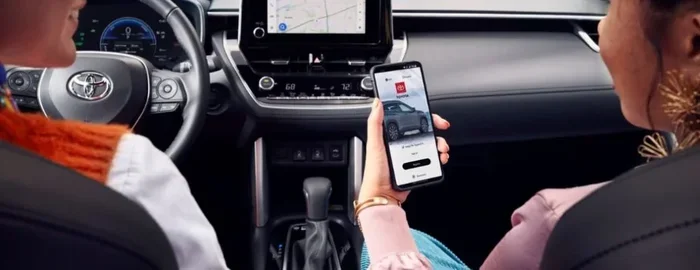
The Toyota App connects your phone to your vehicle. You can lock your doors, start the engine, and check on your car from anywhere. But here is the big question: do you have to pay for all of this? The short answer is no, not everything. But some cool features do come with a price tag. Let us break it all down so you know exactly what you are getting.
In this article, we will cover every part of the Toyota App cost. We will look at free features, paid plans, trial offers, and everything in between. By the end, you will know exactly what it costs to use the Toyota mobile app and whether it is worth it for you.
Key Takeaways
- Basic App Features Are Free: You can download and use core Toyota App functions at no cost.
- Premium Services Require a Subscription: Remote start, smart key, and extended diagnostics often need a paid plan.
- Trial Periods Let You Test Premium Features: Many Toyota models come with a free trial of connected services.
- Costs Vary by Plan and Model: Subscription prices depend on the package and your specific Toyota vehicle.
- No Hidden Fees for the App Itself: The Toyota App download and account creation are completely free.
- Third-Party Subscriptions May Apply: Some features like satellite radio or data plans have separate costs.
📑 Table of Contents
- What Is the Toyota App?
- Do You Have to Pay to Use the Toyota App?
- How the Toyota App Works with Your Vehicle
- Toyota App Subscription Costs Explained
- Common Mistakes People Make with the Toyota App
- Expert Tips for Getting the Most from the Toyota App
- Comparing Toyota App Plans
- The Future of the Toyota App
- Final Thoughts
What Is the Toyota App?
The Toyota App is a mobile application that lets you connect with your Toyota vehicle using your smartphone. It works with both Apple and Android devices. You can download it from the App Store or Google Play Store for free.
Once you install the app, you create an account and link it to your Toyota vehicle. This connection gives you access to a range of Toyota connected services. These services let you control certain features of your car right from your phone.
What Can the Toyota App Do?
The Toyota App offers a wide range of features. Some of them are completely free, while others require a paid subscription. Here are some of the things you can do with the app:
- Remote lock and unlock your doors
- Remote start your engine
- Locate your vehicle on a map
- Check fuel levels and tire pressure
- Schedule service appointments at your dealer
- Get vehicle diagnostics and alerts
- Find nearby Toyota dealerships
- Control climate settings remotely
These features make driving and owning a Toyota much more convenient. But as you can see, not all of them are available for free. Let us get into that next.
Do You Have to Pay to Use the Toyota App?
This is the question everyone wants answered, and the answer is not a simple yes or no. The Toyota App itself is free to download and use. You do not pay anything just to have the app on your phone. However, certain Toyota connected services do require a paid subscription.
Free Features of the Toyota App
When you first set up your Toyota App account, you get access to several free features right away. These include:
- Basic vehicle status checks
- Service reminders and scheduling
- Dealer location finder
- Vehicle alerts and notifications
- Trip logging and history
These free features are handy and useful. They give you a good taste of what the app can do. But if you want the really powerful features, you will likely need a subscription.
Paid Features and Subscription Plans
The Toyota App premium features include things like remote start, smart key access, and extended vehicle diagnostics. These features require a Toyota subscription to work. The cost and length of the subscription depend on your vehicle model and the plan you choose.
Some Toyota models come with a free trial period for connected services. This trial usually lasts between 1 and 3 years. After the trial ends, you will need to pay for a subscription to keep using those premium features.
Here are some common Toyota subscription plans you might encounter:
- Basic Connected Plan: Covers essential features like remote lock/unlock and vehicle tracking
- Premium Connected Plan: Adds remote start, climate control, and advanced diagnostics
- Entune App Suite: A bundled package with multiple connected services
The exact Toyota App cost varies. It is best to check with your local Toyota dealer or visit the official Toyota website for current pricing. Prices can change based on your region and the specific model you drive.
How the Toyota App Works with Your Vehicle
The Toyota App connects to your vehicle through a built-in telematics system. This system uses a cellular connection inside your car to communicate with the app. When you tap a button on your phone, the app sends a signal to your Toyota, and the car responds.
What Vehicles Support the Toyota App?
Not every Toyota model supports the same features. Here is a general breakdown of Toyota connected car compatibility:
- Newer Models (2018 and newer): Most support full Toyota connected services
- Older Models: May have limited or no app support
- Hybrid and Electric Models: Often include extra features like battery status tracking
Before you assume your Toyota has app support, check your vehicle’s manual or contact a dealer. They can tell you exactly which features your car supports and what it costs to use them.
Setting Up the Toyota App
Setting up the Toyota App is straightforward. Here is what you need to do:
- Download the Toyota App from your phone’s app store
- Create an account with your email and a password
- Enter your vehicle identification number (VIN)
- Follow the on-screen prompts to pair your phone with your car
- Start exploring the available features
The whole process takes just a few minutes. Once it is set up, you can start using the app right away. Remember, the basic features are free, but premium features will need a subscription.
Toyota App Subscription Costs Explained
The Toyota App subscription cost is one of the most common questions people ask. Let us look at what you can expect to pay.
Typical Pricing for Toyota Connected Services
Prices for Toyota subscription plans vary, but here is a general idea of what you might pay:
- Basic Plan: Around $80 to $120 per year for essential connected services
- Premium Plan: Around $150 to $250 per year for full-featured access
- Free Trial: Usually 1 to 3 years, depending on the vehicle
Keep in mind that these are rough estimates. The actual Toyota App cost may be different based on your location, model, and the dealer you bought from. Always confirm pricing with your Toyota dealer before making a decision.
Is a Subscription Worth It?
Whether a Toyota subscription is worth it depends on how you use your car. If you love the convenience of remote start and smart key access, a premium plan can be a great value. It saves you time and adds comfort to your daily routine.
On the other hand, if you only need basic features like vehicle tracking and service reminders, the free version of the app might be all you need. Think about what matters most to you and decide from there.
Common Mistakes People Make with the Toyota App
There are a few common mistakes that Toyota owners make when using the Toyota App. Avoiding these can save you time, money, and frustration.
Not Checking Your Subscription Status
One of the biggest mistakes is assuming all features are free forever. After your free trial period ends, premium features will stop working unless you pay for a subscription. Check your status regularly so you are not caught off guard.
Ignoring App Updates
The Toyota mobile app gets regular updates. These updates fix bugs and add new features. Ignoring updates can cause the app to work poorly or stop working altogether. Keep your app updated for the best experience.
Not Linking Your Vehicle Correctly
If the app is not connecting to your car, double-check your VIN and pairing settings. A simple setup error can make it seem like the app is broken when it is really just not linked properly.
Forgetting to Cancel Unused Subscriptions
If you sign up for a paid plan and later decide you do not need it, remember to cancel. Otherwise, you will keep paying for a service you are not using. Check your subscription settings in the app or through your app store account.
Expert Tips for Getting the Most from the Toyota App
Want to get the best experience with your Toyota App? Here are some tips from experts and experienced Toyota owners.
Use the Free Trial to Test Everything
If your Toyota comes with a free trial, use it fully. Test every premium feature. See if remote start and smart key are features you will actually use every day. This helps you decide if paying for a subscription makes sense.
Keep Your Login Info Secure
The Toyota App connects directly to your vehicle. Keep your login information safe and do not share it with others. Use a strong password and enable two-factor authentication if available.
Explore All the Features
Many people only use a small portion of the Toyota App features. Take some time to explore everything the app offers. You might find useful tools you did not know existed, like trip logging and fuel tracking.
Contact Support When Needed
If you run into any issues with the app, do not hesitate to contact Toyota customer support. They can help you troubleshoot problems and answer questions about your subscription and features.
Comparing Toyota App Plans
To make things easier, here is a quick comparison of the typical Toyota App plans available:
- Free Plan: Basic vehicle status, service reminders, dealer finder, and alerts. No monthly cost.
- Connected Services Trial: Full access to premium features for 1 to 3 years at no charge (varies by vehicle).
- Paid Basic Plan: Remote lock/unlock, vehicle tracking, and basic diagnostics. Low annual cost.
- Paid Premium Plan: All premium features including remote start, climate control, and smart key access. Higher annual cost.
Choose the plan that fits your needs and budget. You can always upgrade or downgrade as your needs change.
The Future of the Toyota App
The Toyota App is constantly evolving. Toyota invests heavily in connected car technology to make driving safer and more convenient. In the future, we can expect even more features to be added to the app.
Some rumored upcoming features include enhanced AI-powered diagnostics, deeper integration with smart home devices, and improved electric vehicle monitoring for Toyota’s EV lineup. These additions could make the Toyota mobile app even more valuable for owners.
Whether you pay for a subscription or stick with the free version, the Toyota App is a powerful tool for any Toyota owner. It gives you more control over your vehicle and makes life a little easier every day.
Final Thoughts
So, do you have to pay to use the Toyota App? The answer is: it depends. The app itself is free to download and use. Basic features like vehicle status checks and service reminders cost nothing. But if you want premium features like remote start, smart key access, and advanced diagnostics, you will likely need a paid Toyota subscription.
The good news is that many Toyota vehicles come with a free trial period. This gives you time to test out the premium features before you commit to paying. Use that trial wisely and decide if the Toyota App premium features are worth the cost for you.
At the end of the day, the Toyota App is a valuable tool for any Toyota owner. It adds convenience, safety, and peace of mind to your daily driving experience. Whether you use the free version or pay for a subscription, the app makes it easier to stay connected to your vehicle.
Download the Toyota App today, explore the features, and decide what works best for you. Your Toyota is smarter than you think, and the app is the key to unlocking its full potential.
Frequently Asked Questions
Is the Toyota App completely free to download?
Yes, the Toyota App is free to download from the App Store and Google Play Store. You do not pay anything just to install the app or create an account. However, some premium features may require a paid subscription after any free trial period ends.
How much does a Toyota App subscription cost?
The Toyota App subscription cost varies depending on the plan and your vehicle model. Basic plans typically cost around $80 to $120 per year, while premium plans can range from $150 to $250 per year. Check with your Toyota dealer for the most accurate pricing.
Can I use the Toyota App without a subscription?
Yes, you can use the free features of the Toyota App without a subscription. These include basic vehicle status checks, service reminders, dealer location finder, and trip logging. Premium features like remote start and smart key access will require a subscription.
Do all Toyota models support the Toyota App?
Most newer Toyota models (2018 and newer) support the Toyota App and connected services. Older models may have limited or no app support. Check your vehicle’s manual or contact a Toyota dealer to confirm compatibility for your specific model.
What happens when my Toyota App free trial ends?
When your free trial period ends, premium features will stop working unless you pay for a subscription. You will receive notifications before your trial expires. You can choose to subscribe to a plan or continue using the free features of the app.
Can I cancel my Toyota App subscription at any time?
Yes, you can cancel your Toyota subscription at any time. Go to your app settings or manage your subscription through your app store account. Keep in mind that you will lose access to premium features once the subscription is cancelled.
=== CONCLUSION ===
The Toyota App is a powerful and convenient tool for Toyota owners. It offers a mix of free and paid features that can make your driving experience better. You do not have to pay anything to download and use the basic functions of the app. But if you want the full suite of connected services, a subscription may be necessary.
Take advantage of any free trial your vehicle offers. Test the premium features and decide if they are worth the Toyota App cost for your lifestyle. Whether you stick with the free version or invest in a paid plan, the Toyota App gives you more control and connection to your vehicle than ever before.