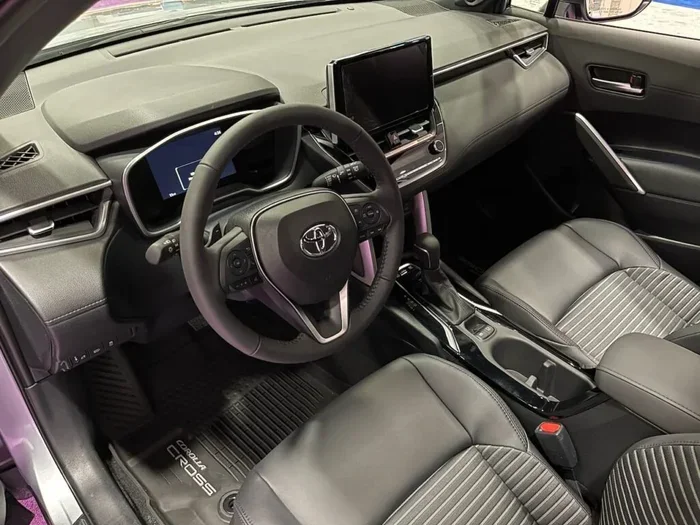
How Do I Reset My Toyota Corolla Computer Tutorial
This tutorial shows you exactly how do I reset my Toyota Corolla computer using simple, proven methods you can do at home. You will learn the battery disconnect method, the OBD2 scanner approach, and how to reset specific Toyota systems like the maintenance light and check engine light. Follow these clear steps to save money on dealer visits and keep your Corolla running at its best.
Have you ever been driving your Toyota Corolla and suddenly noticed a warning light on the dashboard? Maybe it was the check engine light, the maintenance reminder, or something else entirely. It can feel stressful, especially when you are not sure what it means or how to fix it.
The good news is that resetting your Toyota Corolla computer is often simpler than you think. Whether you want to clear an error code, reset a maintenance light, or just give your car’s onboard system a fresh start, this tutorial walks you through every step. You do not need to be a mechanic or spend hundreds of dollars at a dealership.
In this guide, we will cover everything you need to know about the Toyota Corolla reset process. We will explain what your car’s computer does, why you might need to reset it, and the exact methods you can use right in your driveway. By the end, you will feel confident tackling this job on your own.
Key Takeaways
- Multiple Reset Methods: You can reset your Toyota Corolla computer using a battery disconnect, an OBD2 scanner, or the fuse box method.
- Saves Money: Doing it yourself avoids costly trips to the dealership or auto shop.
- Specific System Resets: You can target individual systems like the maintenance light, check engine light, or oil life indicator.
- Safety First: Always follow proper safety steps when disconnecting the battery or working with your Toyota’s electrical system.
- Common Mistakes Exist: Avoid rushing the process or skipping relearning steps to prevent new problems.
- OBD2 Scanners Help: A quality scanner gives you more control and diagnostic information than simple battery disconnects.
📑 Table of Contents
- Understanding Your Toyota Corolla Computer
- How Do I Reset My Toyota Corolla Computer: Step-by-Step Guide
- How to Reset Specific Toyota Corolla Systems
- Common Mistakes to Avoid When Resetting Your Toyota Computer
- Expert Tips for Keeping Your Toyota Corolla Computer Running Smoothly
- When Should You Seek Professional Help?
- Final Thoughts on Resetting Your Toyota Corolla Computer
Understanding Your Toyota Corolla Computer
Before we dive into the reset process, let us talk about what your Toyota Corolla computer actually does. Understanding this helps you know why a reset matters and what to expect.
What Does the Toyota Computer Control?
Your Toyota Corolla has an onboard computer, also called the engine control module or ECM. This small but powerful unit manages many important functions in your vehicle. It controls fuel injection, ignition timing, emission systems, and transmission shifting. It also monitors sensors throughout the car and stores error codes when something goes wrong.
Think of it like the brain of your car. Just like your brain processes information and tells your body what to do, the Toyota computer processes data from sensors and adjusts engine performance accordingly. When you reset this system, you are essentially giving it a fresh start, clearing out stored codes and allowing it to relearn your driving patterns.
Why Would You Need to Reset Your Toyota Corolla Computer?
There are several reasons you might want to reset your Toyota computer. The most common one is clearing a check engine light after you have fixed the underlying problem. Once the repair is done, the light often stays on because the computer still has the old error code stored in its memory.
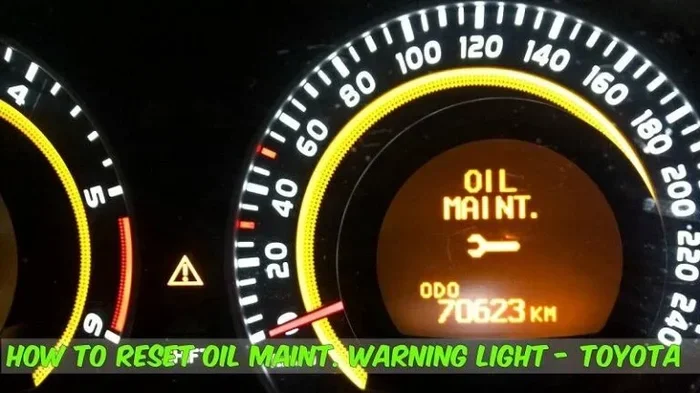
Another reason is resetting the maintenance reminder light. Toyota Corollas have a built-in system that tracks oil life and service intervals. After an oil change or other maintenance, this light needs to be manually reset so it does not keep nagging you.
Sometimes, electrical glitches cause warning lights to turn on even when nothing is actually wrong. A reset can clear these false alerts and get your dashboard back to normal. And in some cases, after installing new parts or making changes to your Toyota, a reset helps the computer adapt to the new components.
How Do I Reset My Toyota Corolla Computer: Step-by-Step Guide
Now let us get to the heart of this tutorial. There are three main methods to reset your Toyota Corolla computer. Each one works well, but they serve slightly different purposes. Let us go through them one by one.
Method 1: The Battery Disconnect Reset
The battery disconnect method is the most popular way to reset a Toyota Corolla computer. It is simple, requires no special tools, and works for most Toyota models. Here is exactly how to do it.
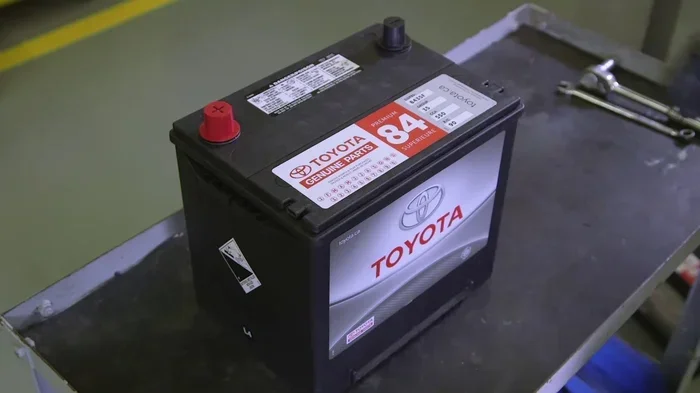
First, make sure your Toyota is turned off and parked on a flat surface. Open the hood and locate the battery. You will see the positive terminal, marked with a plus sign, and the negative terminal, marked with a minus sign.
Using a wrench, loosen the nut on the negative terminal first. Always disconnect the negative terminal first for safety. This prevents short circuits and protects your Toyota’s electrical system. Once the nut is loose, carefully lift the cable off the terminal and tuck it away so it cannot touch the battery again.
Now wait. This is the part many people skip. You need to wait at least 15 to 30 minutes. This gives the Toyota computer enough time to fully discharge and reset its memory. Some experts recommend waiting up to an hour for a complete reset.
After waiting, reconnect the negative terminal first. Tighten the nut securely. Then reconnect the positive terminal and tighten that nut as well. Start your Toyota and let it idle for a few minutes. The computer will reboot and begin relearning your driving habits.
Quick Tip: After a battery disconnect reset, your Toyota radio presets and clock settings may be lost. Have those codes handy if needed. Also, some Toyota models may need a few driving cycles before the check engine light stays off permanently.
Method 2: Using an OBD2 Scanner
An OBD2 scanner gives you more precision and control when resetting your Toyota computer. OBD stands for On-Board Diagnostics, and every Toyota Corolla made after 1996 has an OBD2 port. This port lets you connect a scanning tool that communicates directly with your car’s computer.
To use this method, find your OBD2 port. In most Toyota Corollas, it is located under the dashboard on the driver’s side, near the steering column. It might be hidden behind a small panel or cover.
Plug your OBD2 scanner into the port. Turn the ignition to the “On” position without starting the engine. The scanner should power on and connect to your Toyota’s computer within a few seconds.
Follow the scanner’s menu to read any stored error codes. Write these down if you want to keep a record. Then look for the option to clear or erase the codes. This function resets the Toyota computer and turns off warning lights associated with those codes.
Expert Insight: A quality OBD2 scanner does more than just reset codes. It can read live data from your Toyota’s sensors, help you diagnose problems before they become serious, and save you hundreds of dollars in diagnostic fees at the shop.
Method 3: The Fuse Box Reset
The fuse box method is a less common but still effective way to reset your Toyota Corolla computer. This approach works by cutting power to the engine control module through a specific fuse.
Open your Toyota’s fuse box. The location varies by model year, so check your owner’s manual. Look for the fuse labeled “ECM” or “EFI” which stands for Electronic Fuel Injection. Remove this fuse carefully using fuse pullers or a pair of needle-nose pliers.
Wait about 10 to 15 minutes after removing the fuse. This allows the Toyota computer to fully power down and reset. Then reinsert the fuse and start your car. The computer should reboot with a clean slate.
Quick Tip: The fuse box method is great when you cannot disconnect the battery easily, such as in newer Toyota models where the battery might be located in the trunk or under a seat.
How to Reset Specific Toyota Corolla Systems
Sometimes you do not need a full computer reset. Instead, you might want to reset a specific system in your Toyota Corolla. Here are the most common ones and how to handle them.
Resetting the Maintenance Reminder Light
The maintenance reminder light is that little wrench icon that pops up on your Toyota dashboard. It is designed to remind you when it is time for an oil change or scheduled service. After you complete the maintenance, you can reset it yourself.
For most Toyota Corolla models, turn the ignition to the “On” position without starting the engine. Then press and hold the odometer trip reset button on the dashboard. While holding it, turn the ignition off and then back on. Keep holding the button until the maintenance light blinks and then turns off. Release the button, and the reset is complete.
Resetting the Check Engine Light
The check engine light is one of the most common reasons people search for how to reset their Toyota computer. After fixing the problem that triggered the light, you can clear it using any of the three methods above.
The OBD2 scanner method is the most reliable for this. It not only clears the light but also lets you verify that the error codes have been fully erased. After clearing, drive your Toyota for a few days. If the problem is truly fixed, the light should stay off. If it comes back, there may be an underlying issue that needs further attention.
Resetting the Oil Life Indicator
Toyota Corollas with an oil life indicator use a sophisticated algorithm to track oil quality based on driving conditions. When the oil life percentage drops to zero, a light reminds you to change the oil.
To reset this, turn the ignition to the “On” position. Use the steering wheel arrows to navigate to the maintenance menu on the dashboard display. Select the oil life option and hold the reset button until the indicator resets to 100 percent. This process is quick and easy, taking less than a minute.
Common Mistakes to Avoid When Resetting Your Toyota Computer
Even though resetting your Toyota Corolla computer is straightforward, there are some common mistakes that can cause problems. Let us go over them so you can avoid the same pitfalls.
- Disconnecting the wrong terminal: Always disconnect the negative terminal first. Reconnect it last. This simple rule protects your Toyota from electrical damage.
- Not waiting long enough: Rushing the reset process is a mistake many people make. Give your Toyota computer enough time to fully discharge and clear its memory.
- Resetting without fixing the problem: If your check engine light is on because of a real issue, resetting the computer just hides the symptom. The light will come back, and the problem could get worse.
- Skipping the relearning phase: After a reset, your Toyota computer needs time to relearn your driving patterns. Avoid aggressive driving for the first few trips after a reset.
- Using a cheap OBD2 scanner: A low-quality scanner may not work properly with your Toyota. Invest in a reliable scanner that supports Toyota-specific protocols.
Expert Tips for Keeping Your Toyota Corolla Computer Running Smoothly
Resetting your Toyota computer is one thing, but keeping it healthy over the long term is another. Here are some expert tips to help your Toyota Corolla stay in top shape.
First, address warning lights promptly. When a light comes on, do not ignore it. Even if it seems minor, early diagnosis can prevent costly repairs down the road. Use an OBD2 scanner to check for codes at home before they become bigger problems.
Second, keep your Toyota’s electrical system in good condition. Check battery terminals for corrosion regularly. A weak battery can cause erratic behavior in your Toyota’s computer and trigger false warning lights.
Third, follow the recommended maintenance schedule. Regular oil changes, air filter replacements, and spark plug services keep all of your Toyota’s systems running smoothly, including the onboard computer. Clean sensors and properly functioning components mean fewer error codes and fewer resets needed.
Fourth, be gentle with your driving habits. Aggressive acceleration and hard braking put extra stress on your Toyota’s engine and computer systems. Smooth driving helps the computer maintain optimal performance and extends the life of your vehicle’s components.
Finally, keep your Toyota’s software up to date. Some Toyota models benefit from ECU updates that Toyota releases through dealerships. These updates can improve fuel economy, fix known bugs, and enhance overall performance. Ask your dealer if a software update is available for your specific Corolla model.
When Should You Seek Professional Help?
While resetting your Toyota Corolla computer is a task you can handle at home, there are times when professional help is the right call. If you reset your computer and warning lights keep coming back, there is likely an underlying issue that needs professional diagnosis. A certified Toyota mechanic has the tools and training to find and fix the root cause.
Also, if you are uncomfortable working with your car’s electrical system, there is no shame in visiting a shop. Many auto parts stores offer free OBD2 code reading and basic diagnostic services. They can help you understand what is going on with your Toyota and guide you on the next steps.
Remember, resetting the computer is a tool, not a cure-all. It works best when combined with proper maintenance and timely repairs. Use it as part of your overall Toyota care routine, and your Corolla will reward you with reliable performance for years to come.
Final Thoughts on Resetting Your Toyota Corolla Computer
Knowing how do I reset my Toyota Corolla computer gives you real power as a car owner. You can handle common dashboard warnings, clear annoying error codes, and save money on unnecessary dealer visits. The methods in this tutorial are simple, effective, and easy to follow.
Whether you choose the battery disconnect method, the OBD2 scanner approach, or the fuse box reset, the key is to be patient and follow each step carefully. Your Toyota’s onboard computer is a sophisticated system, and treating it with care pays off in the long run.
Take what you have learned here and apply it with confidence. The next time a warning light pops up on your Toyota Corolla dashboard, you will know exactly what to do. Your car, your wallet, and your peace of mind will all thank you.
Frequently Asked Questions
Can I reset my Toyota Corolla computer without disconnecting the battery?
Yes, you can. The most common alternative is using an OBD2 scanner, which connects directly to your Toyota’s diagnostic port and clears error codes electronically. Another option is the fuse box method, which cuts power to the engine control module without touching the battery terminals.
How long does a Toyota Corolla computer reset take?
The actual reset process takes only a few minutes, but the full relearning period can take several days of normal driving. After a battery disconnect, wait at least 15 to 30 minutes before reconnecting. Your Toyota computer will then need a few driving cycles to relearn your driving patterns and adapt to current conditions.
Will resetting my Toyota computer erase saved settings?
A battery disconnect reset may reset your radio presets, clock, and some personalized settings on your Toyota Corolla. However, most other settings like power window controls and mirror positions usually remain intact. Using an OBD2 scanner to reset codes does not affect any of your saved settings at all.
Why does my check engine light come back after I reset it?
If the check engine light returns after a reset, it means the underlying problem has not been fully resolved. The Toyota computer detected the same issue again during driving. You should use an OBD2 scanner to read the codes, diagnose the actual problem, and fix it properly before resetting again.
Do I need any special tools to reset my Toyota Corolla computer?
For a battery disconnect reset, you only need a basic wrench to loosen the battery terminal. For an OBD2 scanner reset, you need a compatible scanner that supports Toyota protocols. For a fuse box reset, you need fuse pullers or needle-nose pliers. None of these methods require expensive or specialized equipment.
Is it safe to reset my Toyota Corolla computer yourself?
Yes, it is safe as long as you follow the proper steps. Always disconnect the negative battery terminal first when doing a battery reset. Make sure your Toyota is turned off and parked safely. If you feel unsure at any point, consult your Toyota owner’s manual or seek help from a qualified mechanic.