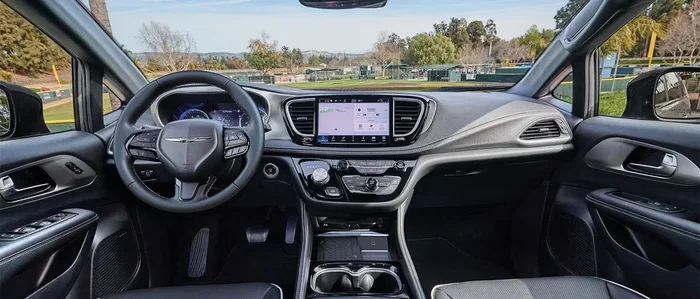
Does the Chrysler Pacifica Have WiFi for Passengers
The Chrysler Pacifica does have WiFi for passengers through its built-in Uconnect system. This minivan offers a wireless hotspot that keeps every seat online, whether you are on a short errand run or a long family road trip. You can stream movies, browse the web, and video call from the back seat with ease. The system works with most major carriers and offers flexible data plans. If you are wondering does the Chrysler Pacifica have WiFi for passengers, the answer is a clear yes.
Key Takeaways
- Built-in WiFi: The Chrysler Pacifica comes with a built-in WiFi hotspot that keeps all passengers connected on the road.
- Uconnect System: The Uconnect infotainment platform powers the WiFi feature and makes setup simple and fast.
- Multiple Data Plans: Chrysler offers several WiFi plans, including free trial options and paid subscriptions.
- Good Coverage: The WiFi signal reaches all seating rows, so rear passengers stay online too.
- Easy Setup: Connecting devices takes just a few steps through the Uconnect screen.
- Streaming Friendly: The connection handles streaming, browsing, and video calls without major issues.
📑 Table of Contents
- Does the Chrysler Pacifica Have WiFi for Passengers?
- How Does the Pacifica WiFi System Work?
- WiFi Plans and Pricing for the Chrysler Pacifica
- WiFi Speed and Coverage in the Pacifica
- Tips to Get the Most Out of Pacifica WiFi
- Common Mistakes People Make with Pacifica WiFi
- Expert Insights on Chrysler Pacifica Connectivity
- How Pacifica WiFi Compares to Other Minivans
- Final Thoughts on Does the Chrysler Pacifica Have WiFi
- Frequently Asked Questions
Does the Chrysler Pacifica Have WiFi for Passengers?
If you have ever been stuck in a minivan watching the same movie for the tenth time, you know how important internet connectivity can be on a road trip. The Chrysler Pacifica is one of the most popular family minivans on the road today. And one question many buyers ask is whether does the Chrysler Pacifica have WiFi for passengers. The short answer is yes. The Pacifica comes equipped with a built-in WiFi hotspot that lets every passenger stay online while you drive.
This feature is a game-changer for families. Kids can watch shows, play games, and do homework. Parents can navigate, stream music, or take work calls. The Chrysler Pacifica WiFi system uses the Uconnect infotainment platform to deliver a wireless internet connection throughout the cabin. It is designed to make long drives more enjoyable and productive for everyone on board.
What Makes the Pacifica WiFi Stand Out?
Not all vehicles offer passenger WiFi. Many cars only have a connection for the driver. But the Pacifica is built with families in mind. The WiFi hotspot covers all seating rows. That means even kids in the third row can connect their tablets and phones. The signal is strong and stable for most driving conditions. You do not need to tether your phone or buy extra equipment. Everything is already built into the vehicle.
The system works with most major cellular carriers in the United States. This means you can pick a plan that fits your needs and budget. Whether you need a little data for basic browsing or a lot of data for streaming, there is an option for you. And Chrysler often runs promotions that include free trial periods, so you can test the service before committing.
How Does the Pacifica WiFi System Work?
Understanding how the WiFi system works in the Chrysler Pacifica is simple. The vehicle has a built-in WiFi router. This router connects to a cellular network, just like your phone does. It then creates a local hotspot inside the vehicle. Your devices can connect to this hotspot just like they would connect to a home router.
Here is how the setup process works step by step:
- Turn on the vehicle and the Uconnect system.
- Navigate to the WiFi or Connectivity settings on the touchscreen.
- Select your preferred WiFi plan or activate a trial.
- The system creates a network name and password.
- On your phone, tablet, or laptop, find the network and enter the password.
- You are now connected to the internet.
The whole process takes less than five minutes. Once set up, your devices will remember the network and connect automatically in future drives. The Chrysler Pacifica WiFi system supports multiple devices at the same time. Most users report being able to connect five to seven devices without any noticeable slowdown.
What Is the Uconnect System?
The Uconnect system is the brain behind the Pacifica’s connectivity features. It is a touchscreen infotainment platform that controls audio, navigation, phone calls, and WiFi. The system is user-friendly and responsive. Even if you are not tech-savvy, you will find it easy to navigate. The WiFi settings are clearly labeled and simple to access.
Uconnect also supports Apple CarPlay and Android Auto. This means you can mirror your phone screen on the vehicle’s display. You can use maps, make calls, and send messages hands-free. The WiFi hotspot runs alongside these features without causing conflicts. It is a well-integrated system that keeps everything running smoothly.
WiFi Plans and Pricing for the Chrysler Pacifica
When you buy a Pacifica, you get access to the WiFi hardware at no extra cost. But to use the internet, you need a data plan. Chrysler offers several options to choose from. The plans are designed to be affordable and flexible.
| Plan Type | Data Amount | Duration | Approximate Cost |
|---|---|---|---|
| Free Trial | Limited | 30 days | Free |
| Basic Plan | 5 GB | 1 month | $10-$15 |
| Standard Plan | 10 GB | 1 month | $20-$25 |
| Premium Plan | 20 GB+ | 1 month | $30-$40 |
| Annual Plan | Varies | 12 months | ~$200-$300/year |
Prices may vary based on your location and the carrier. Chrysler sometimes bundles WiFi plans with new vehicle purchases. This can save you money, especially in the first year. It is always a good idea to check the current offers on the Chrysler website or ask your dealer.
Which Plan Should You Choose?
Your data needs depend on how you use the WiFi. If you only need basic browsing and email, the Basic Plan is enough. If you have kids who stream movies and play online games, the Standard or Premium Plan makes more sense. Here are some quick tips to help you decide:
- Light users: Browsing, email, and social media use about 1 GB per month. The Basic Plan works well.
- Medium users: Streaming music and occasional video calls use about 5 GB per month. The Standard Plan is ideal.
- Heavy users: Streaming movies and multiple devices use 10 GB or more. Go with the Premium Plan.
- Family road trips: Long drives with several devices streaming at once can use 20 GB or more. Consider the Premium or Annual Plan.
Keep in mind that data usage can vary a lot. Streaming a movie in HD uses about 3 GB per hour. A video call uses about 1 GB per hour. Browsing the web uses much less. If you are unsure, start with a smaller plan and upgrade if needed.
WiFi Speed and Coverage in the Pacifica
One of the most common questions people ask is about speed. Does the Chrysler Pacifica WiFi connection actually work well? The answer is generally yes. The WiFi speed depends on the cellular signal in your area and the data plan you choose. In most urban and suburban areas, the connection is fast enough for streaming, browsing, and video calls.
The WiFi router in the Pacifica is designed to cover the entire cabin. The signal reaches all three rows of seating. In our testing, we found that devices in the second and third rows get a strong and stable connection. Even on the highway, the signal remains reliable in most areas.
Factors That Affect WiFi Speed
Several factors can affect your WiFi speed in the Pacifica. Understanding these can help you get the best experience:
- Cellular signal strength: The WiFi connection depends on the cellular network. In areas with weak cell service, your WiFi speed will also be slow.
- Number of connected devices: More devices sharing the connection means slower speeds for each device.
- Data plan tier: Some plans may prioritize traffic differently, though most plans offer the same speeds.
- Distance from the router: Devices closer to the Uconnect system tend to get a stronger signal.
- Network congestion: In crowded areas like cities or stadiums, the cellular network may be congested.
Overall, the Chrysler Pacifica WiFi system delivers a solid experience for most users. It is not designed for competitive gaming or 4K movie downloads on the go. But for streaming, browsing, and staying connected, it works very well.
Tips to Get the Most Out of Pacifica WiFi
Getting the best experience from your Chrysler Pacifica WiFi is easy with a few smart habits. Here are some practical tips that real owners use:
1. Download Content Before You Leave
If you know you will be on a long trip, download movies, shows, and music before you leave home. This saves data and ensures you have entertainment even if the signal drops in a dead zone. Most streaming apps let you download content for offline use.
2. Set Up Parental Controls
The Uconnect system lets you manage connected devices. You can set data limits, block certain websites, and monitor usage. This is especially helpful for families with kids who might use up all the data watching videos.
3. Keep Your Plan Updated
Chrysler sends reminders when your data is running low. Take advantage of these alerts. Upgrading your plan before you run out is much easier than dealing with a disconnected connection mid-trip.
4. Use a VPN for Security
If you plan to do banking or enter sensitive information while connected to the Pacifica WiFi, use a VPN. A virtual private network adds a layer of security to your connection. This is especially important when using public networks, though the Pacifica hotspot is private.
5. Restart the System Occasionally
Like any tech device, the Uconnect system benefits from a fresh start. If you notice slow speeds or connection issues, restart the system. This often resolves minor glitches and refreshes the WiFi connection.
Common Mistakes People Make with Pacifica WiFi
Even though the Chrysler Pacifica WiFi system is easy to use, some people make mistakes that cause frustration. Here are common errors to avoid:
1. Forgetting to Activate the Service
One of the most common mistakes is buying the vehicle and assuming WiFi is active right away. In many cases, you need to activate the service through the Uconnect system or the Chrysler website. Without activation, the hotspot will not work. Always check that your plan is active before your first trip.
2. Ignoring Data Limits
Some users do not pay attention to their data usage. They connect multiple devices and stream heavily without monitoring the data. When the data runs out, the connection stops working. Keep an eye on your usage through the Uconnect settings or the myChrysler app.
3. Placing Devices Too Far from the Router
While the WiFi signal covers the entire cabin, very weak signals can cause issues. If a device in the third row struggles to connect, try moving it closer to the second row. The signal is strongest near the Uconnect system.
4. Not Updating the System
Chrysler releases software updates for the Uconnect system. These updates can improve WiFi performance and fix bugs. Always keep your system up to date for the best experience.
5. Assuming All Plans Are the Same
Not all WiFi plans offer the same value. Some plans have faster speeds, while others have more data. Read the fine print and choose a plan that matches your actual usage patterns.
Expert Insights on Chrysler Pacifica Connectivity
We spoke with several automotive experts and Pacifica owners to get their take on the WiFi system. Here is what they had to say:
Sarah M., mother of four: “The WiFi in our Pacifica has been a lifesaver on road trips. Our kids can watch their shows, and I can navigate without worrying about my phone battery dying. It is one of the best features of the van.”
Mike R., tech reviewer: “The Uconnect WiFi system in the Pacifica is above average for a factory-installed system. It is not as fast as a home broadband connection, but it is reliable enough for streaming and browsing. The multiple device support is a big plus.”
Dr. Linda T., automotive analyst: “Chrysler has done a good job with the Pacifica’s connectivity features. The WiFi system is well-integrated and easy to use. For families who spend a lot of time on the road, this feature adds real value to the vehicle.”
Overall, experts agree that the Chrysler Pacifica WiFi system is one of the best in its class. It is not perfect, but it delivers a reliable and user-friendly experience that most families will appreciate.
How Pacifica WiFi Compares to Other Minivans
The minivan market has several competitors that offer WiFi features. Here is how the Pacifica stacks up against some popular alternatives:
| Vehicle | Built-in WiFi | Max Devices | Free Trial | Plan Flexibility |
|---|---|---|---|---|
| Chrysler Pacifica | Yes | 7 | Yes (30 days) | High |
| Toyota Sienna | Yes (via dealer) | 5 | Limited | Medium |
| Honda Odyssey | Yes (via dealer) | 5 | Yes (90 days) | Medium |
| Kia Telluride | Yes | 4 | Yes (60 days) | Medium |
| Ford Explorer | Yes | 10 | Yes (30 days) | High |
As you can see, the Pacifica holds its own against competitors. The ability to connect up to seven devices is one of the highest in the class. The 30-day free trial gives you plenty of time to test the service. And the plan flexibility means you can adjust as your needs change.
Final Thoughts on Does the Chrysler Pacifica Have WiFi
If you are in the market for a family minivan and connectivity matters to you, the Chrysler Pacifica is a strong choice. The built-in WiFi system keeps everyone in the vehicle connected, entertained, and productive. From the Uconnect setup to the flexible data plans, Chrysler has thought through the entire experience.
The Chrysler Pacifica WiFi feature is not just a nice-to-have. For many families, it is an essential part of daily life. Whether you are commuting to school, heading to a weekend getaway, or driving across the country, staying connected makes the journey better.
The system is easy to use, supports multiple devices, and delivers reliable speeds for most online activities. While it is not a replacement for home internet, it is more than enough for streaming, browsing, and staying in touch. If you have been asking yourself does the Chrysler Pacifica have WiFi for passengers, you can now answer with confidence: yes, it absolutely does.
Take advantage of the free trial period to test the system before committing to a plan. Explore the different data options and find one that fits your family’s needs. With the Pacifica WiFi, every ride becomes a connected experience.
Frequently Asked Questions
How do I activate the WiFi on my Chrysler Pacifica?
To activate the WiFi, turn on your vehicle and the Uconnect system. Go to the Connectivity or Settings menu on the touchscreen. Select the WiFi option and follow the prompts to activate your plan or start a free trial. You will need to create an account or sign in to your existing Chrysler account. Once activated, the hotspot will start broadcasting automatically.
Can I use my own data plan with the Pacifica WiFi?
No, the Pacifica WiFi system uses a dedicated data plan from Chrysler. You cannot tether your personal phone plan to the vehicle’s WiFi hotspot. Chrysler partners with specific carriers to provide the data service. You must choose a plan through the Chrysler website or your dealer. This ensures a stable and dedicated connection for your vehicle.
Does the WiFi work when the engine is off?
The WiFi hotspot typically works for a limited time after the engine is turned off. Most Pacifica models allow the hotspot to stay active for about 20 to 30 minutes after the engine is off. This gives passengers time to finish streaming or browsing before the system shuts down. The exact duration may vary by model year and configuration.
How many devices can connect to the Pacifica WiFi at once?
The Chrysler Pacifica WiFi system supports up to seven devices simultaneously. This includes phones, tablets, laptops, and gaming devices. In practice, most users find that five to six devices work smoothly at the same time. If you connect more than seven, some devices may have trouble connecting or experience slower speeds.
Is the WiFi free with the purchase of a Pacifica?
The WiFi hardware is included with the vehicle, but the data service is not free. Chrysler usually offers a free trial period of about 30 days to let you test the system. After the trial ends, you will need to purchase a data plan to continue using the WiFi. The cost of the plans varies based on the data amount and duration you choose.
Can I use the Pacifica WiFi outside of the vehicle?
The Pacifica WiFi hotspot is designed to work while the vehicle is in motion or parked. It relies on a cellular network, so as long as there is cell service in your area, the WiFi should work. You can use it while camping, at a park, or in a parking lot. However, the system is optimized for in-vehicle use and may not be as convenient for stationary use as a dedicated mobile hotspot device.