Does Toyota Have Wireless Apple CarPlay Here Is Everything
Yes, many Toyota models now come with wireless Apple CarPlay, but not all trims or years include it. This guide covers every Toyota that supports wireless Apple CarPlay, how to set it up, common problems, and what to expect from Toyota’s infotainment system. Whether you own a Camry, RAV4, or Tacoma, you will find the answers you need right here.
If you drive a Toyota or are thinking about buying one, you have probably asked yourself a simple question. Does Toyota have wireless Apple CarPlay? The answer is yes, but with some important caveats. Not every Toyota model, not every trim level, and not every model year includes this feature. That is exactly why we wrote this guide.
We are going to walk you through everything you need to know about wireless Apple CarPlay in Toyota vehicles. You will learn which Toyota models support it, how to set it up, what the differences are between wired and wireless versions, and how to troubleshoot common problems. By the end, you will feel confident about your Toyota’s smartphone integration capabilities.
Let us start with the basics and then dive deep into the details. This is your complete guide to wireless Apple CarPlay Toyota compatibility and setup.
Key Takeaways
- Toyota offers wireless Apple CarPlay on select models and trims: newer vehicles from 2021 onward are more likely to include this feature.
- Not every Toyota comes with wireless connectivity: some models still use wired Apple CarPlay or older infotainment systems.
- Setting up wireless Apple CarPlay is simple: you just need a compatible iPhone and a Toyota with the right software.
- Wireless streaming offers more convenience than a cable: no fumbling with cords, and your phone charges less efficiently though.
- Common issues like lag or disconnections are fixable: a quick reset or software update usually solves the problem.
- Toyota is updating its technology lineup: newer models and trim packages are adding wireless support as standard.
- Always check your specific model year and trim: Toyota offers wireless Apple CarPlay unevenly across its lineup.
📑 Table of Contents
- Understanding Wireless Apple CarPlay in Toyota Vehicles
- Which Toyota Models Support Wireless Apple CarPlay
- How to Set Up Wireless Apple CarPlay in Your Toyota
- Wireless vs Wired Apple CarPlay: What is the Difference
- Troubleshooting Common Wireless Apple CarPlay Issues in Toyota
- The Future of Toyota and Apple CarPlay Technology
- Expert Tips for Getting the Most from Wireless Apple CarPlay in Toyota
- Conclusion
Understanding Wireless Apple CarPlay in Toyota Vehicles
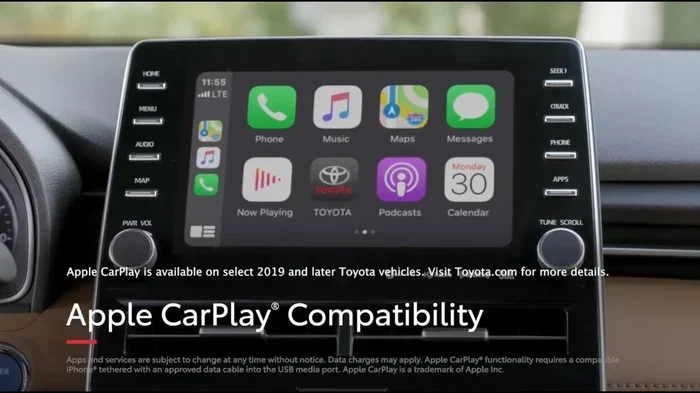
Apple CarPlay is a feature that mirrors your iPhone onto your car’s touchscreen. It lets you access maps, music, messages, and phone calls safely while driving. Toyota has been adding this feature to its vehicles for several years now, but the wireless version is a more recent addition.
With wireless Apple CarPlay Toyota setups, your phone connects to the car without any cables. You just pair it once, and it connects automatically every time you get in the car. This is a huge upgrade from the older wired version where you had to plug in a USB cable every single time.
How Wireless Apple CarPlay Works
Wireless Apple CarPlay uses Bluetooth and Wi-Fi to create a direct connection between your iPhone and the Toyota infotainment system. The phone streams its screen content wirelessly to the car’s display. You can still use Siri, make calls, listen to podcasts, and get turn-by-turn directions just like with a wired connection.
The big advantage is convenience. No cables to manage. No clutter on your dashboard. You just hop in the car, and your Toyota multimedia system picks up right where you left off. It feels seamless and modern, which is exactly what drivers want from their car connectivity options today.
What You Need for Wireless Apple CarPlay
Not just any iPhone will work with wireless Apple CarPlay. You need an iPhone that supports wireless projection, which means iPhone 8 or newer running iOS 13 or later. Your Toyota also needs the right infotainment software version. Some older Toyota models can be upgraded to support wireless Apple CarPlay through a dealer visit or a software update.
Here is a quick checklist of what you need:
- An iPhone 8 or newer
- iOS 13 or later installed
- A Toyota model with wireless Apple CarPlay support
- A stable Wi-Fi connection in the vehicle
Once you have all of these, the setup process is straightforward and takes just a few minutes. We will cover the exact steps in a later section.
Which Toyota Models Support Wireless Apple CarPlay
This is the question most drivers want answered. The truth is that Toyota offers wireless Apple CarPlay across a growing list of models, but availability depends heavily on the model year and trim level. Let us break it down by popular Toyota vehicles.
Toyota Camry
The Toyota Camry is one of the most popular sedans on the road, and it has embraced wireless Apple CarPlay in recent years. Models from 2021 onward with the upgraded infotainment system generally support wireless Apple CarPlay. Older Camry models from 2018 to 2020 may only have wired support, unless they received a software update.
If you are shopping for a used Camry, always ask the seller about the infotainment system version. A dealer can confirm whether the car has wireless Apple CarPlay Toyota compatibility or if it needs a software flash.
Toyota RAV4
The Toyota RAV4 is a compact SUV that has become one of the best-selling vehicles in America. The 2021 and newer RAV4 models come with wireless Apple CarPlay as a standard or available feature depending on the trim. The higher trims, like the XLE and XSE, typically include this feature out of the box.
If you own an older RAV4, you may still be able to add wireless support. Toyota dealerships can sometimes perform a system upgrade that adds wireless Apple CarPlay compatibility to older infotainment units. It is worth asking about, especially if you rely heavily on your phone for navigation and music.
Toyota Corolla
The Toyota Corolla has been around for decades, and the latest generation offers wireless Apple CarPlay on most 2020 and newer models. The Corolla’s infotainment system has been updated over the years, and the wireless feature is now standard on most trims. This makes the Corolla a great choice for drivers who want smartphone integration without paying for luxury features.
Toyota Tacoma
The Toyota Tacoma is a beloved pickup truck, and its infotainment system has improved significantly in recent years. The 2024 Tacoma and newer models offer wireless Apple CarPlay on higher trims. Older Tacoma models from 2016 to 2023 may only support wired Apple CarPlay, though some can be upgraded.
If you use your Tacoma for work or off-road adventures, having wireless streaming of your phone’s content can make the drive more enjoyable. You can listen to your favorite podcasts or stream music without worrying about a loose cable rattling around the cab.
Toyota Highlander
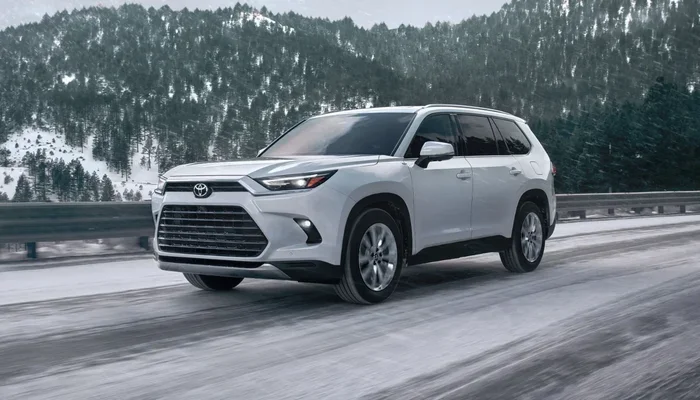
The Toyota Highlander is a three-row SUV that families love. Wireless Apple CarPlay is available on the 2020 Highlander and newer models, particularly on the XLE and Limited trims. The larger touchscreen in the Highlander makes wireless Apple CarPlay Toyota integration feel even more seamless and natural.
Other Toyota Models with Wireless Support
Beyond these popular models, Toyota has been rolling out wireless Apple CarPlay across its lineup. Here are some other models that may support this feature:
- Toyota Sienna (2021 and newer)
- Toyota Avalon (2021 and newer)
- Toyota Tundra (2022 and newer)
- Toyota 4Runner (2024 and newer)
- Toyota Crown (2023 and newer)
Always double-check the specific model year and trim before purchasing. Toyota’s technology packages vary widely, and what comes standard on one trim may be optional on another.
How to Set Up Wireless Apple CarPlay in Your Toyota
Setting up wireless Apple CarPlay in a Toyota is a straightforward process. Once you do it the first time, your phone will connect automatically every time you start the car. Here is how to get it done.
Step-by-Step Setup Guide
Follow these steps to connect your iPhone to your Toyota’s wireless Apple CarPlay system:
- Make sure your iPhone is updated to the latest iOS version.
- Start your Toyota and turn on the infotainment system.
- Press the Apple CarPlay icon on the touchscreen.
- Select “Wireless” when prompted for a connection type.
- Follow the on-screen instructions to pair your iPhone.
- Accept any permissions that appear on your phone screen.
- Wait for the connection to establish. This usually takes a few seconds.
Once paired, your Toyota will remember your iPhone. The next time you get in the car, wireless Apple CarPlay should connect automatically as long as Bluetooth and Wi-Fi are turned on your phone.
Tips for a Smooth Setup
Here are some practical tips that make the setup process even easier:
- Keep your phone within arm’s reach of the car’s touchscreen during initial pairing.
- Make sure your Toyota’s infotainment system is fully updated before pairing.
- Restart both your iPhone and the car’s system if the connection fails the first time.
- Delete old paired devices from your car’s Bluetooth settings to avoid confusion.
Setting Wireless Apple CarPlay as Default
On most Toyota models, you can set wireless Apple CarPlay as the default connection type. This means your phone will always try to connect wirelessly first, without prompting you to choose between wired and wireless every time. To do this, go to your iPhone’s Settings, then General, then CarPlay, and select your Toyota. From there, you can manage your preferred connection settings.
Wireless vs Wired Apple CarPlay: What is the Difference
Toyota offers both wired and wireless Apple CarPlay on many of its models. Understanding the differences helps you decide which option works best for your driving habits and needs.
Wireless Apple CarPlay Advantages
The wireless version of Apple CarPlay has several clear benefits:
- No cables needed: you never have to fumble with a USB cord in the dark or while driving.
- Automatic connection: your phone connects the moment you sit in the car.
- Cleaner dashboard: no cables running across the center console.
- Easier to share: passengers can quickly connect their phones without swapping cables.
Wired Apple CarPlay Advantages
The wired version is not without its strengths either:
- More stable connection: a physical cable sometimes provides a more reliable data transfer.
- Phone charging: a wired connection keeps your iPhone charged while you drive.
- Broader compatibility: wired Apple CarPlay works on more Toyota models, including older ones.
Which One Should You Choose
For most drivers, wireless Apple CarPlay is the better choice. The convenience factor is hard to beat. You just get in the car, and everything is ready to go. The only real downside is that wireless Apple CarPlay does not charge your phone as efficiently as a wired connection. If your phone battery is low, you might want to keep a cable handy for long road trips.
That said, if you have an older Toyota that only supports wired Apple CarPlay, do not worry. The wired experience is still excellent. You get all the same features, just with a cable connecting your phone to the car.
Troubleshooting Common Wireless Apple CarPlay Issues in Toyota
Even with the best technology, occasional problems can pop up. Wireless Apple CarPlay in Toyota vehicles is generally reliable, but it is not perfect. Here are the most common issues drivers face and how to fix them.
Wireless Apple CarPlay Won’t Connect
If your Toyota’s infotainment system does not detect your iPhone, try these steps first:
- Turn off Bluetooth and Wi-Fi on your iPhone, then turn them back on.
- Restart your Toyota’s infotainment system by holding the power button for 10 seconds.
- Restart your iPhone completely.
- Make sure your iPhone is not in Low Power Mode, as this can disable wireless CarPlay.
In most cases, a simple restart of both devices resolves the connection issue. If the problem persists, try unpairing your iPhone from the Toyota and pairing it again from scratch.
Connection Drops Frequently
A wireless Apple CarPlay Toyota connection that keeps dropping can be frustrating. This usually happens when the Wi-Fi signal between your phone and the car is weak. Try parking in a different spot or moving away from areas with heavy Wi-Fi interference. Also, make sure your Toyota’s software is up to date, as older firmware versions can cause connection instability.
Audio or Video Lag
Sometimes you might notice a slight delay between what happens on your phone and what appears on the Toyota’s screen. This is usually caused by a weak Wi-Fi connection or an outdated infotainment system. Updating your Toyota’s software through a dealer visit almost always fixes this issue.
When to Visit a Dealer
If none of the troubleshooting steps work, it may be time to visit a Toyota dealership. They can check for software updates, reset the infotainment system, and diagnose any hardware issues with the wireless connectivity module. Most Toyota dealers will perform these updates for free or at a minimal cost.
The Future of Toyota and Apple CarPlay Technology
Toyota has been investing heavily in its infotainment technology over the past few years. The company is making a clear push toward wireless connectivity as the standard for all its vehicles. This trend is exciting for Toyota owners and buyers alike.
What Toyota Has Announced
Toyota has confirmed that newer models coming in 2024 and beyond will feature wireless Apple CarPlay more broadly across their lineup. The company is also working on improving the wireless connection speed and stability. Future Toyota vehicles may support faster data transfer, smoother video streaming, and even enhanced hands-free calling through the CarPlay interface.
Competing with Other Brands
Brands like Ford, BMW, and Honda have offered wireless Apple CarPlay for years. Toyota is catching up, and catching up fast. The latest Toyota models are closing the gap, offering wireless smartphone integration that rivals what you find in luxury vehicles. This is great news for Toyota owners who want modern technology without the luxury price tag.
What This Means for Current Toyota Owners
If you own an older Toyota that does not have wireless Apple CarPlay, you are not stuck forever. Aftermarket solutions exist that can add wireless CarPlay to older Toyota models. These kits plug into your car’s existing infotainment system and add wireless connectivity. They range in price and quality, so it is worth researching before buying one.
For those planning to buy a new Toyota, the future looks bright. Wireless Apple CarPlay is becoming a standard feature rather than a luxury add-on. Toyota is listening to what drivers want, and wireless connectivity is clearly at the top of the list.
Expert Tips for Getting the Most from Wireless Apple CarPlay in Toyota
Now that you know the ins and outs of wireless Apple CarPlay in Toyota vehicles, here are some expert tips to help you get the most out of the experience.
Keep Your iPhone and Toyota Software Updated
Apple regularly releases iOS updates that improve CarPlay performance. Toyota also pushes infotainment updates that fix bugs and add features. Keeping both your phone and your car updated ensures the smoothest possible wireless streaming experience.
Organize Your CarPlay Apps
You can customize which apps appear on your Toyota’s CarPlay screen. Only add the apps you actually use while driving. This keeps the interface clean and reduces distractions. The apps that matter most for driving are navigation, music, podcasts, and messaging.
Use Siri for Hands-Free Control
One of the best features of Apple CarPlay is Siri integration. You can ask Siri to make calls, send messages, play specific songs, or navigate to a destination, all without touching your phone. This is especially valuable for Toyota drivers who want to keep their hands on the wheel and eyes on the road.
Maximize Battery Life While Using Wireless CarPlay
Since wireless Apple CarPlay does not charge your phone as efficiently as a wired connection, consider using a wireless charging pad if your Toyota supports it. This keeps your iPhone powered up during long drives without the hassle of a cable. Many newer Toyota models now offer wireless charging pads as part of their technology packages.
Download Offline Maps for Navigation
Even with wireless Apple CarPlay Toyota navigation, you can lose signal in rural areas or tunnels. Downloading offline maps in Google Maps or Apple Maps ensures you always have directions, even without a data connection. This small step can save you a lot of frustration on road trips.
Conclusion
The answer to the question “Does Toyota have wireless Apple CarPlay” is a clear yes for many models and trims. Toyota has made significant strides in wireless connectivity over the past few years, and the trend is only accelerating. Whether you drive a Camry, RAV4, Corolla, Tacoma, or Highlander, there is a good chance your Toyota supports wireless Apple CarPlay.
Setting up wireless Apple CarPlay Toyota is easy, and the convenience it offers is hard to overstate. No cables, no clutter, and an automatic connection every time you get behind the wheel. Of course, not every Toyota model includes this feature, and older models may need a software update or an aftermarket solution. But the overall direction is clear, Toyota is moving toward wireless as the standard.
If you have been hesitant about which Toyota to choose based on smartphone integration features, this guide should give you the confidence to make an informed decision. Check your specific model year and trim, follow the setup steps we outlined, and enjoy the seamless experience of wireless Apple CarPlay in your Toyota.
Take the time to explore your Toyota’s infotainment settings, organize your CarPlay apps, and keep everything updated. A little effort goes a long way toward making every drive more connected, more convenient, and more enjoyable. Wireless Apple CarPlay is not just a feature, it is a lifestyle upgrade for your daily commute and your weekend road trips alike.