How Do I Turn Off the Maintenance Reminder on a Toyota RAV4
Turning off the maintenance reminder on a Toyota RAV4 is a simple process you can do at home in minutes. Whether you just finished an oil change or need to reset the service light after a repair, this guide walks you through every method. The Toyota RAV4 maintenance reminder can be reset using the dashboard buttons, the trip meter, or the infotainment system depending on your model year. Below you will find clear, step-by-step instructions for each approach. Read on to reset your RAV4 maintenance light and get back on the road with confidence.
That little wrench icon on your dashboard can really get on your nerves. It keeps flashing even after you have taken your Toyota RAV4 in for service. You are not alone. Thousands of RAV4 owners face the same question every day. How do I turn off the maintenance reminder on a Toyota RAV4?
The good news is that the answer is simpler than you think. You do not need a mechanic. You do not need expensive tools. In most cases, you can reset the maintenance light yourself in under five minutes. This guide will show you exactly how. We will cover every method for every model year. You will also learn why the light comes on in the first place and when you should actually visit a service center.
Whether you drive a 2010 model or a brand-new 2024 RAV4, this article has you covered. Let us dive in and get that annoying light off your dashboard for good.
Key Takeaways
- Easy DIY Reset: You can turn off the maintenance reminder yourself using the dashboard buttons or trip meter in just a few minutes.
- Multiple Methods Exist: Different Toyota RAV4 model years use different reset procedures, so knowing your year matters.
- No Tools Needed: The reset process requires no special equipment or visits to a mechanic.
- Prevents Annoying Alerts: A persistent maintenance light can be distracting and stressful while driving.
- Regular Maintenance Still Matters: Turning off the light does not replace actual scheduled servicing for your vehicle.
- Quick Reference Guide: This article covers every method with clear instructions, tips, and common mistakes to avoid.
📑 Table of Contents
- Why Does the Maintenance Reminder Light Come On?
- How Do I Turn Off the Maintenance Reminder on a Toyota RAV4?
- Common Mistakes People Make When Resetting the Light
- When Should You Visit a Toyota Service Center?
- Understanding the Toyota RAV4 Maintenance Schedule
- Quick Tips to Keep Your Maintenance Light Working Properly
- How the Maintenance Reminder System Works Technically
- Maintenance Reminder Reset for Different RAV4 Trims
- Can You Use an OBD2 Scanner to Reset the Light?
- Does Turning Off the Maintenance Light Affect Your Warranty?
- Conclusion
Why Does the Maintenance Reminder Light Come On?
Before you learn how to reset the light, it helps to understand what triggers it. The Toyota RAV4 maintenance reminder is part of the vehicle’s onboard diagnostics system. It tracks your driving habits and engine hours to estimate when the next service is due.
The system is smart but not perfect. Sometimes it resets too early. Other times it stays on long after you have completed the needed service. Here are the most common reasons the light activates:
- Oil change interval reached: The system calculates when you need fresh oil based on driving conditions.
- Scheduled maintenance due: Toyota recommends regular inspections at set mileage intervals.
- Aftermarket service completed: If you changed your oil at an independent shop, the system does not know automatically.
- Dashboard sensor reset needed: Sometimes the system simply needs a manual reset after any service.
- Battery disconnect: Disconnecting the battery can trigger the maintenance light as a default warning.
Understanding these triggers helps you know when the light is legitimate and when it is just a reminder that needs clearing. Always complete your actual maintenance first before resetting the light. The light is a helpful tool, not just an annoyance.
How Do I Turn Off the Maintenance Reminder on a Toyota RAV4?
This is the heart of the article. The method you use depends on your Toyota RAV4 model year. Older models use a simple button combination on the dashboard. Newer models with advanced infotainment systems follow a different path. Below we break down every method clearly.
Method 1: The Dashboard Button Reset (2006-2018 Models)
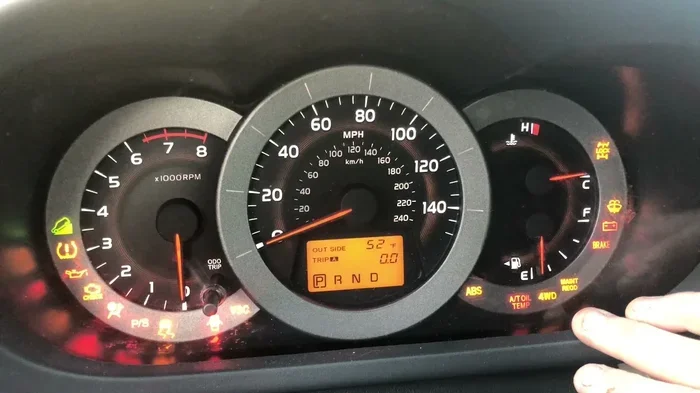
This is the most common method for older RAV4 models. It works on vehicles from 2006 through 2018. You will use the odometer/trip meter buttons on the dashboard. Here is exactly what to do:
- Turn the ignition to the ON position. Do not start the engine. Just press the start button once or turn the key to the accessory position.
- Locate the trip meter reset button. It is usually on the left side of the dashboard near the instrument cluster.
- Press and hold the trip reset button. Keep holding it firmly with your finger.
- Turn the ignition to the OFF position. Then turn it back to ON while still holding the button.
- Continue holding the button for about 10 seconds. Watch the odometer display carefully.
- The maintenance light will flash and then turn off. Release the button once you see this happen.
- Turn the ignition off and then back on. The light should now be gone.
This method resets the RAV4 maintenance light for most models in this range. If the light stays on, try the method again more slowly. Timing matters with these older systems.
Method 2: The Trip Meter Button Reset (2019 and Newer Models)
Toyota updated the reset procedure for 2019 and newer RAV4 models. These vehicles have a slightly different process. Here are the steps:
- Step 1: Press the start button to put the vehicle in ON mode without starting the engine.
- Step 2: Use the steering wheel controls to navigate to the trip meter display on the instrument cluster.
- Step 3: Press and hold the trip meter reset stalk or button for several seconds.
- Step 4: A menu should appear on the display. Look for the maintenance or service option.
- Step 5: Select the option to reset the maintenance reminder.
- Step 6: Confirm your selection. The light should turn off immediately.
For some 2019-2024 models, you may also need to access the Toyota multi-information display. Use the steering wheel arrows to scroll through the menu. Find the vehicle settings section. Look for maintenance or service reset. Select it and confirm. The process is straightforward once you know where to look.
Method 3: Using the Infotainment System (2019+ Models with Touchscreen)
Newer RAV4 models come with a large touchscreen infotainment system. This screen gives you another way to reset the light. Here is how:
- Step 1: Press the home button on the touchscreen to access the main menu.
- Step 2: Navigate to Settings.
- Step 3: Scroll down to Vehicle Settings or Maintenance.
- Step 4: Look for the Service Maintenance Reset option.
- Step 5: Tap it and follow the on-screen prompts.
- Step 6: Confirm the reset. The maintenance light will turn off.
This method works well for owners who prefer using the touchscreen. It is the most visual approach and very intuitive. Toyota designed this system to be user-friendly. You do not need any technical knowledge to use it.
Common Mistakes People Make When Resetting the Light
Even though the process is simple, many people make avoidable mistakes. These errors can lead to frustration and wasted time. Here are the most common ones:
- Starting the engine during the reset: You must keep the engine off during the reset process. Starting the engine interrupts the sequence.
- Not holding the button long enough: On older models, you need to hold the trip button for at least 10 seconds. Letting go too early causes the reset to fail.
- Ignoring the actual maintenance need: The light is a reminder for a reason. Turning it off without completing the service means you skip important upkeep.
- Using the wrong method for your model year: Not all RAV4s use the same reset procedure. Always match the method to your specific year.
- Disconnecting the battery as a shortcut: While this sometimes works, it can also erase other settings and codes in your vehicle.
Avoid these mistakes and your reset will go smoothly every time. Take your time and follow the steps carefully. There is no rush.
When Should You Visit a Toyota Service Center?
Resetting the light at home works great in most situations. But there are times when you should let a professional handle it. Here are the signs that it is time to visit a Toyota service center:
- The light keeps coming back after you reset it: This could indicate an underlying issue the system detected.
- Multiple warning lights appear at once: This is never normal and needs professional diagnosis.
- You are unsure about your vehicle maintenance schedule: A service advisor can pull up your service history and recommend what is due.
- You need actual maintenance performed: Oil changes, tire rotations, brake inspections, and other services require a trained technician.
- The reset procedure does not work for your model: Some rare models or trim levels may need dealer-level tools to reset the light.
A Toyota service center has access to specialized diagnostic equipment. They can read error codes and identify problems the maintenance light might be signaling. Regular visits to the dealer also help maintain your warranty coverage. Staying on top of your RAV4 service schedule protects your investment and keeps the vehicle running safely.
Understanding the Toyota RAV4 Maintenance Schedule
Knowing when to service your RAV4 helps you stay ahead of the maintenance reminder. Toyota provides a clear maintenance schedule for every model year. Here is a general overview of what to expect:
Routine Maintenance Intervals
- Every 5,000 miles or 6 months: Oil change, tire rotation, and basic inspection. This is the most common trigger for the maintenance reminder.
- Every 15,000 miles: Air filter replacement, cabin filter check, and brake inspection.
- Every 30,000 miles: Transmission fluid change, spark plug replacement, and thorough brake inspection.
- Every 60,000 miles: Coolant flush, timing belt inspection, and major component check.
- Every 100,000 miles: Comprehensive service including all fluid replacements and belt inspections.
Your specific schedule may vary based on driving conditions. If you drive in stop-and-go traffic or extreme temperatures, you may need service more often. Always refer to your RAV4 owner manual for the exact maintenance schedule for your model year.
Quick Tips to Keep Your Maintenance Light Working Properly
A well-functioning maintenance reminder system is a valuable tool. Here are some quick tips to keep it working properly:
- Reset the light every time you complete a service. This keeps the system accurate and prevents false alerts.
- Do not ignore the light for too long. Even if you just reset it, make sure you actually complete the needed service soon.
- Keep a maintenance log. Write down every oil change, inspection, and service visit. This helps you track your RAV4’s health over time.
- Use genuine Toyota parts when possible. OEM parts ensure the system’s sensors and diagnostics work as designed.
- Update your infotainment system regularly. Software updates can improve the accuracy of the maintenance reminder system.
These small habits make a big difference over the life of your vehicle. They keep your Toyota RAV4 running smoothly and help you avoid unexpected repairs.
How the Maintenance Reminder System Works Technically
The Toyota RAV4 maintenance reminder is more than just a light. It is part of a sophisticated onboard computer system. Here is how it works behind the scenes:
The system monitors various engine parameters including RPM, temperature, driving time, and distance traveled. It uses algorithms to estimate when the oil and other fluids degrade and need replacement. Based on this data, the system triggers the maintenance reminder at the appropriate interval.
When you reset the light, you are essentially telling the system that service has been completed. The system then starts a new tracking cycle. This is why it is important to reset the light only after actual maintenance is done. Resetting it prematurely means the system will remind you again sooner than needed.
Understanding this process helps you appreciate why the reset procedure exists and why it matters. The maintenance reminder is a helpful tool when used correctly. It keeps you on track with your vehicle care schedule.
Maintenance Reminder Reset for Different RAV4 Trims
Toyota offers several RAV4 trims including LE, SE, XLE, XSE, and Limited. The good news is that the maintenance reset process is the same across all trims. The difference lies in the dashboard and controls, not in the reset procedure itself.
LE and XLE trims use the traditional button-based reset method on the dashboard. SE and XSE trims may include the same method plus access through the multi-information display. Limited and Platinum trims typically feature the full touchscreen infotainment system with the most intuitive reset menu. Regardless of your trim level, the methods described in this article will work for you.
If you are unsure which method applies to your specific trim, consult the owner manual that came with your vehicle. You can also find the information online on Toyota’s official website. Every RAV4 model shares the same core reset functionality.
Can You Use an OBD2 Scanner to Reset the Light?
Yes, you can use an OBD2 scanner to reset the maintenance reminder on a Toyota RAV4. An OBD2 scanner plugs into the diagnostic port under your dashboard. It communicates directly with the vehicle’s computer system. Many auto parts stores offer free OBD2 scanning services as well.
Using an OBD2 scanner has some advantages. It can read error codes that explain why the light came on in the first place. It also provides a more thorough reset than the button method. However, for most RAV4 owners, the button reset methods described earlier are all you need.
If you do use a scanner, make sure to purchase one that supports Toyota vehicles. Not all scanners are compatible with every make and model. An OBD2 scanner is a great tool to have in your garage. It gives you insight into your vehicle’s health beyond just the maintenance light.
Does Turning Off the Maintenance Light Affect Your Warranty?
This is a common concern among RAV4 owners. The short answer is no. Turning off the maintenance reminder light does not affect your warranty. The light is simply a notification tool. It does not control any vehicle functions or systems.
However, Toyota does recommend following the maintenance schedule outlined in your owner manual. Skipping regular services could potentially void warranty coverage for issues that are directly related to neglected maintenance. So while turning off the light is perfectly fine, make sure you actually complete the services on schedule.
Keep records of all your maintenance visits. Whether you do the work yourself or visit a service center, documentation protects your warranty. This is especially important for newer RAV4 models that are still under the factory warranty.
Conclusion
So there you have it. How do I turn off the maintenance reminder on a Toyota RAV4? Now you know the answer. Whether you drive a 2010 model or a 2024 model, you have multiple ways to reset that annoying light. The dashboard button method works for older models. The trip meter reset works for mid-range years. The infotainment system method is perfect for the newest RAV4s.
Remember to always complete your actual maintenance before resetting the light. The reminder is there for a reason. Use it as a helpful tool to keep your vehicle in top shape. And if the light keeps coming back, do not hesitate to visit a Toyota service center for professional diagnosis.
With the steps in this guide, you can handle the reset yourself quickly and easily. No mechanic visit required. No expensive tools needed. Just a few minutes of your time and your RAV4 will be running smoothly with a clean dashboard. Take care of your vehicle and it will take care of you.
Frequently Asked Questions
Can I drive my Toyota RAV4 with the maintenance light on?
Yes, you can drive safely with the maintenance light on. The light is a reminder and does not affect vehicle performance. However, you should schedule service soon to keep your RAV4 running at its best. Ignoring the light for too long may lead to skipped maintenance that could cause bigger problems down the road.
How often does the Toyota RAV4 maintenance reminder come on?
The maintenance reminder typically activates every 5,000 to 7,500 miles depending on your driving conditions and model year. Toyota’s system uses an algorithm that considers factors like driving habits and engine hours. Always check your owner manual for the specific schedule recommended for your RAV4 trim.
What should I do if the maintenance light will not turn off?
If the light stays on after you try the reset methods, first make sure you followed the steps correctly. Try the process again slowly and carefully. If it still does not work, visit a Toyota service center. They have professional diagnostic tools that can identify and resolve the issue quickly.
Do I need any special tools to reset the maintenance reminder?
No, you do not need any special tools. The reset process uses buttons already on your dashboard or steering wheel. Some owners also use an OBD2 scanner, but this is optional. The button-based methods work perfectly for most RAV4 owners without any extra equipment.
Will resetting the maintenance light also clear any error codes?
Resetting the maintenance reminder only clears the service light. It does not clear diagnostic trouble codes stored in the vehicle’s computer. If you have other warning lights on, those codes need to be addressed separately. An OBD2 scanner can read and clear those codes if needed.
Is it safe to reset the maintenance light myself?
Absolutely. Resetting the maintenance light is completely safe and will not harm your vehicle. Toyota designed the reset procedure to be simple enough for any owner to perform. Just make sure you complete the actual maintenance before resetting so your RAV4 stays in great condition.
=== FOOTER ===
Disclaimer: This article is for informational purposes only. Always refer to your Toyota RAV4 owner manual for model-specific instructions. Maintenance procedures may vary by model year and trim level.