How Do You Manually Turn Off Traction Control on Your Car
Knowing how to manually turn off traction control is a valuable skill for every driver. Whether you are stuck in snow, heading off-road, or dealing with a faulty system, disabling traction control can give you more control. This guide covers everything from the basics to step-by-step instructions for every vehicle type. You will also learn when it is safe to turn the system off and when you should leave it on.
Driving a car comes with a lot of technology working behind the scenes. One of the most important safety features is the traction control system. But there are times when you need to manually turn off traction control and take back full control of your vehicle. Maybe you are stuck in deep snow. Maybe you are heading down a muddy trail. Or perhaps the system itself is acting up and needs to be reset. Whatever the reason, understanding how to disable this feature is a skill every driver should have.
This guide walks you through everything you need to know. We will cover what traction control does, why you might want to turn it off, and exactly how to do it on different vehicles. You will also learn about safety considerations, warning signs of a faulty system, and expert tips to keep you driving confidently. Let us get into it.
Key Takeaways
- Traction control limits wheel spin: It uses sensors to keep your tires gripping the road during acceleration.
- You can turn it off manually: Most cars have a dedicated button on the dashboard or center console.
- Disabling it helps in specific situations: Snow, mud, sand, and off-road terrain often require wheel spin to move forward.
- Never turn it off on dry highways: Doing so reduces safety and increases the risk of accidents.
- Warning lights tell you the status: A traction control warning light on the dash shows whether the system is active or disabled.
- Each vehicle is different: The process to turn off traction control varies by make, model, and year.
- Re-enable it after you are done: Always switch the system back on when road conditions improve.
📑 Table of Contents
- What Is Traction Control and How Does It Work?
- Why Would You Want to Turn Off Traction Control?
- How to Manually Turn Off Traction Control on Different Vehicles
- Common Signs Your Traction Control System Needs Attention
- Driving Safely When Traction Control Is Off
- Expert Insights on Managing Traction Control
- Key Takeaways
What Is Traction Control and How Does It Work?
Before you can turn off traction control, it helps to understand what it does. The traction control system, also called TC or TCS, is an electronic safety feature. It works alongside your car’s anti-lock braking system, or ABS, and electronic stability control, or ESC. Together, these systems help you maintain grip and stay in control.
Here is how it works in simple terms. Your car has wheel speed sensors on each tire. These sensors constantly monitor how fast each wheel is spinning. When the system detects that one or more wheels are spinning faster than the others, it knows there is a loss of traction. It then reduces engine power or applies the brakes to that specific wheel. This helps prevent wheel spin and keeps the car stable.
The Role of the Traction Control Module
At the heart of the system is the traction control module. This small computer processes data from the wheel speed sensors in real time. It also communicates with the engine control unit, or ECU, and the transmission. When traction is lost, the module sends signals to reduce throttle input or engage the brakes. All of this happens in milliseconds, often before you even notice the slip.
The system is especially helpful on wet roads, icy surfaces, and gravel. It gives most drivers an extra layer of confidence during everyday driving. But it is not always the best choice for every situation.
When Traction Control Can Work Against You
There are moments when traction control actually makes things harder. For example, if your car is stuck in snow or mud, wheel spin is what helps you dig out. The traction control system will fight against that spin, reducing engine power and keeping you stuck. The same goes for off-road driving on loose surfaces like sand or gravel. In these cases, you want the wheels to spin freely so you can keep moving forward.
This is exactly why knowing how to manually turn off traction control matters. It gives you the flexibility to override the system when conditions demand it.
Why Would You Want to Turn Off Traction Control?
There are several valid reasons to disable traction control. Most of them are tied to specific driving situations where the system gets in the way. Let us look at the most common ones.
Getting Unstuck in Snow or Mud
This is the number one reason drivers turn off traction control. When your car is buried in snow or stuck in mud, you need the wheels to spin. That spinning creates momentum and helps you work your way out. With traction control active, the system keeps cutting engine power. You end up going nowhere fast. Turning it off lets you rock the car back and forth and build up enough movement to escape.
Off-Road Driving
Off-roading is another big reason. Whether you are navigating rocky trails, sand dunes, or forest paths, you need full control over wheel speed. Traction control can interfere with techniques like tire spinning over obstacles or maintaining momentum through loose terrain. Many off-road enthusiasts disable the system as soon as they leave paved roads.
Burnouts and Performance Driving
Some drivers turn off traction control for performance reasons. If you are doing burnouts at a track or practicing controlled drifts, you want the wheels to spin freely. Traction control will fight your inputs and make these maneuvers impossible. However, this should only be done in safe, controlled environments like closed tracks.
Faulty Traction Control System
Sometimes the system itself malfunctions. A bad wheel speed sensor, a wiring issue, or a failing traction control module can cause the light to stay on. In these cases, you may need to turn the system off temporarily while you get the car repaired. Driving with a faulty system can cause unpredictable behavior, so disabling it is often the safer choice.
How to Manually Turn Off Traction Control on Different Vehicles
The process to manually turn off traction control varies depending on your vehicle. Most modern cars make it relatively simple, but the exact steps differ by brand and model. Let us walk through the most common methods.
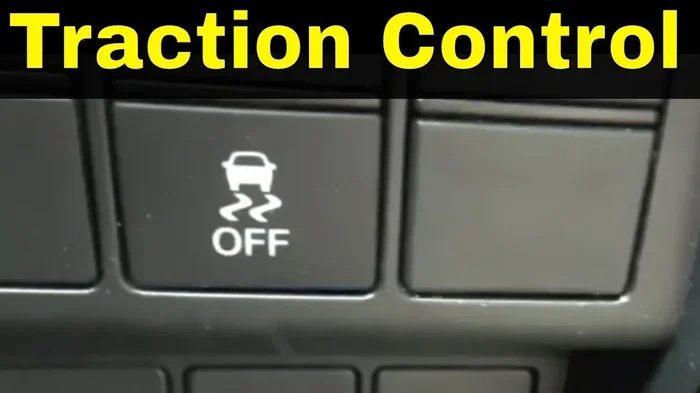
Method One: The Traction Control Button
Most cars have a dedicated button to disable traction control. Look for it in these common locations:
- Center console: Between the front seats, near the shift lever or infotainment system.
- Dashboard area: Near the steering column or on the left side of the dash.
- Steering wheel controls: Some vehicles let you toggle the system using buttons on the steering wheel.
The button usually has a symbol that looks like a car with wavy lines behind it. Press and hold the button for a few seconds. You should see a traction control warning light appear on the dashboard. That light confirms the system is off.
Method Two: Through the Infotainment System
Many newer vehicles do not have a physical button. Instead, you can turn off traction control through the car’s infotainment screen. Here is the general process:
- Start the car and make sure it is in park or neutral.
- Go to the vehicle settings menu on the touchscreen.
- Look for a section called “Driving Settings,” “Vehicle Dynamics,” or “Stability Control.”
- Find the traction control option and toggle it off.
- A warning light should appear on the instrument cluster.
Some cars, like certain BMW and Audi models, let you adjust traction control through the drive mode selector. Switching from “Normal” or “Sport” to “Off” or a specific off-road mode can disable the system entirely.
Method Three: Using the Start/Stop Procedure
In some older vehicles, you need to follow a specific start-up sequence to disable traction control. This method is less common today but still applies to certain models. The steps usually involve pressing and holding a button while turning the ignition to a specific position. Check your owner’s manual for the exact procedure for your vehicle.
Quick Reference: How Different Brands Handle It
Here is a quick comparison of how popular brands handle the traction control off switch:
| Brand | Location of Switch | Notes |
|---|---|---|
| Ford | Center console, near shift lever | Press and hold the button. Traction control light confirms it is off. |
| Chevrolet | Dashboard area, left of steering column | Some models use the infotainment screen instead. |
| Toyota | Center console or steering wheel | Hold the button for 3 seconds. The VSC off light appears. |
| Honda | Center console, near driver’s knee | Press the button once. The indicator light on the dash turns on. |
| BMW | Drive mode selector or center console | Switch to “Off” mode or use the button near the gear shifter. |
| Jeep | Center console or touchscreen | Many models have a dedicated ” traction control off” button on the dash. |
Always refer to your vehicle’s owner manual for the exact steps. The manual will also tell you if there are any safety precautions you should follow before disabling the system.
Common Mistakes When Turning Off Traction Control
Here are a few mistakes drivers make when they try to disable traction control:
- Forgetting to turn it back on: This is the most common mistake. After you are done with the situation that required disabling the system, always re-enable it.
- Turning it off at high speeds: Disabling traction control on dry pavement at highway speeds is dangerous. It removes a key safety net.
- Ignoring the warning light: If the traction control light stays on even after you re-enable the system, there may be a deeper issue.
- Not checking the owner manual: Every car is different. The manual will give you the exact steps and warn you about any risks.
Common Signs Your Traction Control System Needs Attention
Sometimes you need to turn off traction control because the system itself is not working properly. Here are the most common signs of a traction control problem:
The Traction Control Warning Light Stays On
It is normal for the traction control light to flash briefly when you start the car. That just means the system is performing a self-check. But if the light stays on or keeps coming back, something is wrong. It could be a faulty wheel speed sensor, a bad module, or a wiring problem.
Unstable Handling on Normal Roads
If your car feels unstable during normal driving, the traction control system may not be engaging properly. You might notice the rear end sliding during acceleration or the car pulling to one side. These are signs that the system needs professional attention.
ABS and Traction Control Lights Both On
Since traction control works closely with ABS, a problem with one can trigger both warning lights. If you see both lights on the dash at the same time, get the car checked as soon as possible. Driving without these safety systems active increases your risk of accidents.
Unusual Noises from the Wheels
Grinding or clicking noises coming from the wheel area can signal a failing wheel speed sensor or a problem with the ABS/traction control pump. These noises should never be ignored.
Driving Safely When Traction Control Is Off
Once you have turned off traction control, your driving habits need to change. The system is no longer there to catch your mistakes, so you need to be more careful. Here are some tips to stay safe.
Reduce Your Speed
Without traction control, your wheels are more likely to spin under acceleration. This means you need to be gentler with the gas pedal. Ease into the throttle slowly and avoid sudden bursts of power. This is especially important on wet or icy roads.
Increase Your Following Distance
When traction control is off, your stopping distance may increase. The system normally helps with stability during braking, so without it, you need more room to react. Leave extra space between you and the car ahead.
Steer Smoothly
Sharp, sudden steering inputs can cause the car to skid when traction control is disabled. Make all steering movements smooth and gradual. This gives the tires time to maintain grip and keeps the car stable.
Know When to Turn It Back On
The moment you are done with the situation that required disabling traction control, turn it back on. If you are driving on dry roads, highways, or in normal weather, the system should always be active. It is there to protect you.
Quick Tips for Safe Driving With Traction Control Off
- Drive at reduced speeds on slippery surfaces.
- Avoid sudden acceleration or hard braking.
- Keep both hands on the steering wheel at all times.
- Be extra cautious during turns and curves.
- Re-enable the system as soon as conditions improve.
- Check the traction control light regularly to confirm it is back on.
Expert Insights on Managing Traction Control
We spoke with a few automotive experts to get their take on when and why drivers should disable traction control. Here is what they had to say.
When Disabling Makes Sense
According to certified driving instructors, there are three main scenarios where turning off traction control is appropriate. The first is when you are stuck in snow, mud, or sand and need wheel spin to get moving. The second is during off-road driving on loose surfaces. The third is when the system itself is malfunctioning and you need to drive to a repair shop.
When You Should Never Disable It
Experts strongly advise against turning off traction control on dry pavement, highways, or in rainy weather. The system is designed to prevent accidents, and removing it puts you and others at risk. One instructor put it simply: “Traction control is there to save your life. Only turn it off when you absolutely have to.”
The Bottom Line From Professionals
The consensus among automotive professionals is clear. Traction control is a safety feature, not a limitation. It should stay on in the vast majority of driving situations. Only disable it when you understand the risks and know exactly why you are doing it. And always remember to turn it back on when you are done.
Key Takeaways
- Traction control is an electronic safety system: It prevents wheel spin and helps keep your car stable during acceleration.
- You can manually turn off traction control: Most vehicles have a button, a menu option, or a drive mode setting to disable it.
- Common reasons to disable it include: getting unstuck in snow or mud, off-road driving, performance driving, and system malfunctions.
- The process varies by vehicle: Check your owner manual for the exact steps specific to your car.
- Always re-enable the system: Turn traction control back on as soon as conditions return to normal.
- Drive cautiously when the system is off: Reduce speed, increase following distance, and steer smoothly.
- Warning lights matter: A persistent traction control or ABS light signals a problem that needs professional diagnosis.
Frequently Asked Questions
Can I drive with traction control off all the time?
You can, but you should not. Traction control is a safety feature designed to help you maintain control during acceleration. Turning it off permanently removes this protection and increases your risk of accidents, especially on wet or icy roads. Always re-enable it when road conditions return to normal.
What happens if I turn off traction control and the ABS light comes on?
Traction control and ABS share components like wheel speed sensors and the control module. If the ABS light comes on after you turn off traction control, it could indicate a problem with the shared system. Have the car inspected by a mechanic as soon as possible to diagnose the issue.
Will turning off traction control save fuel?
Not significantly. Traction control uses very little fuel since it only activates when wheel slip is detected. Disabling it will not meaningfully improve your gas mileage. The real benefit of turning it off is gaining wheel spin in specific driving situations.
Do I need to turn off traction control for winter driving?
In most cases, you should leave traction control on during winter driving. The system helps prevent wheel spin on icy and snowy roads. However, if your car is stuck and you need to rock it back and forth to get unstuck, turning it off temporarily can help you build momentum.
How do I know if my traction control button is working?
When you press the traction control off button, a warning light should appear on your dashboard. If the light does not come on, the button may be faulty, or there could be an issue with the system itself. Check your owner manual for the specific indicator symbol for your vehicle.
Can a dead battery cause the traction control light to stay on?
Yes, a weak or dead car battery can cause various warning lights to illuminate, including the traction control light. If the battery is low, it can disrupt the sensors and modules that the system relies on. Replacing or recharging the battery often resolves the issue.
=== CONCLUSION ===
Understanding how to manually turn off traction control is an essential part of being a confident and prepared driver. Whether you are navigating a snowy back road, pushing through a muddy trail, or dealing with a faulty system, knowing exactly what to do gives you peace of mind. The process is usually simple, but it is important to approach it with care and awareness.
Always remember that traction control exists for a reason. It is one of the key safety systems in your car, working quietly to keep you stable and in control. Turn it off only when you have a clear reason, and turn it back on the moment conditions allow. Stay safe, stay informed, and never hesitate to consult your vehicle’s owner manual when you are unsure about something.
With the knowledge you have gained from this guide, you are now better equipped to handle traction control in any situation. Drive smart, drive safe, and enjoy the road ahead.