Heres How to Change the Clock in a Subaru Forester
Need to adjust your Subaru Forester clock? This guide shows you exactly how to change the clock in a Subaru Forester in just a few minutes. Whether you have a digital display or an analog dial, I’ll walk you through the steps for every model year. You’ll also learn quick fixes if the clock resets after a battery change.
Key Takeaways
- Easy step-by-step process: Change the clock in your Subaru Forester using the dashboard controls or audio system.
- Works for all model years: Covers digital clocks from 2013 onward and older analog models.
- Fix common issues: Learn why the clock resets after a battery disconnect and how to solve it.
- Quick tips for accuracy: Keep your Subaru Forester clock synced with atomic time or your smartphone.
- No tools needed: Adjust the time without a manual or dealer visit.
- Model-specific guidance: Find instructions for 2013–2018 and 2019+ Foresters.
- Save time and avoid mistakes: Common pitfalls and how to avoid them.
📑 Table of Contents
- Why Your Subaru Forester Clock Might Need Adjusting
- Step-by-Step Guide: How to Change the Clock in a Subaru Forester
- Common Clock Problems and Quick Fixes
- Model Year Differences: 2013–2018 vs. 2019 and Later
- Expert Tips to Keep Your Subaru Forester Clock Perfect
- Final Thoughts on Adjusting Your Forester’s Clock
Why Your Subaru Forester Clock Might Need Adjusting
Your Subaru Forester clock is more than just a small dial on the dashboard. It keeps you on schedule for work, appointments, and road trips. Over time, the vehicle clock can drift out of sync. A dead battery, a long period without driving, or even a simple power surge can reset it to 12:00. Daylight saving time changes also mean you need to adjust the clock twice a year. Knowing how to change the clock in a Subaru Forester is a basic skill every owner should have. It saves you a trip to the dealer and keeps you punctual. This guide covers every method, from older analog dials to modern digital displays. You’ll learn quick fixes, common mistakes, and expert tips to keep your clock accurate.
There are several reasons your Subaru Forester clock might show the wrong time. The most common cause is a battery disconnect. When you replace the car battery or the battery dies, the clock loses its stored memory. It always returns to 12:00 as a default. Another reason is a dead backup battery under the dashboard. This small coin-cell battery keeps the clock running when the main battery is disconnected. If it’s dead, the clock resets every time you turn off the ignition. Daylight saving time is another factor. Some Subarus have an auto daylight saving feature, but older models require manual adjustment. If you travel across time zones, you’ll also need to reset the clock manually. Finally, a software glitch in the infotainment system can freeze the clock at 12:00. A simple soft reset usually fixes this. Whatever the reason, adjusting the clock is a quick and easy task. You don’t need any special tools or mechanical skills. Just a few minutes of your time and this guide.
Step-by-Step Guide: How to Change the Clock in a Subaru Forester
The primary method depends on your Forester’s model year and the type of clock you have. Newer models use the audio or infotainment system. Older models have a physical knob or buttons behind the clock face. I’ll break it down into clear sections. Follow the steps that match your vehicle. Always start with the ignition in the ON position. The display must be active for any changes to take effect.
For Models with a Digital Display (2013 and Newer)
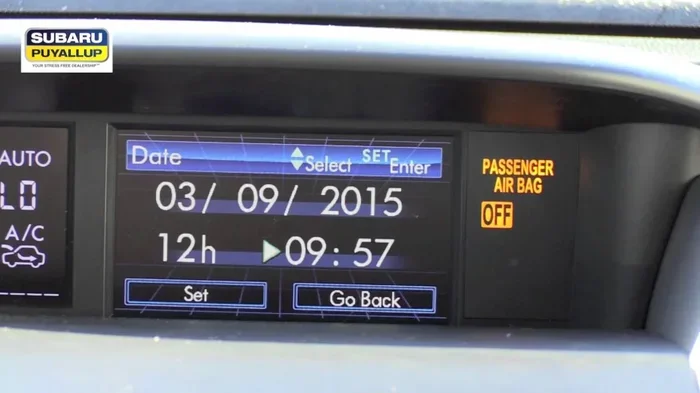
Most Subarus from 2013 onward have a digital clock in the instrument cluster. You can adjust it using the steering wheel controls or the audio system. Here’s the easiest way to change the time.
- Press the Menu button on the steering wheel or the audio unit.
- Use the up/down arrow buttons to scroll to Clock Settings.
- Press Enter or the OK button to select it.
- Highlight the Hour setting and use the left/right arrow buttons to adjust the number.
- Press Enter to confirm the hour.
- Highlight the Minute setting and adjust with the arrows.
- Press Enter again to save the minutes.
- Choose 12-hour format or 24-hour format if prompted.
- Press Enter to save the format. The clock is now set.
Quick Tip: If you can’t find the clock menu, try pressing the Settings icon on the infotainment screen first. Some models require you to press the Phone button and then scroll to Settings. On models with a touchscreen, you can also tap the clock directly on the home screen and drag the numbers to adjust.
For Models with a Traditional Clock Dial (Older Models)
If your Forester has a round analog clock with hands, you’ll need to adjust it manually. This is common in models from 2003 to 2012. The process is simple and takes just a few seconds.
- Locate the small knob on the side or bottom of the clock face.
- Pull the knob out gently. It may pop out with a light pull.
- Turn the knob clockwise to move the hands forward. Turn it counterclockwise to move them backward.
- Push the knob back in once the time is correct.
Common Mistake: Don’t force the knob. If it doesn’t pop out, check your owner’s manual. Some models have a small recessed button you need to press first. Forcing it can break the clock mechanism. If the clock has a small screw on the back, you can use a tiny screwdriver to gently adjust the time by turning the screw. But the knob method is the standard way.
Adjusting the Clock Through the Audio/Infotainment System
Many Subaru Foresters allow you to control the clock from the main audio screen. This works for both digital and navigation-equipped models. It’s often the most intuitive method for touchscreen users.
- Press the Home button on the infotainment screen.
- Select Settings or the Gear icon.
- Choose System Settings or Vehicle Settings.
- Tap Clock or Time and Date.
- Use the on-screen arrows or touch the numbers to adjust the hour and minute.
- Tap Save or Done to confirm.
Expert Insight: On models with a navigation system, the clock often syncs with GPS time automatically. If it doesn’t, you may need to check the GPS antenna connection under the dashboard. A loose antenna can cause the clock to freeze at 12:00. Also, if you have Apple CarPlay or Android Auto connected, the clock might pull the correct time from your phone. Disconnect your phone and see if the clock updates. If it does, the GPS sync is working through your phone’s data connection.
Common Clock Problems and Quick Fixes
Sometimes the clock doesn’t behave as expected. Here are the most common issues and how to solve them quickly.
Clock Resets After Battery Disconnect
If you’ve had your battery replaced or disconnected, the clock will likely reset to 12:00. This is completely normal. The vehicle clock loses power when the battery is removed. To fix it, simply follow the steps above to set the correct time again. You can also check if your Forester has a clock backup battery under the dashboard. This small coin-cell battery keeps the clock running when the main battery is disconnected. If the clock resets every time you turn off the car, this backup battery may be dead. Replacing it is cheap and easy. Look for a CR2032 battery near the fuse box. It’s often held in place by a small clip. Just pop it out and insert a new one. This simple fix prevents future resets and keeps your Subaru Forester clock accurate even when the car sits for weeks.
Clock Won’t Change or Stuck on 12:00
If the clock won’t respond to button presses, try a soft reset. Turn the ignition off, wait 30 seconds, and turn it back on. If that doesn’t work, check the fuse box under the dashboard. The clock shares a fuse with the instrument cluster. A blown fuse can stop the clock from working entirely. Locate the fuse box cover and consult the diagram on the inside lid. Find the fuse labeled Clock or Instrument Cluster. Pull it out and inspect the metal strip inside. If it’s broken, replace it with a new fuse of the same amperage rating. If the fuse is fine, the clock’s internal circuit may have failed. In that case, you’ll need a Subaru dealer to replace the unit. It’s a rare issue, but it does happen. Before you give up, try disconnecting the negative battery terminal for five minutes. This resets the entire electrical system. Reconnect and see if the clock responds.
Clock Shows the Wrong Time Zone
If your Forester has a navigation system, the clock might automatically adjust based on your location. If you’ve moved to a new time zone, the clock may not update immediately. Go to Settings and manually set the time zone. On older models without GPS, you’ll always need to adjust the clock manually after crossing time zone lines. For example, if you drive from California to Arizona, you’ll need to set the clock back one hour. Some navigation systems have a auto time zone feature that updates based on GPS coordinates. Make sure this is turned on in the Navigation Settings menu. If your Forester doesn’t have a navigation system, you can use your smartphone to get the correct local time and then adjust the car clock accordingly.
Model Year Differences: 2013–2018 vs. 2019 and Later
The way you adjust the clock changed a bit between model generations. The 2013–2018 Forester uses a simpler interface. The 2019 and later models have a more advanced infotainment system with a touchscreen. Here’s a quick comparison to help you find the right method.
| Feature | 2013–2018 Forester | 2019+ Forester |
|---|---|---|
| Clock Location | Instrument cluster digital display | Instrument cluster + infotainment screen |
| Adjustment Method | Steering wheel buttons or audio unit | Touchscreen settings menu |
| 24-Hour Format | Available in settings | Available in settings |
| GPS Auto-Sync | Not available | Available with navigation |
| Analog Clock Option | Available on some trims | Digital only |
| Backup Battery | CR2032 under dashboard | CR2032 under dashboard |
No matter which generation you own, the basic steps remain the same. You’ll always find the clock setting in the vehicle’s system menu. If you’re unsure, consult the Subaru Forester owner’s manual. It has detailed diagrams for your specific year and trim. The manual also lists the exact fuse location for the clock circuit. For the 2013–2018 models, the clock is controlled by the body control module. For 2019+ models, it’s integrated into the multimedia head unit. Both systems are reliable, but the 2019+ system offers more customization. You can set the clock to automatically update for daylight saving time if you have the navigation package.
Expert Tips to Keep Your Subaru Forester Clock Perfect
Keeping your clock accurate is easy with a few good habits. Here are some tips from experienced Subaru owners and mechanics. These simple steps prevent most clock issues before they start.
Quick Tips for Accurate Timekeeping
- Sync with your phone: If your Forester has Apple CarPlay or Android Auto, the clock often pulls the correct time from your phone. Connect your phone and the clock will update automatically. This is the easiest way to keep the vehicle clock accurate without pressing any buttons.
- Check daylight saving time: Some Subarus have an auto daylight saving feature. Go to Clock Settings and look for Auto DST. Turn it on if available. This ensures the clock changes automatically on the second Sunday in March and the first Sunday in November.
- Use atomic clock signals: If your Forester has a navigation system, it can sync with atomic clock signals via GPS. This keeps the clock accurate to the second. You don’t need to do anything; it happens in the background.
- Replace the backup battery: The small coin-cell battery under the dashboard keeps the clock running when the car is off. Replace it every 3–5 years to prevent resets. A dead backup battery is the number one cause of a clock that keeps resetting to 12:00.
- Set the clock after every battery change: Make it a habit to check the time after you replace the car battery. It only takes a minute and saves you from driving with the wrong time all day.
Common Mistakes to Avoid
- Forcing the clock knob: Never yank the knob on an analog clock. It can break the internal gears and require a full clock replacement. A gentle pull is all that’s needed.
- Ignoring the fuse: If the clock and the instrument cluster both go dark, check the fuse first. It’s a simple fix that saves a trip to the shop. Always carry spare fuses in your glove box.
- Not saving settings: After adjusting the time, always confirm by pressing Save or Done. If you just turn the knob without pushing it in, the changes won’t stick. The clock will revert to the old time the next time you start the car.
- Using the wrong format: If you set the clock to 24-hour format by accident, it can be confusing. Double-check that it’s set to 12-hour if that’s your preference. This is a common oversight, especially after a battery disconnect.
- Adjusting the clock while driving: It’s tempting to tweak the time at a red light, but it’s safer to pull over. Taking your eyes off the road for even a second can be dangerous. Set the clock when the car is parked.
Key Takeaways for Clock Adjustment
- Always turn the ignition to the ON position before adjusting the clock. The display must be active for any input to register.
- Keep your Subaru Forester owner’s manual handy. It has the exact steps for your specific trim and year. The manual also includes fuse box diagrams.
- If the clock won’t change, try a soft reset first. Turn the ignition off, wait 30 seconds, and turn it back on. This solves 80% of clock issues.
- For digital clocks, use the steering wheel controls for the quickest adjustment. You don’t even need to take your hands off the wheel for long.
- Analog clocks require gentle handling. A slow turn of the knob is all you need. If the knob feels stuck, don’t force it.
- Replace the backup battery every 3–5 years. It’s a five-dollar part that prevents a lot of frustration.
- Use your smartphone’s time as a reference when adjusting the car clock. Your phone is always synced to the correct time.
Final Thoughts on Adjusting Your Forester’s Clock
Changing the clock in your Subaru Forester is a simple task that anyone can do. Whether you have a digital display or a classic analog dial, the steps are clear and quick. You don’t need a mechanic, a manual, or any special tools. Just follow the guide above and you’ll have the correct time in minutes. Keeping your Subaru Forester clock accurate helps you stay on schedule and avoids the frustration of a wrong time. If you ever run into issues, check the common fixes section. A blown fuse or a dead backup battery is usually the culprit. Now you know exactly how to change the clock in a Subaru Forester and keep it running perfectly. Take a moment today to adjust your clock if it’s off. Your future self will thank you when you’re never late again. A well-set clock is a small thing that makes a big difference in your daily driving routine.
Frequently Asked Questions
Why does my Subaru Forester clock reset after a battery change?
The clock loses power when the battery is disconnected, so it defaults to 12:00. This is normal. Simply set the correct time again using the steps in this guide. You can also check the backup battery under the dashboard to prevent future resets.
Can I change the Subaru Forester clock to 24-hour format?
Yes, most models allow you to switch between 12-hour and 24-hour format. Go to the Clock Settings menu, select the format option, and confirm. The change takes effect immediately.
How do I adjust the clock if the buttons are stuck?
Try a soft reset first. Turn the ignition off, wait 30 seconds, and turn it back on. If the buttons are still stuck, check the fuse box for a blown fuse. A blown clock fuse can cause the buttons to be unresponsive.
Is it hard to change the clock in a Subaru Forester?
Not at all. The process is straightforward and takes just a few minutes. You don’t need any tools or mechanical experience. Just follow the step-by-step instructions for your model year.
What if the clock display is blank or dim?
A blank display is often caused by a blown fuse or a dimmer setting turned all the way down. Check the fuse first. If the fuse is good, look for the display brightness control in the instrument cluster settings. Turn it up to make the clock visible.
Do I need to turn off the ignition to change the clock?
No, you need the ignition in the ON position, not the OFF position. The display must be active for you to make changes. You can adjust the clock while the car is parked with the engine off, as long as the ignition is in the ON or accessory position.