How to Reset Oil Life on a 2007 Honda Civic Step by Step
Resetting the oil life on a 2007 Honda Civic takes just a few minutes using the steering wheel controls and the information display. This guide covers the full step-by-step procedure, common mistakes to avoid, and tips for keeping your Civic running smoothly between oil changes.
Owning a 2007 Honda Civic comes with the joy of driving a reliable and fuel-efficient car. But with that ownership comes the responsibility of keeping up with regular maintenance. One of the most important tasks is staying on top of your oil changes. The oil life system in your Civic helps you track when service is due. However, after you complete an oil change, you need to reset that indicator. If you do not reset it, the warning light stays on and can be confusing. This guide will show you exactly how to handle this process. You will learn the steps, the tools you need, and tips to avoid common mistakes.
The oil life reset procedure on a 2007 Honda Civic is straightforward. Unlike some newer models with advanced tech, the 2007 Civic uses a simple button-based system. You do not need expensive diagnostic tools. You do not need to visit a dealership. With a few taps on your steering wheel controls, you can clear the maintenance reminder. This article breaks down every single step so you can do it yourself with confidence. Let us dive into the details and get your maintenance light off your dashboard.
Key Takeaways
- Simple Process: Resetting the oil life on a 2007 Honda Civic uses the steering wheel controls and the dashboard information display.
- Quick Task: The entire reset procedure takes less than five minutes to complete.
- No Tools Needed: You do not need any special equipment or mechanic help to reset the oil life indicator.
- Important Maintenance: Resetting the system after an oil change keeps your service reminders accurate and your engine protected.
- Common Mistakes Exist: Avoid skipping steps or resetting before actually changing the oil.
- Know Your System: Understanding the oil life system helps you maintain your Honda Civic properly over time.
📑 Table of Contents
- Understanding the Oil Life System in a 2007 Honda Civic
- Tools and Preparation Before You Start
- Step by Step Guide to Reset the Oil Life Indicator
- Common Mistakes to Avoid When Resetting Oil Life
- When to Actually Change Your Oil (Beyond Just Resetting)
- Tips for Keeping Your 2007 Honda Civic Running Smoothly
- Expert Insights on Oil Life Systems
- Key Takeaways
- Conclusion
Understanding the Oil Life System in a 2007 Honda Civic
Before you reset anything, it helps to understand what the system does. The oil life indicator is not just a simple counter. It uses an algorithm to track your driving habits and conditions. Factors like engine temperature, idle time, and driving speed all play a role. The system estimates when your oil is starting to degrade. When the indicator reads low or shows a reminder, it means service is due soon.
How the Oil Life Indicator Works
The maintenance minder system in the 2007 Honda Civic is designed by Honda engineers. It monitors your engine conditions continuously. When the system determines that the oil life has reached a certain threshold, it triggers a reminder. This is different from a simple mileage counter. The system adapts to how you drive. If you drive in severe conditions, the reminder may come sooner. If you drive mostly on highways, it may extend further.
The dashboard display shows the oil life percentage or a maintenance code. When you see this light, it does not mean your oil is completely failed. It means the system recommends service soon. Understanding this helps you avoid panic. You can plan your oil change at a convenient time rather than rushing to a shop immediately.
Why Resetting the Oil Life Matters
After you change your oil and replace the filter, you must reset the system. If you do not, the reminder stays active. This can be annoying and distracting every time you start the car. A persistent maintenance light can also mask other important warnings. By resetting the indicator, you clear the old reminder and set a fresh service interval. This keeps your maintenance schedule organized and accurate.
Resetting also helps you track your actual service history. When the system is properly reset, you know exactly when the next change is due. This is especially helpful if you change your own oil at home. You can log the date and mileage easily. Over time, this builds a clear picture of your Honda Civic maintenance routine.
Tools and Preparation Before You Start
One of the best things about resetting the oil life on a 2007 Honda Civic is that you need almost no tools. The entire process happens through the car’s built-in controls. However, a little preparation makes the job smoother. Here is what you should have ready before starting.
What You Will Need
- Your 2007 Honda Civic with the engine turned off but the ignition in the ON position.
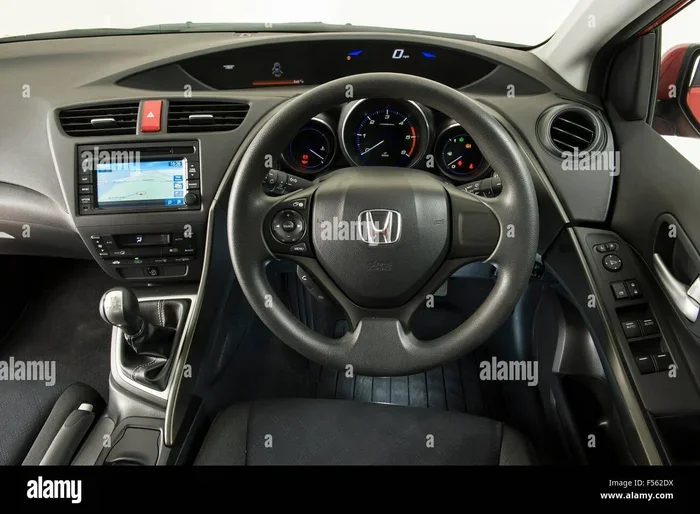
- Steering wheel controls — the buttons on the left side of the steering column.
- The information display screen located behind the steering wheel.
- A notepad or phone to note the current mileage and date.
- Your new oil and filter if you have not changed the oil yet.
When to Reset the Oil Life
The best time to reset the system is right after you complete an oil change. Make sure you have used the correct engine oil type for your 2007 Civic. Honda typically recommends 0W-20 or 5W-20 synthetic blend oil. Check your owner’s manual to confirm the right grade. Also, always replace the oil filter during each change. Fresh oil and a clean filter work together to protect your engine.
Do not reset the system before actually changing the oil. This defeats the purpose of the maintenance reminder. The system tracks service intervals for a reason. Resetting prematurely means you might forget to change the oil on time. That can lead to engine wear and reduced performance over time.
Step by Step Guide to Reset the Oil Life Indicator
Now for the part you have been waiting for. The actual reset process is quick and easy. Follow these steps carefully, and you will have that maintenance light off in no time.
Step 1: Turn the Ignition to the ON Position
Sit in your driver’s seat and close the door. Insert the key into the ignition. Turn it to the ON position without starting the engine. You will know you are in the right spot when the dashboard lights illuminate. The information display behind the steering wheel should light up as well. Do not start the engine for this process. The ON position is all you need.
Step 2: Press the Select/Reset Button
Locate the Select/Reset button on the steering wheel. It is usually on the left side, near the turn signal lever. Press this button repeatedly until you see the oil life indicator appear on the display screen. The screen cycles through different menu items. Keep pressing until the oil life percentage or the wrench icon shows up. This might take a few presses, so be patient.
Step 3: Hold the Select/Reset Button
Once the oil life indicator is displayed, hold the Select/Reset button for about ten seconds. Do not release it too early. You should see the indicator start to blink or reset to 100 percent. This confirms that the system has been cleared. The maintenance reminder is now ready to track your next service interval.
Step 4: Turn the Ignition Off and Back On
After holding the button, turn the ignition off. Wait a few seconds, then turn it back to the ON position. Check the display screen to confirm the oil life indicator has been reset. If you see 100 percent or the indicator is no longer showing a service reminder, you have done it correctly. If the light is still on, repeat the steps and hold the button a bit longer.
Step 5: Start the Engine and Verify
Start the engine and let it idle for a moment. Look at the dashboard to make sure the maintenance light is off. The oil life reset is complete. You can now drive your 2007 Honda Civic with confidence, knowing your maintenance system is tracking fresh oil.
Quick Tips for a Smooth Reset
- Make sure the ignition is fully in the ON position, not in accessory mode.
- Press the Select/Reset button slowly and deliberately to avoid skipping past the oil life display.
- Hold the button for a full ten seconds. Do not let go early.
- If the reset does not work the first time, try the entire process again from the beginning.
- Always reset the system immediately after an oil change for the best results.
Common Mistakes to Avoid When Resetting Oil Life
Even though the reset process is simple, mistakes can happen. Avoiding these common errors saves you time and frustration. Here are the pitfalls to watch out for.
Resetting Before Changing the Oil
This is the most common mistake. Some people reset the light before actually draining the old oil. This clears the reminder but leaves degraded oil in the engine. The oil life system will not warn you again until the next cycle. You could go thousands of miles on old oil without realizing it. Always change the oil first, then reset the indicator.
Not Holding the Button Long Enough
The reset button needs to be held for a full ten seconds. Releasing it after five seconds will not work. Some people tap the button repeatedly instead of holding it down. This will not trigger the reset. Be firm and hold the button steadily until you see the indicator change.
Ignoring the Owner’s Manual
Every Honda model has slight differences in the reset procedure. The 2007 Civic has a specific process that works reliably. However, if you are unsure, the owner’s manual is your best resource. It provides exact instructions tailored to your vehicle. You can also find the manual online through Honda’s website if you misplaced your copy.
Forgetting to Check the Oil Level
Resetting the oil life is not the same as checking the oil level. After an oil change, always use the dipstick to verify the oil is at the proper level. Too much oil or too little oil can cause engine problems. The oil life system tracks service intervals, but it does not monitor your oil level. Make this a habit every time you change your oil.
When to Actually Change Your Oil (Beyond Just Resetting)
Resetting the oil life indicator is just one part of oil maintenance. You also need to know when a real oil change is due. The oil life system on the 2007 Honda Civic is a helpful guide, but it is not the only factor. Several conditions can affect how often you need fresh oil.
Normal vs. Severe Driving Conditions
Honda defines severe driving conditions that require more frequent oil changes. These include short trips under five miles, extreme hot or cold weather, and frequent idling. If you drive in stop-and-go traffic daily, that is also considered severe. If any of these apply to your driving habits, you may need to change your oil more often than the system recommends. Consider shortening your service intervals by about 30 percent under severe conditions.
Recommended Oil Change Intervals
For most 2007 Honda Civic models, the recommended interval is every 5,000 to 7,500 miles with conventional oil. If you use full synthetic oil, you can extend this to 7,500 to 10,000 miles. Always check the Honda maintenance schedule in your owner’s manual for the exact recommendation. Sticking to a consistent schedule keeps your engine running smoothly for years.
Signs It Is Time for an Oil Change Even If the Light Is Not On
- The oil looks dark brown or black on the dipstick instead of amber.
- You hear increased engine noise or knocking sounds.
- You notice a burning oil smell inside the car.
- The engine oil level drops significantly between changes.
- You have driven more than 5,000 miles since the last change.
If you notice any of these signs, do not wait for the indicator. Change your oil right away. Fresh oil is the lifeblood of your engine. It lubricates moving parts, reduces friction, and carries heat away from critical components. Skipping oil changes leads to buildup and can cause expensive repairs down the road.
Tips for Keeping Your 2007 Honda Civic Running Smoothly
Resetting the oil life is just one piece of the maintenance puzzle. Your 2007 Honda Civic deserves regular care to stay reliable. Here are some extra tips to keep your car in great shape between oil changes.
Check Other Fluid Levels Regularly
Beyond engine oil, your Civic needs coolant, brake fluid, transmission fluid, and power steering fluid. Check these levels monthly. Low fluid levels can cause serious problems if left unaddressed. A five-minute check under the hood can save you from costly repairs later.
Keep Up with Tire Maintenance
Tire pressure affects fuel economy, handling, and safety. Check your tire pressure at least once a month. The recommended pressure for a 2007 Honda Civic is listed on the driver’s side door jamb. Properly inflated tires also last longer, saving you money on replacements.
Replace Air Filters on Schedule
A clean air filter helps your engine breathe properly. Dirty filters reduce fuel efficiency and can hurt performance. Check your air filter every 15,000 miles and replace it when it looks dirty. This is a simple DIY task that takes just minutes.
Stay on Top of the Maintenance Schedule
Honda provides a detailed maintenance schedule in the owner’s manual. Follow it closely. Regular inspections of brakes, belts, hoses, and spark plugs keep your Civic running strong. Staying proactive with maintenance prevents unexpected breakdowns and extends the life of your vehicle.
Use Quality Parts and Fluids
When it comes to oil changes, do not skimp on quality. Use Honda-recommended oil and OEM or high-quality aftermarket filters. Cheap oil may seem like a savings, but it does not protect your engine as well. Over time, poor-quality fluids can lead to increased wear and reduced engine life. Invest in quality products for the best long-term results.
Expert Insights on Oil Life Systems
Automotive experts agree that the oil life system in the 2007 Honda Civic is a smart and effective tool. According to Honda technicians, the system is designed to be more accurate than simple mileage-based reminders. The algorithm accounts for real-world driving conditions that affect oil degradation. However, experts also stress that the system is a guide, not a replacement for regular inspections.
Many mechanics recommend resetting the oil life indicator right after every oil change. This ensures the system starts tracking from a true baseline. Some also suggest keeping a physical log of oil changes. Write down the date, mileage, and oil type used. This creates a backup record in case the system ever malfunctions. A simple notebook in the glove box works perfectly for this.
Experts also point out that the oil life reset process is the same across many Honda models from the same era. If you own a 2006 or 2008 Civic, the steps are very similar. Once you learn the process for your 2007 model, you can apply that knowledge to other Hondas easily. This makes it a valuable skill for any Honda owner.
Key Takeaways
- Simple Process: Resetting the oil life on a 2007 Honda Civic uses the steering wheel controls and the dashboard information display.
- Quick Task: The entire reset procedure takes less than five minutes to complete.
- No Tools Needed: You do not need any special equipment or mechanic help to reset the oil life indicator.
- Important Maintenance: Resetting the system after an oil change keeps your service reminders accurate and your engine protected.
- Common Mistakes Exist: Avoid skipping steps or resetting before actually changing the oil.
- Know Your System: Understanding the oil life system helps you maintain your Honda Civic properly over time.
Conclusion
Learning how to reset oil life on a 2007 Honda Civic is one of the easiest and most useful skills any car owner can have. The process is quick, requires no special tools, and can be done in your own driveway. By following the steps outlined in this guide, you can clear that maintenance reminder and keep your service schedule on track. Remember to always change the oil before resetting the system. Use the correct oil grade for your engine, and never skip oil filter replacements.
The oil life indicator is a helpful feature that keeps your Honda Civic running at its best. When you reset it properly after each oil change, you ensure accurate service tracking. This simple habit pays off in the long run by protecting your engine and preventing unexpected repairs. Take a few minutes to learn the process now, and you will thank yourself every time you need to do it again.
Your 2007 Honda Civic has served you well. Keep it running strong with regular maintenance and proper care. The next time that maintenance light comes on, you will know exactly what to do. You have the knowledge, the steps, and the confidence to handle it yourself. That is what car ownership is all about. Stay proactive, stay informed, and enjoy every mile in your Civic.
Frequently Asked Questions
How do I reset the oil life on a 2007 Honda Civic?
Turn the ignition to the ON position without starting the engine. Press the Select/Reset button on the steering wheel until the oil life indicator appears on the display. Hold the button for about ten seconds until the indicator resets to 100 percent. Then turn the ignition off and back on to verify the reset was successful.
Can I reset the oil life without changing the oil?
You can reset the indicator without changing the oil, but you should not. Resetting clears the maintenance reminder without actually servicing the engine. This means you could drive on old oil without getting a warning again. Always change the oil first, then reset the system to maintain proper engine protection.
Where is the Select/Reset button on a 2007 Honda Civic?
The Select/Reset button is located on the left side of the steering wheel, near the turn signal lever. It is a small button that you press to cycle through the information display menu items. If you are unsure, check your owner’s manual for the exact location and function.
What happens if the oil life reset does not work?
If the reset does not work, try repeating the entire process. Make sure you are holding the button for a full ten seconds and that the ignition is in the ON position. If the problem persists, the information display may have an electrical issue. In that case, consult a Honda technician or mechanic for further diagnosis.
How often should I change the oil in my 2007 Honda Civic?
For most driving conditions, change the oil every 5,000 to 7,500 miles with conventional oil. If you use full synthetic oil, you can extend this to 7,500 to 10,000 miles. If you drive in severe conditions like short trips, extreme temperatures, or heavy stop-and-go traffic, reduce the interval by about 30 percent.
Does resetting the oil life also reset the maintenance light?
Yes, on the 2007 Honda Civic, resetting the oil life indicator also clears the maintenance light on the dashboard. The two systems are connected. Once the oil life is reset to 100 percent, the maintenance reminder should no longer appear on the display or illuminate the warning light.
=== META DESCRIPTION ===
Learn how to reset oil life on a 2007 Honda Civic step by step. This complete guide covers the procedure, tips, and common mistakes to avoid.