How to Reset the Volvo XC90 Maintenance Light Step by Step
Resetting the Volvo XC90 maintenance light is a simple DIY task you can do at home in just a few minutes. Whether your service reminder is flashing after an oil change or you just want to clear the dashboard indicator, this guide walks you through every step. We cover multiple methods for different XC90 model years so you can find the right one fast. No mechanic visit needed — just follow along and save time and money.
That little orange light on your dashboard just won’t stop blinking. Every time you start your Volvo XC90, it stares back at you like a tiny reminder that something needs attention. We get it. It’s annoying. But here’s the good news — resetting the Volvo XC90 maintenance light is one of the easiest things you can do as a car owner.
You don’t need a fancy scanner. You don’t need to book an appointment at the dealership. And you definitely don’t need to spend money on something you can handle yourself in under ten minutes. This guide gives you a complete, step-by-step walkthrough for every XC90 model year. Whether you drive a 2003 or a 2023 model, we’ve got you covered.
Let’s be real for a second. Car maintenance can feel overwhelming. But clearing a service indicator should never be one of those overwhelming tasks. By the end of this article, you’ll know exactly what to do, why it works, and how to keep your XC90 dashboard clean and accurate. So grab your coffee, sit comfortably, and let’s get into it.
Key Takeaways
- Easy DIY Process: You can reset the Volvo XC90 maintenance light yourself without any special tools or mechanic visits.
- Multiple Methods Available: Different XC90 model years use slightly different reset procedures, and we cover them all.
- Saves Time and Money: Handling the reset at home eliminates unnecessary trips to the dealership or service center.
- Works for All Service Types: The method clears oil change reminders, inspection alerts, and general service due indicators.
- Quick Process: Most resets take under five minutes once you know the correct steps.
- Model Year Matters: Newer XC90 models have a different menu-based reset process compared to older years.
- Prevent False Alerts: Properly resetting the light ensures your maintenance schedule stays accurate and reliable.
📑 Table of Contents
- Why Does the Volvo XC90 Maintenance Light Come On?
- How to Reset the Volvo XC90 Maintenance Light — Methods by Model Year
- Common Mistakes When Resetting the Volvo XC90 Maintenance Light
- Tips to Keep Your Volvo XC90 Maintenance System Accurate
- When Should You Visit a Volvo Service Center?
- Final Thoughts
Why Does the Volvo XC90 Maintenance Light Come On?
Before we dive into the reset process, let’s quickly talk about why that light shows up in the first place. Understanding the cause helps you know exactly what you’re dealing with.
The Volvo XC90 maintenance light is part of the car’s service interval system. Volvo engineers programmed it to remind you when it’s time for routine upkeep. Here are the most common reasons it activates:
- Oil change due: The most frequent trigger. Your XC90 tracks mileage and flashes the light when it’s time for fresh oil.
- Inspection reminder: In many states and countries, your vehicle needs periodic inspections. The light helps you stay on track.
- General service interval: Volvo recommends specific maintenance tasks at set mileage points, like tire rotations, brake checks, and fluid top-offs.
- Aftermarket oil change: If you changed your oil yourself or visited a quick-lube shop, the system doesn’t automatically reset. That’s where you come in.
- Battery replacement: Disconnecting or replacing the battery can sometimes trigger the maintenance light as a system reset.
The light typically shows up as a small spanner icon or a “SERVICE” message on the XC90 instrument panel. It’s not an emergency warning. Your car is not broken. It’s simply telling you that a scheduled maintenance task is coming up or is overdue.
How to Reset the Volvo XC90 Maintenance Light — Methods by Model Year
Here’s where things get slightly tricky. Volvo updated the XC90 dashboard system over the years, which means the reset process varies depending on your model year. Don’t worry — we break it down clearly below so you can find the right method for your specific vehicle.
Method 1: Reset for Older XC90 Models (2003–2014)
Older Volvo XC90 models use a straightforward manual reset process. You don’t need any electronics knowledge — just follow these steps carefully:
- Turn the ignition to position I. This is the first click before the engine starts. The dashboard lights up but the engine stays off.
- Press and hold the trip meter reset button. This is usually located on the instrument cluster or steering wheel controls.
- While holding the button, turn the ignition to position II. This is the full “on” position without starting the engine.
- Continue holding the button for about 10 seconds. You should see the maintenance light start to flash.
- Release the button. The light should go off, and the service interval has been reset.
- Turn the ignition off and then back on. Check that the maintenance light is no longer visible on the dashboard.
If the light stays on after this process, don’t panic. Try repeating the steps once more. Sometimes the system needs a second attempt to fully register the reset.
Method 2: Reset for Newer XC90 Models (2015–Present)
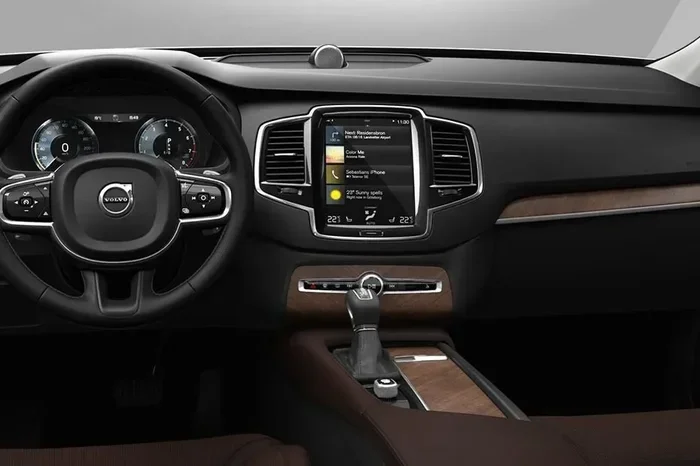
Starting around 2015, Volvo introduced a more digital approach to the XC90 dashboard system. The Sensus infotainment system gives you a menu-based way to handle maintenance reminders:
- Press the menu button on the steering wheel. Navigate to the “Settings” section on the central touchscreen.
- Scroll to “Service & Maintenance.” This option is usually found under the vehicle settings menu.
- Select “Reset Service Interval.” The system may ask you to confirm your choice.
- Confirm the reset. The maintenance light should turn off, and the service interval will restart from zero.
- Turn the vehicle off and back on. Verify that the light no longer appears on the XC90 instrument panel.
Some 2015–2018 models also allow you to use the steering wheel controls to scroll through the menu instead of touching the screen. Either method works — choose whichever feels more comfortable for you.
Method 3: Using an OBD-II Scanner (All Model Years)
If the manual methods don’t work or you want a more universal approach, an OBD-II scanner is your best friend. This little device plugs directly into your XC90’s diagnostic port and gives you full control over the maintenance light:
- Locate the OBD-II port. In the Volvo XC90, it’s typically found under the dashboard on the driver’s side, near the steering column.
- Plug in the scanner. Connect the device and wait for it to power up and communicate with the car’s computer.
- Navigate to the maintenance light option. Most scanners have a dedicated “Clear Service Light” or “Reset Maintenance Reminder” function.
- Select and execute the reset. The scanner will clear the code and turn off the light.
- Disconnect the scanner. Start the car and confirm the light is gone.
OBD-II scanners cost between $20 and $150 depending on the brand and features. They’re a great investment if you do your own DIY car maintenance or want to monitor your XC90’s health between service visits.
Common Mistakes When Resetting the Volvo XC90 Maintenance Light
Even simple tasks can go wrong if you’re not careful. Here are the most common mistakes people make when trying to reset their XC90 service light:
- Not holding the button long enough. This is the number one reason resets fail. Count slowly to ten and keep holding that button.
- Starting the engine during the process. You want the ignition “on” position, not a running engine. Starting the car resets the cycle and you’ll need to begin again.
- Confusing the trip meter button with other buttons. Make sure you’re pressing the correct reset button. Check your owner’s manual if you’re unsure.
- Resetting before completing the actual service. Don’t clear the light just to make it go away. Complete your oil change or scheduled maintenance first.
- Using the wrong method for your model year. A 2018 XC90 needs a different process than a 2008 XC90. Make sure you’re following the right method.
Tips to Keep Your Volvo XC90 Maintenance System Accurate
Resetting the light is just one part of the equation. Here are some practical tips to make sure your XC90 maintenance system stays accurate and reliable:
- Reset immediately after service. As soon as your oil change or maintenance task is complete, reset the light. Don’t let days go by.
- Keep a maintenance log. Write down every service date and mileage. This helps you track patterns and stay ahead of the next service interval.
- Check your owner’s manual. Your specific XC90 model year may have unique reset instructions or recommended service intervals. The manual is your best reference.
- Don’t ignore other dashboard warnings. The maintenance light is different from check-engine lights or oil pressure warnings. If those come on, address them immediately.
- Schedule regular service appointments. Even if the light isn’t on, follow Volvo’s recommended maintenance schedule to keep your XC90 running smoothly for years.
When Should You Visit a Volvo Service Center?
Most of the time, resetting the maintenance light is a DIY job. But there are situations where professional help makes sense:
- The light won’t turn off after multiple reset attempts. This could indicate a deeper electrical or diagnostic issue that needs professional attention.
- Multiple warning lights are active. If the maintenance light comes with other dashboard warnings, don’t try to troubleshoot alone. Visit a certified Volvo technician.
- You’ve done the service but can’t reset the light. Sometimes the system doesn’t recognize the service has been completed. A Volvo service center can force a reset with specialized tools.
- You’re uncomfortable doing it yourself. There’s absolutely no shame in asking a professional. A Volvo service center can handle the reset quickly and often at no extra charge.
Remember, the maintenance light is a helpful tool — not something to fear. Whether you reset it yourself or visit a service center, the goal is the same: keeping your Volvo XC90 in top shape and your service schedule on track.
Final Thoughts
Resetting the Volvo XC90 maintenance light is one of those small car care tasks that makes a big difference. It keeps your dashboard clean, your maintenance schedule accurate, and your mind at ease. Whether you drive an older model with a manual reset or a newer XC90 with a touchscreen menu, the process is straightforward and fast.
The key is knowing which method matches your XC90 model year and following the steps carefully. Don’t rush, don’t skip steps, and always make sure the actual service is done before you clear the light. With the steps in this guide, you should be able to handle the reset in just a few minutes — no mechanic required.
Take a moment after your next oil change or service to reset that light yourself. You’ll feel a real sense of accomplishment, and your XC90 will thank you with reliable performance mile after mile. Happy driving, and keep that maintenance schedule on track!
Frequently Asked Questions
Can I drive my Volvo XC90 with the maintenance light on?
Yes, you can safely drive your XC90 with the maintenance light on. The light is a reminder, not an emergency warning. However, it’s best to complete the recommended service as soon as possible to keep your vehicle running at its best.
How often does the Volvo XC90 maintenance light come on?
The maintenance light typically activates every 10,000 to 15,000 miles, depending on your driving conditions and the specific XC90 model year. Volvo’s recommended service interval may vary, so always check your owner’s manual for the exact schedule.
Will resetting the maintenance light void my Volvo warranty?
No, resetting the maintenance light does not void your warranty. The light is simply a reminder tool. However, it’s still important to follow Volvo’s recommended maintenance schedule and keep records of all service appointments.
What if the maintenance light comes back after I reset it?
If the light returns shortly after resetting, it likely means the service interval has been reached again or the system didn’t fully register the reset. Try repeating the reset process. If it persists, visit a Volvo service center for a diagnostic check.
Do I need any special tools to reset the Volvo XC90 maintenance light?
For most XC90 models, you don’t need any special tools. A simple manual reset using the instrument panel buttons works for older models. Newer models use the touchscreen menu system. An OBD-II scanner is optional but helpful for stubborn lights or diagnostic insights.
Is it safe to reset the maintenance light myself?
Absolutely. Resetting the maintenance light is a safe and simple process that any XC90 owner can do at home. Just make sure you follow the correct steps for your model year and complete the actual maintenance before clearing the light.
=== CONCLUSION ===
There you have it — a complete, easy-to-follow guide on how to reset the Volvo XC90 maintenance light step by step. From older models with manual buttons to the latest XC90s with touchscreen menus, you now have all the methods you need. The process is quick, free, and something you can handle right at home.
Remember to always complete your actual maintenance first, reset the light immediately after service, and keep your XC90 maintenance schedule up to date. Your Volvo will reward you with smooth performance and reliability for many miles to come. Don’t let that little orange light stress you out — you’ve got this.