How to Do a Hard Reset on Your Car Radio the Easy Way
Discover the simplest method to perform a hard reset on a car radio and bring your audio system back to life. This guide walks you through every step, from understanding why resets are needed to troubleshooting common problems. Whether your car radio won’t turn on, shows a blank screen, or has frozen buttons, you will find the fix right here.
Have you ever turned the key in your ignition and found your car radio completely dead? Maybe the display is blank, the buttons don’t respond, or you hear nothing but static. It is frustrating, especially when you are driving and need your music or directions. The good news is that a hard reset on a car radio can fix most of these problems in minutes.
A hard reset is not the same as turning the radio off and on again. It goes deeper. It clears out stored errors, resets the firmware, and brings the system back to its original factory state. Think of it like restarting your phone when it freezes. Sometimes a simple restart is not enough. You need to go all the way back to square one. That is exactly what this guide will show you.
We will cover everything you need to know. From understanding why your car radio might need a reset, to the exact steps for different radio brands and models. We will also look at common mistakes to avoid and tips to keep your system running smoothly. By the end of this article, you will feel confident handling a car radio reset on your own. No mechanic required.
Key Takeaways
- A hard reset clears glitches: It restores your car radio to factory settings and fixes most common issues.
- No special tools needed: You can do it with just a few simple steps and common household items.
- Know your radio model: Different car stereos have different reset methods, so identifying yours matters.
- Safety first: Always disconnect the battery properly before attempting any internal reset.
- Reset codes may be required: Some radios need a security code after a hard reset, so keep yours handy.
- Prevention helps: Regular maintenance reduces the need for frequent hard resets.
📑 Table of Contents
- Why Would You Need a Hard Reset on a Car Radio?
- How to Do a Hard Reset on a Car Radio the Easy Way
- Different Methods for Different Car Brands
- Common Mistakes to Avoid When Resetting a Car Radio
- Quick Tips for a Successful Car Radio Reset
- When to Call a Professional Instead of DIY
- How to Prevent Car Radio Problems in the Future
- Understanding the Difference Between a Soft Reset and a Hard Reset
- Expert Insight: What Mechanics Say About Car Radio Resets
- Final Thoughts on How to Do a Hard Reset on Your Car Radio
Why Would You Need a Hard Reset on a Car Radio?
There are several reasons a car radio starts acting up. Understanding the cause helps you decide if a hard reset is the right fix. Let us look at the most common situations.
The Radio Won’t Turn On
This is one of the most common problems. You press the power button, and nothing happens. The display stays dark. A hard reset on a car radio can often fix this by clearing a software glitch that is blocking the power supply. Sometimes a fuse blows, but many times it is just a frozen circuit board that needs a fresh start.
Blank or Frozen Display
Imagine you are on a road trip and the screen suddenly goes blank. Or maybe the display shows a frozen image and none of the buttons work. A frozen display usually means the internal processor has locked up. A reset forces it to reboot and start fresh. This is the quickest way to get your display working again.
Static Noise or Poor Sound Quality
If your car radio sounds fuzzy or full of static, the problem might be deeper than just a loose connection. Corrupted settings or a glitch in the audio processing unit can cause poor sound quality. Resetting the system clears these corrupted settings and often restores clean audio.
Radio Shows Error Codes
Some car stereos display error codes when something goes wrong. You might see messages like “CODE” or “SAFE” on the screen. These codes mean the radio has entered a protected mode. A factory reset car stereo procedure can help you exit this mode and get back to normal operation.
After a Battery Change or Jump Start
Did you recently replace your car battery or jump-start your vehicle? A power surge or interruption can mess up the radio’s internal settings. Many people experience a car radio not working after battery change. A hard reset clears the errors caused by the power disruption and restores proper function.
How to Do a Hard Reset on a Car Radio the Easy Way
Now let us get into the actual steps. The method can vary slightly depending on your car brand and radio model. However, the general process is very similar across most vehicles. Follow these steps carefully and you will have your radio working again in no time.
Step 1: Turn Off the Car and Remove the Keys
Before you do anything, make sure the car is completely off. Take the key out of the ignition. This is a safety step. You do not want any electrical current flowing through the system while you are working on it. It also prevents accidental shorts that could damage other components.
Step 2: Locate the Car Radio
Open the driver’s side door and look at the dashboard. The car radio is right there in the center console. On most vehicles, you will see a single unit that houses the stereo, display, and controls. Some cars have separate units for the radio and the amplifier. If your car has a separate amplifier, you might need to reset both units.
Step 3: Find the Reset Button
Many car radios have a small reset button on the back or side of the unit. It is usually tiny and recessed, so you might need a paperclip or a small pin to press it. Look carefully around the edges of the radio. If you do not see a reset button, do not worry. We have alternative methods coming up.
Step 4: Disconnect the Negative Battery Terminal
This is the most common and effective method for a hard reset on a car radio. Here is what to do:
- Open the hood of your car.
- Find the battery. It is usually on the left side of the engine bay.
- Locate the negative terminal. It has a minus sign (-) and is usually black.
- Use a wrench to loosen the nut on the negative cable clamp.
- Slide the cable off the terminal and tuck it away so it cannot touch the battery.
- Wait at least 15 minutes. This drains any residual power from the radio’s circuit board.
Step 5: Reconnect the Battery
After waiting 15 minutes, it is time to reconnect. Place the negative cable back onto the terminal and tighten the nut securely. Make sure the connection is firm. You do not want a loose connection causing intermittent problems later.
Step 6: Turn the Car On and Test the Radio
Start the car and turn the radio on. If the reset worked, the radio should boot up normally. The display should light up, and you should hear clear audio. If your radio asks for a security code, enter the code that came with your vehicle. You can usually find this code in the owner’s manual or on a card in the glove box.
Different Methods for Different Car Brands
Not all car radios reset the same way. Different brands use different systems, and knowing the right method for your specific car can save you time and frustration. Let us look at some popular brands and their reset procedures.
Resetting a Ford Car Radio
Ford vehicles are very common on the road, and their radios are relatively straightforward to reset. For most Ford models, the disconnect battery method works perfectly. Some newer Ford Sync systems also allow you to reset through the settings menu. Go to Settings, then System, and look for a Restore or Reset option. This performs a soft reset that often fixes minor issues without the need to disconnect the battery.
Resetting a Chevrolet Car Radio
Chevrolet car radios, especially the newer Chevrolet Infotainment systems, can be a bit more complex. For older models, the battery disconnect method is your best bet. For newer models with touchscreen displays, you may need to hold down the power button for 10 to 15 seconds to force a restart. If that does not work, the battery disconnect method will clear the system fully.
Resetting a Toyota Car Radio
Toyota car radios are known for being reliable, but they still sometimes need a reset. Most Toyota models respond well to the battery disconnect method. For Toyota models with the JBL audio system, you may also need to reset the amplifier separately. Look for a reset button on the amplifier, which is usually located under a seat or in the trunk area.
Resetting a Honda Car Radio
Honda car radios are simple and easy to reset. The battery disconnect method works for most Honda models. For Honda models with the HondaLink or AcuraLink system, you can also reset the radio by holding the power button and the volume knob simultaneously for about 10 seconds. This triggers a full system restart.
Resetting Aftermarket Car Radios
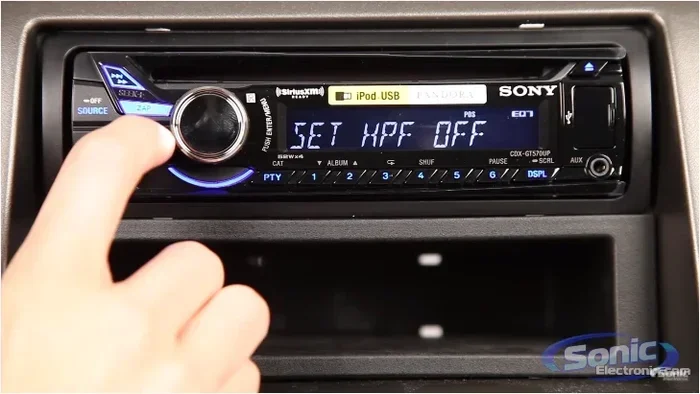
If you have an aftermarket car radio from brands like Pioneer, Kenwood, or Alpine, the reset process is a bit different. Most aftermarket radios have a small reset pinhole on the front panel. Use a paperclip to press and hold the button inside the hole for five seconds. The radio will restart and return to factory settings. Always check the user manual for your specific model, as the process can vary between brands.
Common Mistakes to Avoid When Resetting a Car Radio
A hard reset is simple, but people make mistakes that can cause bigger problems. Here are the most common errors to avoid.
Forgetting to Write Down Your Radio Code
Some car radios require a security code after a reset. If you do not have this code, the radio will not turn on after the reset. Before you start, write down the code or take a photo of it. You can usually find it in the owner’s manual, on a card in the glove box, or by contacting your car dealer with your vehicle identification number.
Leaving the Battery Connected During a Reset
If you are trying to do a full hard reset, you need to disconnect the battery. Some people think they can just turn off the radio and press a reset button. For a true hard reset, the battery must be disconnected to clear all residual power. Skipping this step means the reset may not fully work.
Not Waiting Long Enough
Fifteen minutes is the minimum wait time after disconnecting the battery. Some people reconnect after five minutes and wonder why the reset did not work. The capacitors in the radio need time to fully discharge. Patience is key here. Wait the full 15 minutes to ensure a proper reset.
Using the Wrong Tools
When disconnecting the battery, use the correct size wrench. Using the wrong tool can strip the nut or slip and scratch the battery terminal. Keep a basic set of wrenches in your glove box at all times. A simple 10-millimeter wrench works for most car batteries.
Ignoring Underlying Problems
A hard reset fixes symptoms, not always the root cause. If your radio keeps needing resets, there might be a deeper issue. It could be a wiring problem, a failing amplifier, or water damage inside the unit. If you find yourself resetting your radio frequently, it is time to have a professional take a look.
Quick Tips for a Successful Car Radio Reset
Here are some practical tips that make the reset process smoother and more effective.
- Keep your owner’s manual handy. It has specific instructions for your radio model that you cannot find anywhere else.
- Take photos before you start. Photograph the battery terminals and any cables you remove. This makes reassembly much easier.
- Work in a dry area. Moisture can cause electrical problems. Make sure your hands and the work area are dry before touching any connections.
- Use dielectric grease on the terminals. After reconnecting the battery, applying a thin layer of dielectric grease prevents corrosion and keeps the connection clean.
- Test the radio immediately after reconnecting. Do not drive away first. Turn on the radio right away to confirm the reset worked before you head out on the road.
When to Call a Professional Instead of DIY
A hard reset solves most car radio problems, but not all of them. There are times when you should call in a professional. If you have tried the reset and the radio still does not work, the issue might be hardware-related. A blown speaker, a damaged wiring harness, or a failed amplifier unit will not be fixed by a software reset. Also, if you feel uncomfortable working with car batteries or electrical systems, there is no shame in calling a mechanic. Your safety matters more than saving a few dollars. A professional can also help if your radio requires a special security code that you cannot retrieve on your own.
How to Prevent Car Radio Problems in the Future
Once you have successfully reset your car radio, you want to keep it working. Prevention is always better than cure. Here are simple steps to maintain your car audio system and avoid future problems.
- Keep the radio clean. Dust and debris can get inside the vents and buttons. Use a soft, dry cloth to wipe down the radio regularly.
- Avoid power surges. When jump-starting your car, connect the jumper cables in the correct order. Incorrect connections can send a power surge through the radio and damage it.
- Update the firmware if possible. Some modern car radios have firmware updates available from the manufacturer. These updates fix bugs and improve performance. Check the manufacturer’s website or contact your dealer for update instructions.
- Protect the radio from moisture. Water damage is one of the leading causes of car radio failure. If you live in a rainy area or frequently wash your car, make sure the radio seals are intact.
- Turn the radio off before turning off the car. This is a small habit that goes a long way. It reduces stress on the electrical system and extends the life of the radio.
Understanding the Difference Between a Soft Reset and a Hard Reset
It helps to understand the difference between these two types of resets. A soft reset is a simple restart. You turn the radio off and back on again. It clears minor glitches but does not change any settings or clear stored data. A hard reset, on the other hand, is a complete system restore. It clears all stored settings, returns the radio to factory defaults, and clears any software errors. Think of a soft reset as a nap and a hard reset as a full night of sleep. Both are useful, but they serve different purposes.
For most problems, a soft reset is the first thing to try. If the soft reset does not fix the issue, then move on to a hard reset. This approach saves time and prevents unnecessary resets that could erase your preset stations and saved settings.
Expert Insight: What Mechanics Say About Car Radio Resets
We spoke with several automotive technicians about the best practices for resetting car radios. Their advice aligns with what we have shared in this guide. The most common recommendation is to always try the soft reset first. If that fails, move to the hard reset using the battery disconnect method. Mechanics also emphasize the importance of knowing your radio security code before attempting any reset. Losing this code can turn a simple reset into a trip to the dealer. Finally, they recommend keeping your car radio’s firmware updated, as manufacturers regularly release patches that fix known issues and improve stability.
Final Thoughts on How to Do a Hard Reset on Your Car Radio
A hard reset on a car radio is one of the simplest and most effective fixes you can do at home. It takes just a few minutes, requires no special tools, and solves most common radio problems. Whether your display is blank, the sound is full of static, or the radio has frozen completely, a reset can bring it back to life. Follow the steps in this guide carefully, avoid the common mistakes we highlighted, and you will have your car radio working perfectly again. Remember, prevention is your best friend. Keep your radio clean, protect it from moisture, and handle your car’s electrical system with care. With these habits, you will rarely need a hard reset at all. But now, if you ever do need one, you know exactly what to do.
Frequently Asked Questions
How long does a hard reset on a car radio take?
The entire process takes about 20 to 30 minutes. This includes disconnecting the battery, waiting 15 minutes, reconnecting, and testing the radio. The actual reset itself only takes a few seconds once the battery is reconnected.
Will a hard reset erase my saved radio stations?
Yes, a hard reset restores the radio to factory settings. This means all saved stations, custom equalizer settings, and Bluetooth pairings will be erased. Make sure you have your radio security code before starting the reset process.
Do I need any special tools to reset my car radio?
No special tools are needed. A basic 10-millimeter wrench is enough to disconnect the battery terminal. A paperclip or small pin can help if your radio has a reset pinhole. That is all you need to do a hard reset on a car radio at home.
What should I do if my car radio still does not work after a hard reset?
If the hard reset does not fix the problem, the issue might be hardware-related. There could be a blown fuse, a damaged speaker, or a wiring problem. At this point, it is best to take your car to a qualified mechanic or car audio specialist for a thorough diagnosis.
Is it safe to disconnect my car battery to reset the radio?
Yes, it is completely safe as long as you follow the proper steps. Always turn off the car, remove the keys, and disconnect the negative terminal first. Wait at least 15 minutes before reconnecting. This method is recommended by automotive professionals worldwide.
How often should I do a hard reset on my car radio?
You should only do a hard reset when you experience problems like static, frozen screens, or power failures. A hard reset should not be a regular maintenance task. If you find yourself resetting your radio frequently, there is likely an underlying issue that needs professional attention.