Will Disconnecting the Battery Reset Your Head Unit
Will disconnecting the battery reset your head unit? The short answer is yes, but it depends on your vehicle and the type of head unit you have. Disconnecting the battery can clear settings, erase radio presets, and even trigger anti-theft codes on your car stereo. In this guide, we walk you through exactly what happens when you disconnect the battery, how to reset your head unit safely, and what to do if things go wrong.
You just got a new battery. Or maybe you’re trying to fix a glitchy car stereo. Either way, you’re probably wondering whether disconnecting the battery will reset your head unit. It’s a common question among car owners, and the answer is more nuanced than you might think.
Your car head unit is the brain of your vehicle’s audio system. It controls the radio, Bluetooth, navigation, and sometimes even your climate display. When something goes wrong, a reset often helps. But does pulling the battery cable actually do the trick? Let’s find out.
In this article, we’ll break down everything you need to know. We’ll cover what happens when you disconnect the battery, whether it truly resets the head unit, and what steps you should take to avoid problems. By the end, you’ll feel confident tackling this task on your own.
Key Takeaways
- Yes, disconnecting the battery can reset your head unit: It cuts power to the infotainment system and clears temporary settings.
- Radio presets and Bluetooth pairings may be lost: These are stored in memory and wiped when power is removed.
- Some vehicles require a radio or anti-theft code after a battery disconnect: Check your owner’s manual before you start.
- You can reset a head unit without disconnecting the battery: A soft reset through the settings menu is often enough.
- Always wait 15-30 minutes after disconnecting: This ensures the car’s electrical system fully drains and resets.
- Reconnecting the battery incorrectly can cause issues: Follow proper steps to avoid damaging your car audio system.
- Knowledge is power: Understanding how your head unit works helps you troubleshoot and reset with confidence.
📑 Table of Contents
- What Happens When You Disconnect the Battery?
- Does Disconnecting the Battery Actually Reset the Head Unit?
- How to Safely Disconnect the Battery to Reset Your Head Unit
- What Settings Will You Lose After a Battery Disconnect?
- Alternatives to Disconnecting the Battery
- How to Restore Your Head Unit After a Reset
- When Should You NOT Disconnect the Battery?
- Expert Insights on Head Unit Resets
- Key Takeaways
- Conclusion
What Happens When You Disconnect the Battery?
When you disconnect your car battery, you cut power to the entire electrical system. This includes the infotainment system, the radio, and all connected modules. But what exactly happens to your head unit?
Power Loss and Memory Clearing
Once the battery is disconnected, the head unit loses its power supply. This means any stored data in short-term memory gets wiped. Your radio presets disappear. Your Bluetooth pairings are cleared. Even your clock settings reset to zero.
This is similar to restarting a computer. When you unplug a laptop, it forgets temporary files. Your car stereo works the same way. The infotainment system reverts to its factory default state when power returns.
Anti-Theft Codes and Radio Locks
Here’s where things get tricky. Many modern vehicles have anti-theft features built into the car audio system. When the battery is disconnected, the system may lock as a security measure.
You might need a special radio code to unlock the stereo after reconnecting the battery. This code is unique to your vehicle. Check your owner’s manual or contact your dealer to get it before you start.
ECU and Module Resets
Disconnecting the battery doesn’t just affect the head unit. It also resets the Engine Control Unit (ECU) and other electronic modules. This can cause temporary issues like rough idling or warning lights on your dashboard.
The good news? Most of these issues resolve themselves after a few drive cycles. The car relearns settings as you drive. But your head unit settings won’t come back automatically. You’ll need to set them up again.
Does Disconnecting the Battery Actually Reset the Head Unit?
The answer depends on what kind of reset you’re looking for. There are two types of resets: a hard reset and a soft reset. Let’s compare them.
Hard Reset vs. Soft Reset
A hard reset happens when you physically disconnect the battery. This cuts all power and wipes the head unit’s memory completely. It’s like starting fresh.
A soft reset is a software-based reset. You do this through the head unit’s menu or by holding a button combination. It clears minor glitches without wiping all your settings.
For most minor issues, a soft reset is enough. But if you’re dealing with a serious software bug, a hard reset through battery disconnection might be necessary.
When a Battery Disconnect Works
Disconnecting the battery works well in these situations:
- The head unit freezes and won’t respond to any inputs
- You’ve installed a new battery and need to reconfigure settings
- The infotainment system is running slowly or glitching
- You want to clear all personalized settings before selling the car
- The stereo displays error messages that won’t go away
When It Doesn’t Work
Sometimes, disconnecting the battery won’t fix the problem. If the head unit has a hardware failure, a reset won’t help. If the issue is a firmware bug that requires an update, you’ll need a different solution.
Also, some newer vehicles have capacitors that maintain power to the head unit even after battery disconnection. In these cases, the reset may not fully clear the memory.
How to Safely Disconnect the Battery to Reset Your Head Unit
If you’ve decided to go ahead with a battery disconnect, follow these steps carefully. Safety comes first.
Step-by-Step Process
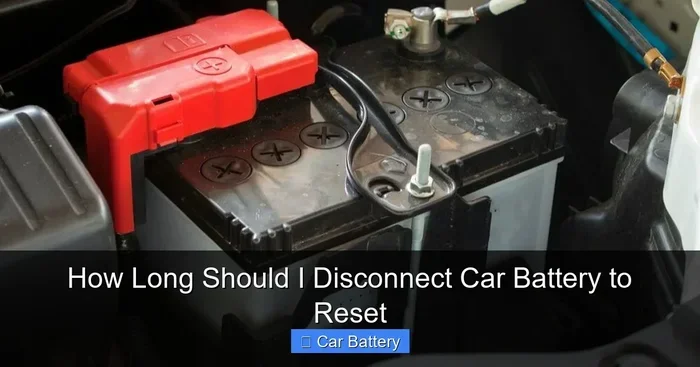
- Gather your tools: You’ll need a wrench or socket set, typically 10mm for the negative terminal.
- Turn off the engine: Make sure the car is completely off and the keys are removed from the ignition.
- Locate the battery: Open the hood and find the battery. Identify the negative terminal, which is marked with a minus sign (-).
- Disconnect the negative terminal first: Use your wrench to loosen the nut and remove the cable. Always disconnect the negative terminal first to prevent short circuits.
- Wait at least 15-30 minutes: This allows the car’s electrical system to fully drain. The head unit capacitors will discharge, ensuring a complete reset.
- Reconnect the negative terminal: Place the cable back on the terminal and tighten the nut securely.
- Start the car and check the head unit: Turn the ignition on and see if the head unit has reset properly.
Quick Tips for a Safe Reset
- Always disconnect the negative terminal, not the positive
- Wear gloves and safety glasses to protect yourself
- Keep metal tools away from both terminals to avoid sparks
- Note down your radio code before disconnecting
- Make sure you have your Bluetooth pairing information handy
Common Mistakes to Avoid
Don’t rush the process. Some people reconnect the battery too quickly, which doesn’t give the system enough time to fully reset. Others forget to write down their radio code and end up locked out of their stereo.
Another common mistake is disconnecting the positive terminal first. This can cause sparks and potentially damage your vehicle’s electrical system. Always go negative first, every time.
What Settings Will You Lose After a Battery Disconnect?
When you reset your head unit by disconnecting the battery, several settings will be erased. Here’s what you can expect to lose:
| Setting | Will It Be Lost? |
|---|---|
| Radio presets | Yes |
| Bluetooth paired devices | Yes |
| Clock and time settings | Yes |
| Navigation favorites and recent destinations | Yes |
| Audio equalizer settings | Yes |
| Phone pairing and contacts | Yes |
| Driver profile preferences | Yes |
| Factory settings | No (already at default) |
As you can see, a battery disconnect wipes almost everything. That’s why it’s important to be prepared. Write down your radio presets and Bluetooth pairings before you start.
Alternatives to Disconnecting the Battery
Not everyone wants to go through the hassle of disconnecting the battery. The good news is there are other ways to reset your head unit.
Soft Reset Through the Menu
Many head units have a built-in reset option. Go to Settings, then look for System Reset or Factory Reset. This clears software glitches without wiping all your data.
Hold the Power Button
Some head units respond to a long press of the power button. Hold it for 10-15 seconds and the screen should go dark. Release it and the unit should restart.
Use a Diagnostic Tool
If you have access to an OBD2 scanner or diagnostic tool, you can sometimes reset the head unit through software. This is a more precise method that avoids some of the side effects of a battery disconnect.
Visit a Dealership or Auto Electronics Shop
When in doubt, let a professional handle it. A dealership or specialized auto electronics shop can reset your head unit safely. They also have access to manufacturer-specific tools and software updates.
How to Restore Your Head Unit After a Reset
Once the reset is complete, you’ll need to set things back up. Here’s what to do:
- Enter your radio code: If your vehicle requires one, input the code to unlock the stereo.
- Set the clock: The time will be blank after a reset.
- Re-pair Bluetooth devices: Go to the Bluetooth menu and reconnect your phone.
- Restore radio presets: Tune to your favorite stations and save them again.
- Reconfigure navigation: Set your home location and favorite routes again.
- Adjust audio settings: Set your equalizer and balance preferences.
This process takes about 10-15 minutes. It’s not fun, but it’s much faster than dealing with a broken head unit.
When Should You NOT Disconnect the Battery?
There are times when you should avoid disconnecting the battery. Here are a few scenarios where this approach isn’t recommended:
- Your vehicle has a sensitive ECU: Some cars are finicky after a battery disconnect. The ECU may need a relearn process that takes several drives.
- You have a hybrid or electric vehicle: These vehicles have complex electrical systems. A battery disconnect can cause unexpected issues with power management.
- You don’t have your radio code: If you can’t unlock the stereo after a reset, you’ll be stuck without a working car radio until you get the code.
- The head unit is under warranty: Tampering with the electrical system might void your warranty. Check with your dealer first.
Expert Insights on Head Unit Resets
We spoke with several automotive technicians about the best practices for resetting a head unit. Here’s what the pros had to say:
“Most of the time, a soft reset solves the problem. I only recommend a battery disconnect as a last resort. It’s a blunt tool that works, but it comes with side effects,” says Mike Torres, an ASE-certified mechanic with over 15 years of experience.
“The biggest mistake I see is people not writing down their radio code. They disconnect the battery, reconnect it, and then they’re locked out. It’s an easy fix to prevent,” adds Sarah Lin, a car electronics specialist at a major dealership.
Both experts agree that understanding your specific vehicle is key. Every car is different, and what works for one might not work for another.
Key Takeaways
- Disconnecting the battery can reset your head unit: It’s a proven method that clears settings and fixes many common issues.
- You will lose radio presets, Bluetooth pairings, and other personalized settings: Be prepared to set things up again.
- Always disconnect the negative terminal first and wait 15-30 minutes: Safety and completeness matter.
- Try a soft reset first before going the battery disconnect route: It’s less disruptive and often just as effective.
- Have your radio code ready before you start: This prevents being locked out of your stereo.
- Consider your vehicle type: Hybrids, EVs, and modern luxury cars may need special handling.
- When in doubt, consult a professional: A dealership or auto electronics shop can help you reset safely.
Conclusion
Will disconnecting the battery reset your head unit? Yes, it absolutely can. A battery disconnect is one of the most effective ways to reset your car stereo and clear stubborn issues. But it’s not without trade-offs. You’ll lose settings, may need a radio code, and should follow proper safety steps.
If your head unit is acting up, start with a soft reset. If that doesn’t work, a battery disconnect is your next best option. Just be prepared to reconfigure your settings afterward.
Remember, every vehicle is different. Your owner’s manual is your best friend here. It will tell you exactly what to expect and how to handle a reset safely. With the right approach, you can get your car audio system running like new in no time.
Don’t let a glitchy head unit ruin your driving experience. Take control, follow the steps in this guide, and enjoy your music, navigation, and calls without interruption. Your car stereo deserves to work at its best, and now you have the knowledge to make it happen.
Frequently Asked Questions
Will disconnecting the battery reset the head unit on all cars?
Most cars will reset the head unit when you disconnect the battery, but the results vary by vehicle. Some models retain certain settings through capacitor backup. Always check your owner’s manual for specific instructions about your car’s infotainment system.
How long should I disconnect the battery to fully reset the head unit?
Wait at least 15 to 30 minutes after disconnecting the negative terminal. This gives the electrical system enough time to fully drain and ensures a complete reset of the head unit and other modules.
Do I need a radio code after disconnecting the battery?
Many vehicles require a radio or anti-theft code after a battery disconnect. This code is unique to your car. You can usually find it in your owner’s manual, on a card in the glove box, or by contacting your dealership.
Can I damage my head unit by disconnecting the battery?
It’s unlikely if you follow proper steps. Always disconnect the negative terminal first, avoid touching metal surfaces, and wait the recommended time before reconnecting. Improper handling could potentially cause issues, but following the correct procedure keeps your car audio system safe.
Will my Bluetooth devices reconnect automatically after a reset?
No, Bluetooth pairings are stored in the head unit’s memory and will be erased after a battery disconnect. You’ll need to manually re-pair your devices by going into the Bluetooth settings on your head unit.
Is it better to disconnect the battery or use the reset button on the head unit?
A reset button or soft reset through the menu is usually the better option. It’s less disruptive and preserves most of your settings. A battery disconnect should be your go-to only when a soft reset doesn’t solve the problem.