USB Bluetooth Device for Car Music System That Works
A USB Bluetooth device for car music system transforms your old car stereo into a wireless powerhouse. You get hands-free calling, wireless music streaming, and Bluetooth connectivity without expensive upgrades. This guide covers everything you need to pick, set up, and enjoy the best car Bluetooth adapter for your ride.
Have you ever sat in your car and wished you could stream music wirelessly? Maybe your car stereo is older, and it only plays CDs or radio. Or perhaps the AUX cable keeps falling out and driving you crazy. Whatever the reason, a USB Bluetooth device for car music system solves the problem fast.
This little gadget plugs right into your car’s USB port. It connects to your phone through Bluetooth connectivity. Then you can play any song, podcast, or audiobook through your car speakers. No wires. No fuss. Just great sound.
In this guide, we walk you through everything. You will learn what these devices do, how to pick the right one, and how to set it up in minutes. We also share tips to avoid common mistakes. By the end, you will know exactly which wireless car kit works best for you.
Key Takeaways
- Easy Upgrade: A USB Bluetooth device for car music system gives your old stereo wireless capabilities without replacing the whole unit.
- Hands-Free Safety: You can make and receive calls while driving, keeping your hands on the wheel and eyes on the road.
- Wide Compatibility: Most car Bluetooth adapters work with any car that has a USB port or AUX input.
- Simple Setup: Plug and play in minutes. No tools, no wiring, no mechanic needed.
- Key Features Matter: Look for multipoint pairing, long battery life, and noise cancellation for the best experience.
- Common Mistakes Are Avoidable: Skipping firmware updates or ignoring compatibility checks are the top reasons people have problems.
📑 Table of Contents
- What Is a USB Bluetooth Device for Car Music System?
- Benefits of Using a USB Bluetooth Device in Your Car
- How to Choose the Right USB Bluetooth Device
- Top Features to Look For in a USB Bluetooth Device
- How to Set Up Your USB Bluetooth Device
- Common Mistakes to Avoid
- Expert Tips for Best Performance
- Conclusion
What Is a USB Bluetooth Device for Car Music System?
A USB Bluetooth device for car music system is a small adapter. It bridges the gap between your phone and your car stereo. Most car stereos from before 2015 do not have Bluetooth functionality built in. This device fixes that.
You plug the adapter into a USB port in your car. Some models also use the car’s power outlet, called a cigarette lighter. Once it powers on, it sends out a Bluetooth signal. Your phone detects it. You pair the two. Done.
How It Works
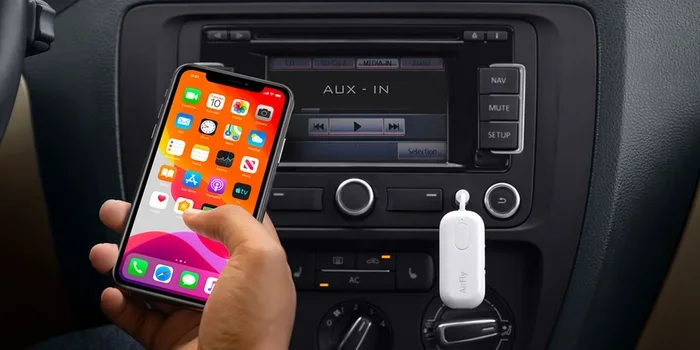
The device acts like a Bluetooth receiver for car. It receives audio from your phone over wireless Bluetooth and sends it to the stereo. Your car speakers then play the music. It is like having a wireless car speaker built into your dashboard.
Some models also handle calls. When someone calls you, the audio routes through the car speakers. You can answer with a button on the device or on the steering wheel. Hands-free calling keeps you safe and legal while driving.
Why You Need One
Here is why a car audio upgrade with a Bluetooth adapter makes sense:
- Cost savings: Replacing a car stereo costs $100 to $300. A Bluetooth car adapter costs $15 to $50.
- No drilling: You do not need to touch your dashboard.
- Reversible: Unplug it anytime. Your car stays stock.
- Instant wireless: Stream music from Spotify, Apple Music, or any app.
- Works everywhere: Take it out of one car and plug it into another.
Benefits of Using a USB Bluetooth Device in Your Car
Switching to a wireless car music system brings real, everyday benefits. Let us look at the big ones.
Hands-Free Calling Made Easy
Safety comes first. A car hands-free Bluetooth device lets you talk on the phone without holding it. The audio goes through your car speakers. Your voice goes through the device’s microphone.
This is huge for driving safety. Studies show that handheld phone use while driving causes accidents. A Bluetooth car kit keeps you focused on the road. Many devices also let you use voice commands. Just say “Call Mom” and the device dials for you.
Wireless Music Streaming
Imagine this. You are driving. Your favorite playlist starts. The music fills the car through the speakers you already have. No AUX cable to manage. No phone resting on the dash, wobbling over bumps.
A USB Bluetooth music adapter makes this happen. You control everything from your phone. Skip tracks. Adjust volume. Pause. All without touching the car stereo. It feels like a car music player upgrade even though nothing changed under the hood.
Better Sound Quality
Modern Bluetooth audio transmitters support advanced codecs. These include aptX and AAC. They deliver clearer, richer sound than older Bluetooth versions. Your car sound system sounds better with a good adapter.
You will notice the difference especially with vocals and bass. Songs sound fuller. Podcasts sound crisper. It is a small device that makes a big change.
How to Choose the Right USB Bluetooth Device
Not all Bluetooth adapters for car are the same. Some are cheap and skip. Others deliver great sound and last for hours. Here is how to pick the right one.
Compatibility Matters
Before buying, check your car. Does it have a USB port? Most cars made after 2010 do. If not, look for a model that plugs into the 12V power outlet instead.
Also check your stereo. Some car stereo Bluetooth adapters work best with certain systems. Read the product description carefully. Look for words like “universal fit” or “works with all cars.”
Here is a quick comparison to help:
- USB Port Models: Plug into the dash USB slot. Clean look. No extra cables.
- 12V Outlet Models: Fit into the cigarette lighter. More placement options.
- AUX Input Models: Use the 3.5mm jack if your car has one. Very flexible.
Key Features to Look For
When shopping for a USB Bluetooth device for car music system, watch for these features:
- Multipoint pairing: Connect two phones at once. Great for families sharing one car.
- Long battery life: Look for 10 hours or more. Some last up to 20 hours.
- Noise cancellation: Reduces wind and road noise during calls.
- Fast charging: Some models charge your phone while playing music.
- Voice assistant support: Works with Siri, Google Assistant, and Alexa.
- Quick pairing: One-touch connection saves time every time you get in the car.
Price Range and Value
You can find basic car Bluetooth adapters for under $20. Mid-range models with better sound and longer battery run $30 to $50. Premium options with noise cancellation and multipoint pairing go up to $80.
For most drivers, the $25 to $40 range hits the sweet spot. You get reliable Bluetooth connectivity and solid sound without overpaying.
Top Features to Look For in a USB Bluetooth Device
A good wireless car kit should have more than just Bluetooth. Here are the features that make a real difference.
Bluetooth Version
Look for Bluetooth 5.0 or newer. These versions offer stronger signals and less audio dropouts. Bluetooth 4.2 still works, but 5.0 is the current sweet spot for car audio Bluetooth devices.
Range and Stability
Most Bluetooth receivers for car devices claim a 30-foot range. In real life, 20 to 25 feet is more realistic. The signal stays strong as long as your phone stays inside the car. If you leave your phone on the porch, expect dropouts.
Build Quality
Cars get hot. Vibrations happen. Buy a device with a solid build. Metal housings last longer than plastic. Look for models that handle heat well, especially if you park outside in summer.
LED Indicators
A good car USB Bluetooth adapter has clear LED lights. They show power status, pairing mode, and connection state. This makes troubleshooting easy. If the light blinks red, you know something needs attention.
How to Set Up Your USB Bluetooth Device
Setting up a USB Bluetooth device for car music system is simple. Most people finish in under five minutes. Here is the step-by-step process.
Step-by-Step Setup Guide
- Plug the device in: Insert it into the USB port or 12V outlet. The LED light should turn on.
- Turn on Bluetooth on your phone: Go to settings and enable Bluetooth connectivity.
- Put the device in pairing mode: Most models have a button for this. Hold it for three seconds. The light will flash.
- Find the device on your phone: Look for its name in the Bluetooth list. Tap to connect.
- Play music: Open your music app. The audio should flow through your car speakers.
- Adjust volume: Use the car stereo controls or your phone. Both work.
That is it. No apps to download. No cables to manage. Your wireless car music setup is ready.
Quick Tips for First-Time Users
- Restart both devices if pairing fails the first time.
- Keep your phone charged. Some adapters draw power from the phone.
- Forget old pairings if the device connects to the wrong phone.
- Update firmware if your model supports it. This fixes bugs and improves performance.
- Place the device near the stereo for the strongest signal.
Common Mistakes to Avoid
Even with a simple device, people make avoidable mistakes. Here is what to watch out for.
Ignoring Compatibility
Not every car Bluetooth adapter works with every car. Some older stereos do not recognize USB audio devices. Before buying, search online for your car model and the device name. This saves returns and frustration.
Skipping Firmware Updates
Manufacturers release updates that fix Bluetooth pairing issues and improve sound quality. If your device has an app, check for updates regularly. A simple update can solve problems you did not even know you had.
Placing the Device Poorly
Where you put the adapter matters. Do not hide it under a seat. Keep it near the stereo or in the cup holder. The closer it is to the car’s audio system, the stronger the signal and the better the sound.
Using Low-Quality Files
A USB Bluetooth device for car music system can only deliver what you give it. If your music files are low quality, the sound will be low quality. Use high-quality MP3s, FLAC files, or streaming services like Spotify or Tidal for the best results.
Expert Tips for Best Performance
Get the most out of your car audio Bluetooth setup with these pro tips.
Keep the Device Clean
Dust and lint build up in USB ports. Use a soft brush or compressed air to keep the adapter clean. A dirty connection causes dropouts and static.
Pair Only Essential Devices
Too many paired devices slow things down. Keep only the phones you actually use connected. This ensures fast Bluetooth pairing every time you get in the car.
Use the Right Audio App Settings
Some music apps have a “Bluetooth output” setting. Make sure it is set to “Auto” or “Hands-Free.” This prevents audio from playing through the phone speaker instead of the car speakers.
Drive Safely
Adjust settings before you start driving. Set your playlist. Adjust volume. Pair your device. Once the car is moving, keep your eyes on the road. Hands-free calling and voice commands help here.
Conclusion
A USB Bluetooth device for car music system is one of the best small upgrades you can make. It brings wireless music streaming, hands-free calling, and modern Bluetooth connectivity to any car. No expensive stereo replacement needed. No tools. No hassle.
Whether your car is old or new, this little adapter changes everything. You get better sound, safer driving, and more convenience. The setup takes minutes. The benefits last for years.
Pick a model that fits your car and your budget. Follow the setup steps. Avoid the common mistakes. And enjoy every drive with your favorite music flowing wirelessly through your speakers. Your car music system deserves better. And now it can have it.
Frequently Asked Questions
Can I use a USB Bluetooth device for car music system in any car?
Yes, most models work with any car that has a USB port or 12V outlet. If your car has an AUX input, some adapters include a 3.5mm cable for that too. Check the product specs before buying to make sure it fits your car.
Do I need to install any app for the Bluetooth device to work?
Most car Bluetooth adapters work without any app. They use standard Bluetooth pairing built into your phone. Some premium models offer an app for firmware updates and equalizer settings, but it is not required for basic use.
Will a Bluetooth device affect my car battery?
No. These devices use very little power. They draw about the same amount as a USB phone charger. If you are worried, unplug the device when the car is off. Most models also auto-shut off when the car turns off.
Can I charge my phone while using the Bluetooth device?
Many models include a USB passthrough port. This lets you plug in your phone and charge it at the same time. Check the product description to confirm this feature before buying.
How far can my phone be from the Bluetooth device?
Most Bluetooth receivers for car devices work within 20 to 30 feet. As long as your phone stays inside the car, the connection stays strong. If you leave your phone outside the car, expect the signal to weaken or drop.
Is the sound quality as good as a built-in Bluetooth stereo?
Yes, with modern devices. Bluetooth 5.0 adapters support aptX and AAC codecs. These deliver near-lossless audio quality. You will not notice a big difference between a wireless car kit and a factory-installed Bluetooth car audio system.