Can You Replace a Key Fob Battery Yourself at Home
Yes, you can absolutely replace a key fob battery yourself at home — it is one of the simplest maintenance tasks you can do. Most key fobs use a common CR2032 coin battery that costs just a few dollars and takes only minutes to swap. This guide walks you through everything from identifying the right battery to reassembling your fob with confidence. You will learn the tools you need, common mistakes to avoid, and how to extend your new battery’s life. No special skills or expensive trips to the dealer required.
This is a comprehensive guide about Can You Replace a Key Fob Battery Yourself.
Key Takeaways
- DIY replacement is easy: Most people can swap a key fob battery in under five minutes with basic tools.
- CR2032 is the most common battery: Check your owner’s manual or the old battery to confirm the right type.
- You save money: Replacing the battery yourself costs a fraction of what a dealer or locksmith charges.
- Avoid common mistakes: Using the wrong battery, damaging the clip, or getting moisture inside are the top errors to watch for.
- Know when to call a pro: If your fob still does not work after a battery swap, there may be a deeper issue that needs professional attention.
- Extend battery life: Simple habits like keeping your fob away from other electronics can help your battery last longer.
[FEATURED_IMAGE_PLACEHOLDER]
Can You Replace a Key Fob Battery Yourself at Home?
Have you ever stood by your car, pressing the remote button over and over, watching the lock lights blink weakly? That is the telltale sign of a dying key fob battery. It is frustrating, especially when you are in a hurry. But here is the good news — you do not need to rush to a dealership or pay a locksmith. Replacing a key fob battery yourself at home is simple, fast, and costs next to nothing.
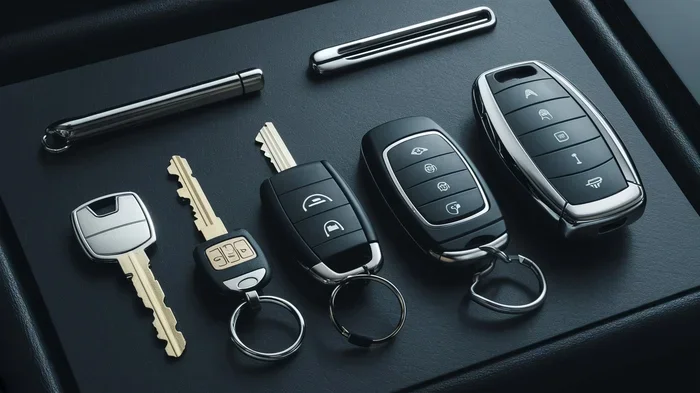
Most car owners do not realize that a key fob battery replacement is one of the easiest maintenance tasks they will ever do. You do not need technical skills, special training, or expensive equipment. A small screwdriver, a replacement battery, and about three minutes of your time is all it takes. Whether you drive a Toyota, Honda, Ford, Chevrolet, BMW, or just about any other brand, the process is remarkably similar across most models.
In this guide, we will walk you through every single step. You will learn how to identify the correct battery type, open your specific fob model, swap the old battery for a new one, and troubleshoot if things do not work right away. We will also cover common mistakes people make, how to make your new battery last longer, and when it is smart to call a professional instead. By the end, you will feel completely confident handling this job on your own.
The idea of opening up your remote key fob might feel intimidating at first. But trust us — once you see how straightforward it is, you will wonder why you ever paid someone else to do it. Let us get into it.
Why Does Your Key Fob Battery Die?
Understanding why your key fob battery dies helps you prepare for the next replacement and even delay it. Most key fob batteries are designed to last between two and four years. However, several factors can shorten that lifespan significantly.
Common Reasons Key Fob Batteries Drain Fast
- Frequent use: If you press the lock or unlock button dozens of times a day, the battery wears out faster.
- Proximity to other electronics: Keeping your fob next to your phone, tablet, or laptop can cause slow battery drain through signal interference.
- Moisture or humidity: Water damage can corrode the battery contacts and shorten the life of the entire fob.
- Cold weather: Extreme cold temperatures reduce battery performance and can make a dying fob seem even worse in winter months.
- Low-quality batteries: Cheap or expired batteries may not last as long as trusted brands.
- Aging fob circuitry: Older key fobs naturally draw more power as internal components wear down over time.
Knowing these causes helps you take preventive steps. For example, storing your keyless entry fob in a drawer away from other devices when you are at home can make a real difference. And always grab batteries from reputable brands like Energizer or Duracell for the best results.
Tools and Batteries You Will Need
Before you start, gather everything you need. The good news is that the supply list is very short. You probably already have most of these items sitting in a drawer somewhere in your home.
Essential Tools for Key Fob Battery Replacement
- Small flathead screwdriver: This is your main tool for prying open most key fob casings. A thin, sturdy screwdriver works best.
- Coin (like a dime or quarter): Some fobs have a small slot where you can insert a coin to twist open the back cover.
- Tweezers: Helpful for carefully removing the old battery without touching the internal circuitry.
- Soft cloth or towel: Place this under your work area to catch any small parts that might fall.
- Replacement battery: Most fobs use a CR2032 coin battery, but always double-check your owner’s manual or the label on the old battery.
Which Battery Type Does Your Fob Use?
The CR2032 battery is the undisputed king of key fob batteries. It is a 3-volt lithium coin cell that fits in the vast majority of car remotes. However, some models use different sizes. Here is a quick reference:
- CR2032: Most common. Used by Toyota, Honda, Ford, Chevrolet, Nissan, and many others.
- CR2025: Slightly thinner than the CR2032. Found in some BMW and Mercedes models.
- CR1632: Less common. Used in certain older fob models.
- CR2016: Even thinner. Occasionally found in compact fobs.
Pro tip: Always check the markings on the old battery before buying a replacement. The numbers printed on the battery tell you the exact model. Using the wrong size can damage your fob or cause it to malfunction.
Step-by-Step Guide to Replacing Your Key Fob Battery
Now for the part you have been waiting for — the actual replacement process. Follow these steps carefully, and you will have a working fob in no time.
Step 1: Identify Your Fob Type
Not all key fobs are built the same way. Some have a removable mechanical key hidden inside, while others are a solid, sealed unit. Before you do anything, figure out what type of fob you have. Look for a small button or slider on the side that releases the metal key blade. If your fob has no removable key, it likely opens by splitting along a seam in the middle.
Step 2: Open the Fob Casing
Place your fob face-down on the soft cloth. If your fob has a seam running along the middle, gently insert the flathead screwdriver or your coin into the gap. Twist slowly and carefully. Do not force it. The casing should pop apart with light pressure.
For fobs with a removable key, look for a small release button near the key slot. Press it, slide the key out, and then use the key to pry open the back cover. It is usually a very satisfying click when the two halves separate.
Step 3: Remove the Old Battery
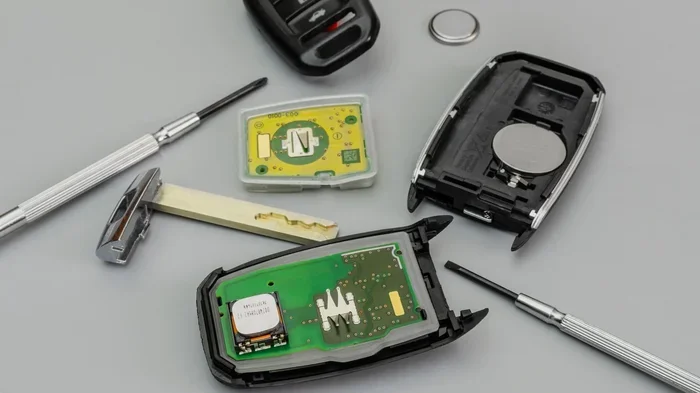
Once the fob is open, you will see the battery sitting in a small compartment. It is usually held in place by a tiny metal clip or spring. Use your tweezers or the tip of the screwdriver to gently lift the clip and pop the old battery out. Pay attention to which side faces up — the positive side (marked with a +) should face up in most fobs.
Important: Do not touch the internal circuitry with your bare fingers. The oils on your skin can cause corrosion over time. If possible, hold the fob by its edges only.
Step 4: Insert the New Battery
Take your new CR2032 battery (or whatever type your fob requires) and place it in the compartment with the positive side facing up, just like the old one. Press it gently until it sits flush. Then release the metal clip so it snaps back into place and holds the battery securely.
Step 5: Reassemble the Fob
Align the two halves of the fob casing carefully. Press them together firmly until you hear the click or feel the snap. Make sure there are no gaps or misaligned edges. A properly sealed fob is also water-resistant, which helps protect the internal components.
Step 6: Test Your Key Fob
Stand near your car and press the lock and unlock buttons. The lights on the fob should flash, and you should hear the car respond. Test all buttons, including the trunk release and panic button if your fob has them. If everything works, congratulations — you just saved yourself a trip to the dealer!
If the fob does not work, do not panic. Flip the fob over and check that the battery is seated correctly. Sometimes the clip does not hold the battery firmly enough, or the positive and negative sides got flipped. Try opening the fob again and reseating the battery.
Common Mistakes People Make When Replacing a Key Fob Battery
Even though this is a simple task, people do make mistakes. Learning what they are helps you avoid the same pitfalls.
Using the Wrong Battery
The most common error is grabbing the wrong battery size. A CR2025 looks almost identical to a CR2032 but is two millimeters thinner. This tiny difference can mean the battery does not make proper contact, and your fob will not work. Always match the exact model number printed on the old battery.
Forcing the Fob Open
Key fob casings are designed to pop open with gentle pressure. If you are using a lot of force, you are probably using the wrong tool or inserting it in the wrong spot. Forcing the casing can crack the plastic, damage the internal circuit board, or break the buttons. Go slow and steady.
Touching the Circuit Board with Bare Fingers
Skin oils may seem harmless, but over time they can corrode the delicate electronics inside your fob. Use a soft cloth or gloves if you have them. Even just washing and drying your hands thoroughly before you start can help.
Forgetting to Check the Battery Orientation
Every battery has a positive and negative side. Putting it in backwards means your fob will not power on. The positive side, marked with a + sign and usually the smoother side, should face up in most fob designs. Look at the old battery before you remove it so you know the correct orientation.
Not Resetting the Fob After Replacement
In rare cases, some vehicles require a simple reset procedure after a key fob battery change. This usually involves sitting in the car, closing all doors, turning the ignition on and off a few times, or pressing a specific button sequence. Check your vehicle owner’s manual for any reset instructions specific to your make and model.
When Should You Call a Professional?
Replacing the battery solves the problem in the vast majority of cases. But sometimes, a new battery does not fix the issue. Here is when it is time to seek professional help.
- The fob still does not work after a fresh battery: This could indicate a damaged circuit board or a broken internal connection.
- The fob buttons feel sticky or unresponsive: Wear and tear on the rubber membrane underneath the buttons may need replacement.
- Your car does not recognize the fob: Some vehicles require the fob to be reprogrammed after a battery change, especially newer models with advanced security systems.
- You cracked the fob casing during the process: A cracked fob can let moisture in, which will damage the electronics further.
- You are simply not comfortable doing it yourself: There is no shame in that. A locksmith or dealership can handle the job quickly and affordably.
Most locksmiths can replace a key fob battery for a small fee, and many will do it while you wait. It is always better to ask for help than to risk damaging a more expensive component.
How to Make Your New Key Fob Battery Last Longer
You just invested in a fresh battery. You want to get the most out of it. Here are some simple habits that can extend your key fob battery life significantly.
- Store your fob away from other electronics: Phones, tablets, laptops, and even USB chargers emit signals that can slowly drain your fob battery. Keep them separated.
- Avoid extreme temperatures: Do not leave your fob in a hot car in summer or in a freezing car in winter. Room temperature storage is ideal.
- Do not press buttons unnecessarily: Each press uses a small amount of battery power. Only press the buttons when you actually need to lock or unlock.
- Use quality batteries: Name-brand batteries from Energizer, Duracell, or Panasonic tend to last longer than generic store brands.
- Keep the fob dry: Moisture is the enemy of electronics. If your fob gets wet, dry it immediately and let it air out before using it again.
- Replace the battery proactively: When you notice the signal getting weaker, do not wait for it to die completely. Swapping the battery early prevents you from being locked out.
Key Fob Battery Replacement Across Popular Car Brands
While the basic process is the same, different car brands have slight variations in their fob designs. Here is a quick look at what to expect for some popular brands.
- Toyota and Lexus: Most models use a CR2032 battery and open by pressing a small release button on the back.
- Honda and Acura: Also use a CR2032. The back cover typically has a small slot for a flathead screwdriver.
- Ford: Many Ford fobs use a CR2032 and open by twisting the back cover with a coin.
- Chevrolet and GMC: Use a CR2032 in most models. The battery compartment is usually easy to access once the fob is split open.
- BMW: Some BMW fobs use a CR2025 instead of a CR2032. Check your owner’s manual to be sure.
- Nissan and Infiniti: Typically use a CR2032 with a straightforward battery compartment design.
When in doubt, your vehicle owner’s manual is the best resource. It will tell you exactly which battery type to use and often includes diagrams showing how to open the fob.
Frequently Asked Questions
How much does it cost to replace a key fob battery yourself?
A CR2032 battery costs between two and five dollars at most grocery stores, drugstores, or online retailers. That means the entire DIY replacement costs you less than the price of a cup of coffee. Compare that to paying a dealer or locksmith, which can range from twenty to seventy-five dollars or more for the same simple service.
How do I know which battery my key fob uses?
The easiest way is to open your fob and look at the old battery. The model number is printed right on it. You can also check your vehicle owner’s manual, which lists the battery type for your specific fob model. If you still are unsure, search online for your car make, model, and year along with “key fob battery type.”
Will replacing the key fob battery erase any settings?
No. Swapping out the battery does not erase any programming or settings from your key fob. Your locks, alarm, and remote start features will all remain exactly as they were before. This is one of the reasons this is such a simple and reassuring DIY task.
How long does a key fob battery last?
Most key fob batteries last between two and four years, depending on how often you use the fob and what brand of battery you choose. If you notice the signal getting weaker or the range decreasing, it is a good sign that it is time for a replacement.
Can a dead key fob battery prevent my car from starting?
In most vehicles, a dead fob battery will not prevent you from starting the car if you use the physical key blade. However, push-button start systems rely on the fob communicating with the car. If the fob battery is completely dead, the system may not recognize the fob, and the engine will not start. This is a great reason to replace the battery at the first sign of weakness.
Is it safe to use a rechargeable battery in a key fob?
It is not recommended. Most key fobs are designed to work with standard disposable lithium coin batteries. Rechargeable batteries have a slightly different voltage and discharge pattern, which can cause inconsistent performance or damage the fob’s internal electronics. Stick with a standard CR2032 or whatever type your fob requires.
Final Thoughts
So, can you replace a key fob battery yourself at home? Absolutely, and you should. It is one of those rare maintenance tasks that saves you real money, takes almost no time, and requires zero technical expertise. With just a small screwdriver, a replacement battery, and the simple steps outlined in this guide, you can breathe new life into your remote key fob right at your kitchen table.
The confidence you gain from handling this small job yourself carries over into other DIY maintenance tasks too. Once you realize how easy and rewarding it is to fix something on your own, you start to see opportunities everywhere. And that is exactly the mindset that keeps your car running well and your wallet happy.
Remember to always use the correct battery type, handle the fob gently, and store it properly to get the most from each replacement. If you ever run into trouble, a locksmith or dealership is just a phone call away. But for the vast majority of key fob battery replacements, you have everything you need right now, at home, to get the job done.
Go ahead and give it a try. You will be glad you did — and your car will thank you with a strong, reliable signal every time you reach for that little remote on your keychain.
Frequently Asked Questions
What is Can You Replace a Key Fob Battery Yourself?
Can You Replace a Key Fob Battery Yourself is an important topic with many practical applications.