How Does a Toyota Digital Key Work Every Time You Drive
The Toyota Digital Key lets you unlock, start, and secure your car using just your smartphone. It uses NFC technology and encrypted signals to replace your traditional key fob. This guide covers how the system works, how to set it up, which Toyota models support it, and common troubleshooting tips. You will also learn about keyless entry, remote start, and smart key system features that make driving easier and safer.
Imagine walking up to your Toyota and unlocking the doors without ever taking your phone out of your pocket. That is exactly what the Toyota Digital Key makes possible. This smart technology has changed the way people think about car access and vehicle security. In this article, we will walk you through exactly how a Toyota Digital Key works every time you drive.
Whether you are a tech enthusiast or someone who just wants a simpler way to get into your car, this guide has you covered. We will break down the technology, the setup process, and all the features that make Toyota Digital Key a game-changer. By the end, you will understand why this system is becoming a standard in modern Toyota vehicles.
Key Takeaways
- Phone-as-a-Key Technology: The Toyota Digital Key uses NFC and Bluetooth to turn your smartphone into a car key.
- Easy Setup: You can add your phone as a key through the Toyota app in just a few simple steps.
- Wide Compatibility: Many newer Toyota models support the digital key feature, including Camry, RAV4, and Tundra.
- Enhanced Security: Encrypted signals and proximity sensors keep your vehicle safe from unauthorized access.
- Multiple Users: You can share digital keys with family members through the Toyota app.
- Remote Start and Lock/Unlock: The digital key supports remote start, lock, and unlock from your phone.
- Battery-Saving Design: The system uses low-energy Bluetooth to preserve your phone battery life.
📑 Table of Contents
What Is a Toyota Digital Key?
A Toyota Digital Key is a feature that lets you use your smartphone as your car key. Instead of carrying a bulky key fob, you just need your phone. The system uses NFC technology and Bluetooth Low Energy to communicate with your vehicle. This means you can lock, unlock, and start your Toyota with a tap or a proximity signal.
The digital car key lives inside the Toyota Owner App. You download the app, pair your phone with your car, and that is it. The app creates a digital credential that your vehicle recognizes. Think of it as giving your phone a digital identity that your Toyota trusts.
Not all Toyotas come with this feature out of the box. You need a compatible model and a supported smartphone. But for those who qualify, the experience is smooth and incredibly convenient. No more digging through your bag for a key fob. Your phone becomes your most important driving tool.
How Does Phone-as-a-Key Technology Work?
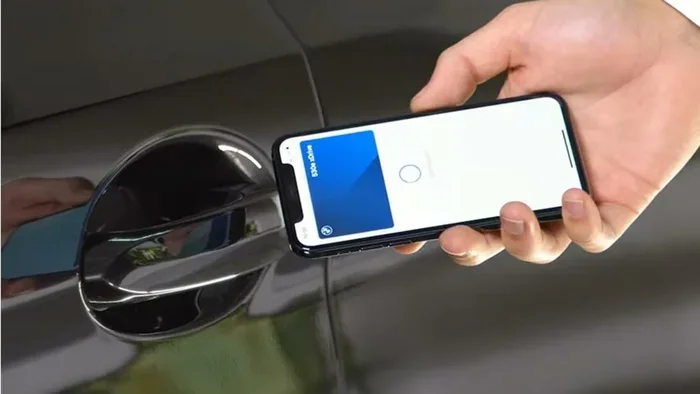
The phone-as-a-key system relies on two main wireless technologies. The first is NFC, or Near Field Communication. This works when your phone is very close to the car, usually within a few centimeters. The second is Bluetooth Low Energy, which has a longer range and can detect your phone as you approach the vehicle.
When you walk up to your Toyota, the car’s proximity sensor detects your phone. The vehicle and your phone exchange encrypted signals to verify each other’s identity. Once verified, the doors unlock automatically. You then press the push button start to fire up the engine. All of this happens in seconds.
The encrypted signal is what keeps the system secure. A simple copied signal will not work. Each session uses a unique code that changes every time. This makes car security much stronger than traditional key fobs. Even if someone tries to intercept the signal, they cannot replicate it.
How Does the Toyota Digital Key Technology Work?
The Toyota Digital Key operates on a combination of hardware and software working together. Your phone needs a compatible chip, and your Toyota needs the right sensors and modules. Let us break down the technology so you can understand what is happening under the hood.
The Role of NFC in Toyota Digital Key
NFC technology is the backbone of the digital key system. It allows two devices to communicate when they are very close together. In the case of your Toyota, your phone and the car’s reader need to be within a few inches of each other.
Here is how it works step by step:
- Your phone sends an NFC signal to the car’s door handle or console reader.
- The car’s reader verifies the signal using encrypted authentication.
- If the signal is valid, the car unlocks the doors.
- You place your phone on the wireless charging pad or the start button.
- The car reads your phone again and starts the engine.
This entire process takes less than a second. It feels almost magical. But behind the scenes, there is a lot of powerful technology making it happen. The digital credential stored on your phone is protected by advanced encryption. Only the Toyota system can read and validate it.
Bluetooth Low Energy and Remote Features
While NFC handles the close-up interactions, Bluetooth Low Energy powers the remote features. BLE has a range of about 30 to 50 feet. This means you can unlock your car from a distance before you even reach it.
You can also use the Toyota app to remote start your vehicle. This is especially useful in hot or cold weather. You start the engine from your phone, set the temperature, and walk into a comfortable car. The smart key system makes all of this possible without a traditional fob.
BLE also handles vehicle lock and unlock commands sent from the app. If you forget to lock your car, you can do it from anywhere with an internet connection. This adds a layer of convenience that traditional keys simply cannot match.
Security Features of the Toyota Digital Key
Security is a top priority for Toyota connected systems. The Toyota Digital Key uses multiple layers of protection to keep your vehicle safe.
- Encrypted Signal Authentication: Every communication between your phone and car is encrypted. No one can clone or intercept the signal.
- Dynamic Key Rotation: The digital key changes its code frequently. This prevents replay attacks where someone captures and reuses a signal.
- Proximity Detection: The car only responds when your verified phone is nearby. This prevents relay attacks from distant devices.
- Multi-Factor Verification: Your phone must pass both NFC and BLE checks before the car grants access.
- Remote Lock and Wipe: If your phone is lost or stolen, you can lock the car and remove the digital key through the app.
These features make the Toyota Digital Key more secure than most traditional key fobs. The car security system is designed to stay ahead of modern threats. Toyota has invested heavily in making sure your vehicle remains protected at all times.
Setting Up Your Toyota Digital Key
Setting up your Toyota Digital Key is a straightforward process. You will need a compatible Toyota vehicle, a supported smartphone, and the Toyota Owner App installed. Let us walk through the steps.
Step-by-Step Setup Guide
- Download the Toyota Owner App: Visit the App Store or Google Play Store and install the official Toyota app.
- Create Your Account: Sign up with your Toyota credentials. You will need your vehicle identification number.
- Navigate to Digital Key: Open the app and select the “Digital Key” option from the main menu.
- Place Your Phone on the Reader: Hold your phone against the door handle reader or the center console.
- Follow On-Screen Prompts: The app will guide you through pairing your phone with the vehicle.
- Test Your Key: Walk away from the car and try unlocking it with your phone. Then try starting the engine.
The entire setup takes about 10 to 15 minutes. Make sure your phone is fully charged before you begin. Also, keep your physical key fob nearby in case you need a backup during setup.
Quick Tips for a Smooth Setup
- Make sure your phone supports NFC and Bluetooth Low Energy. Most modern Android and iPhone models do.
- Keep the Toyota app updated to the latest version for the best experience.
- Restart your phone before setup if you encounter any connection issues.
- Make sure your car is in park and the ignition is off during the pairing process.
- Add your digital key to your phone’s digital wallet if your device supports it.
Once setup is complete, you will never need your physical key fob for daily driving. Of course, it is still a good idea to keep a backup fob in your glove box for emergencies.
Features and Benefits of Toyota Digital Key
The Toyota Digital Key offers a range of features that go beyond simple keyless entry. These features make your driving experience more convenient, secure, and enjoyable.
Keyless Entry and Push Button Start
The most obvious benefit is keyless entry. You do not need to press any buttons on a fob. Simply walk up to your car, and the doors unlock. When you sit down, press the push button start, and the engine turns on. It is a seamless experience that feels futuristic.
Remote Start and Climate Control
You can remote start your Toyota from your phone. This is incredibly useful during extreme weather. In winter, you can warm up the cabin before you get in. In summer, you can cool it down before your morning commute. The Toyota connected system sends commands to your car over the internet, so distance is not a barrier.
Share Digital Keys with Family
One of the best features of the Toyota Digital Key is the ability to share keys. You can send a digital key to family members through the app. Each person gets their own digital credential that is tied to their phone. You can also set restrictions, like limiting speed or setting curfew hours.
This is perfect for lending your car to a spouse or teenage driver. You do not need to hand over a physical key. And if you ever need to revoke access, you can do it instantly from the app.
Wireless Charging Integration
Many Toyota models with Toyota Digital Key also feature wireless charging pads. You can place your phone on the charging pad while driving. The phone stays powered, which is important because a dead phone means no digital key. The wireless charging pad also serves as a secondary reader for the digital key system.
Real-World Benefits Summary
| Feature | Benefit |
|---|---|
| Keyless Entry | Unlock doors by just approaching the car |
| Remote Start | Start the engine from anywhere using the app |
| Digital Key Sharing | Grant access to family or friends instantly |
| Encrypted Signals | Enhanced car security against theft |
| Wireless Charging | Keep your phone powered while driving |
| Multi-User Support | Add up to several digital keys for different users |
Compatible Toyota Models and Requirements
Not every Toyota supports the Toyota Digital Key feature yet. The system requires specific hardware and software in the vehicle. Here is what you need to know about compatibility.
Supported Toyota Models
The Toyota Digital Key is currently available on several popular models. These include the Camry, RAV4, Tundra, and select trims of the Highlander and Tacoma. Toyota has been expanding the list of compatible models each year, so more vehicles are getting this feature.
To find out if your specific model supports the digital key, check the Toyota website or ask your dealer. The feature is typically available on higher trim levels, but it is slowly rolling down to base trims as well.
Smartphone Requirements
Your phone also needs to meet certain requirements to work with the Toyota Digital Key:
- Android Phones: Most Android phones released after 2019 with NFC support work with the system. Samsung Galaxy, Google Pixel, and OnePlus models are fully compatible.
- iPhone: Apple iPhones with U1 chip support (iPhone 11 and newer) can use the digital key through Apple Wallet integration.
- Operating System: You need Android 10 or later, or iOS 14 or later.
- Battery Level: Your phone should have at least 20% battery for the digital key to function reliably.
What Happens If Your Phone Dies?
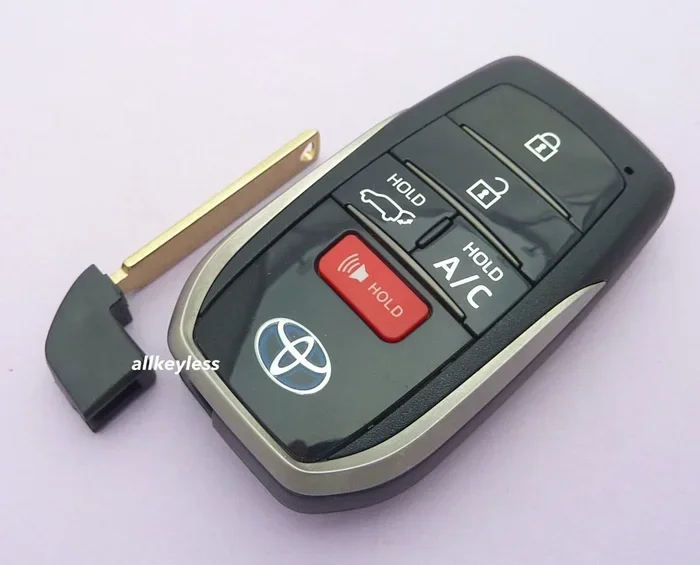
This is a common concern with any digital car key system. The good news is that Toyota has thought about this. You can still use your physical key fob as a backup. The fob uses a traditional smart key system that works independently of your phone. So even if your phone is dead, you can still access and start your Toyota.
Troubleshooting Common Toyota Digital Key Issues
Like any technology, the Toyota Digital Key can sometimes have hiccups. Most issues are easy to fix. Here are some common problems and their solutions.
Phone Not Detected by the Car
If your car does not recognize your phone, try these steps:
- Make sure NFC and Bluetooth are turned on in your phone settings.
- Restart both your phone and the car’s infotainment system.
- Check that the Toyota app is updated to the latest version.
- Remove your phone case. Thick cases can block NFC signals.
- Place your phone flat against the reader, not at an angle.
Digital Key Not Working After Phone Update
Sometimes a phone software update can interfere with the digital key. If this happens:
- Open the Toyota Owner App and re-pair your phone with the vehicle.
- Check for app updates in the store.
- Clear the app cache and restart your phone.
- If the issue persists, contact your Toyota dealer for assistance.
Digital Key Not Working After Phone Update
Sometimes a phone software update can interfere with the digital key. If this happens:
- Open the Toyota Owner App and re-pair your phone with the vehicle.
- Check for app updates in the store.
- Clear the app cache and restart your phone.
- If the issue persists, contact your Toyota dealer for assistance.
Remote Features Not Responding
If remote start or lock/unlock commands from the app are not working:
- Check your internet connection on your phone.
- Make sure the car is within Bluetooth Low Energy range or connected via cellular data.
- Verify that the car’s remote connect subscription is active.
- Log out of the app and log back in to refresh your digital credential.
Can You Use Multiple Phones with One Toyota Digital Key?
Yes, you can add multiple phones as digital keys to one vehicle. Each phone gets its own digital credential. This is great for families or shared vehicles. You can manage all keys from the Toyota Owner App and even revoke access for any phone at any time.
Expert Insights on Toyota Digital Key Technology
Automotive technology experts have praised the Toyota Digital Key for its reliability and ease of use. The system represents a significant step forward in Toyota connected services. Industry analysts note that phone-as-a-key technology is becoming an industry standard, and Toyota is leading the charge with a well-executed implementation.
One key advantage is the use of encrypted signal authentication. Unlike some competitors, Toyota’s system uses dynamic key rotation, which makes it very difficult to hack. The proximity sensor technology is also tuned well, reducing false unlocks and ensuring the car only responds to verified devices.
From a user experience perspective, the Toyota Digital Key removes friction from the driving routine. You do not need to fumble with a key fob in the dark or worry about dropping it in the snow. Your phone is always with you, and now it doubles as your car key.
Common Mistakes to Avoid with Toyota Digital Key
Here are some mistakes users commonly make, and how to avoid them:
- Ignoring Phone Battery: A dead phone means no digital key. Keep your phone charged, especially before long trips.
- Not Setting a Backup Key: Always keep your physical key fob accessible. Do not rely solely on the digital key.
- Skipping App Updates: Outdated app versions can cause connectivity issues. Enable auto-updates for the Toyota app.
- Using a Phone Without NFC: If your phone does not support NFC, the digital key will not work. Check your phone specs before relying on this feature.
- Leaving the App Open: The digital key works in the background. You do not need to keep the app open at all times.
Conclusion
The Toyota Digital Key is a powerful and convenient feature that makes driving simpler and more secure. From keyless entry to remote start, this system covers all the basics of traditional key fobs and adds modern smart features on top. The use of NFC technology and encrypted signals ensures that your car security remains strong while enjoying the benefits of a smart key system.
Setting up your Toyota Digital Key is quick and easy through the Toyota Owner App. Once configured, you will wonder how you ever drove without it. The ability to share digital keys, remote start your vehicle, and enjoy seamless vehicle access sets Toyota apart in the connected car space.
If you own a compatible Toyota model, we strongly recommend setting up the digital key feature. It is one of those upgrades that you will use every single time you drive. The Toyota Digital Key works every time, and once you try it, you will not want to go back to a traditional key fob.
Frequently Asked Questions
Can I use the Toyota Digital Key if my phone battery is low?
The digital key requires a minimum battery level to function. If your phone drops below 20%, the system may not work. Keep your phone charged, especially before long drives. You can always fall back to your physical key fob in an emergency.
Which Toyota models support the Digital Key feature?
The Toyota Digital Key is available on models like the Camry, RAV4, Tundra, Highlander, and Tacoma, depending on the trim level. Check with your Toyota dealer or visit the Toyota website to confirm if your specific model year supports the feature.
Is the Toyota Digital Key secure against hacking?
Yes, the system uses encrypted signal authentication and dynamic key rotation to prevent hacking attempts. Each session generates a unique code that cannot be reused. This makes the Toyota Digital Key more secure than most traditional key fobs.
Can I share my Toyota Digital Key with someone else?
Absolutely. You can share your digital key through the Toyota Owner App with family members or friends. Each person gets their own digital credential linked to their phone. You can also set usage restrictions for shared keys.
What happens if I lose my phone?
If you lose your phone, you can remotely lock the vehicle and remove the digital key through the Toyota app. You can also use your physical key fob to access the car. It is a good idea to set up a backup key before relying solely on the digital key.
Do I need an internet connection to use the Toyota Digital Key?
For basic lock, unlock, and start functions, you do not need the internet. These work through NFC and Bluetooth Low Energy directly between your phone and the car. However, remote features like remote start and location tracking require a cellular or Wi-Fi connection.