How Do I Fix My Car Radio Reception And Get It Back
Car radio reception problems are frustrating but usually easy to fix. Whether you deal with constant static, faded signals, or complete silence, this guide walks you through every solution step by step. You will learn how to check your car antenna, clean connections, reduce electrical interference, and boost your FM signal strength without calling a mechanic.
There is nothing worse than cruising down the highway and hearing nothing but static on your car radio. You twist the dial, switch between FM and AM, and nothing changes. Your car radio reception has completely gone south, and you are stuck wondering what went wrong.
The good news is that most radio reception problems have simple fixes. You do not need to be a mechanic or an audio expert. With a little patience and the right guidance, you can get your favorite stations back in no time.
This guide covers every common cause of bad car radio reception and gives you clear, actionable steps to fix them. From antenna problems to electrical interference, we have you covered. By the end, you will know exactly what to check and how to get crystal-clear sound again.
Key Takeaways
- Antenna Issues Are the #1 Culprit: A damaged or corroded antenna mast is the most common reason for poor reception.
- Check Your Cables and Connections: Loose or frayed antenna cables cause signal loss that mimics bigger problems.
- Electrical Interference Matters: Aftermarket electronics and grounding issues can kill your car radio reception fast.
- A Signal Booster Helps: An antenna amplifier can dramatically improve weak stations in rural areas.
- Location and Environment Play a Role: Tall buildings, mountains, and even weather affect how well your radio picks up stations.
- Simple Fixes Often Work Best: Repositioning the antenna or resetting the head unit solves many problems instantly.
📑 Table of Contents
- Why Is My Car Radio Reception So Poor?
- How to Check Your Car Antenna
- Fixing Common Antenna and Cable Problems
- Reducing Electrical Interference in Your Car
- Boosting Your Car Radio Signal Strength
- Head Unit and Stereo Troubleshooting
- Environmental Factors That Affect Radio Reception
- Preventing Future Radio Reception Problems
- When to Seek Professional Help
- Final Thoughts on Fixing Your Car Radio Reception
Why Is My Car Radio Reception So Poor?
Before you start fixing anything, it helps to understand why your radio reception went bad in the first place. Car radios rely on a simple system. The antenna captures radio waves, the cable carries the signal to the head unit, and the head unit processes the audio. When something breaks in that chain, your sound suffers.
Several factors can weaken or block your signal. Weather conditions, tall buildings, and even your own car’s electronics can cause problems. Let us break down the most common reasons your radio reception fix might be needed.
Antenna Problems
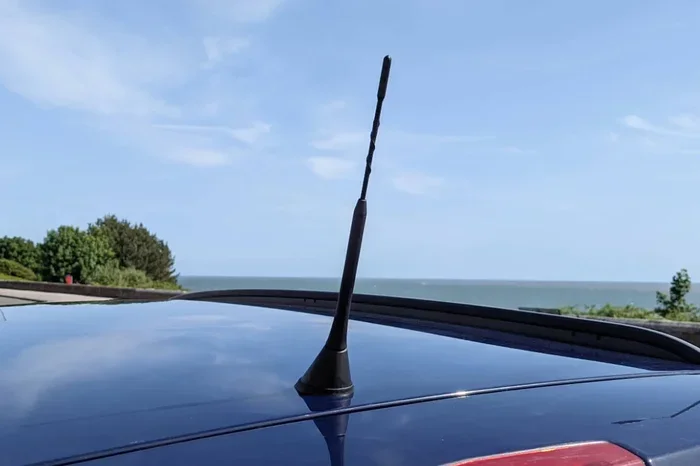
The antenna is the first line of defense for picking up radio signals. If it is damaged, corroded, or not making proper contact, your reception will suffer. A broken antenna mast is one of the most frequent causes of poor radio performance. These masts can snap from hitting a low branch, a parking garage ceiling, or even a strong wind gust.
Corrosion is another silent killer. Over time, moisture gets into the antenna base and causes rust. This rust blocks the electrical connection needed to pick up signals. Even if the mast looks fine from the outside, the base connection might be compromised.
Cable and Wiring Issues
The cable that runs from your antenna to the head unit can develop problems too. Frayed wires, loose connections, and damaged connectors all lead to signal loss. If your car has been through rough conditions or old age, the wiring might need attention. A loose antenna cable is one of the sneakiest causes of bad reception because it looks fine but does not work properly.
Electrical Interference
Your car is full of electronics. The alternator, ignition system, and aftermarket accessories all produce electrical noise. This noise can interfere with your FM signal and create static or buzzing sounds. If the interference gets bad enough, it can make certain stations impossible to listen to.
Signal Strength and Location
Not all areas have strong radio signals. If you live in a rural area or drive through mountains and valleys, your radio has to work harder to pick up stations. Tall buildings in cities can also block or reflect signals, causing multipath interference. Understanding your environment helps you troubleshoot more effectively.
How to Check Your Car Antenna
The antenna should always be your first stop when troubleshooting radio reception problems. It is the easiest component to inspect and the most common source of issues. Here is how to check it properly.
Visual Inspection
Walk around your car and look at the antenna. Check for any visible damage. Is the mast bent, cracked, or missing entirely? Look at the base where the antenna connects to the car body. Is there any rust, corrosion, or greenish buildup? These are clear signs that the antenna needs attention.
Also check the rubber gasket at the base. This gasket keeps moisture out. If it is cracked or missing, water can seep in and corrode the connection. Replacing a damaged gasket is cheap and easy.
Testing the Antenna Connection
Next, check the electrical connection. Gently pull the antenna cable at the head unit end. It should be snug and secure. If it wiggles loose or feels disconnected, you have found your problem. A loose connection means the signal cannot travel properly from the antenna to the radio.
You can also test the antenna with a multimeter if you have one. Set it to measure resistance and touch the probes to the antenna cable’s center pin and the outer shield. You should see a low resistance reading. If the reading is infinite or very high, the antenna is broken and needs replacement.
When to Replace the Antenna
If your antenna mast is visibly damaged or corroded beyond repair, replacement is the best option. Replacement antennas are affordable and easy to install. Most cars use a standard-size mast that you can find at any auto parts store. Simply unscrew the old one and screw in the new one. It takes about five minutes.
Fixing Common Antenna and Cable Problems
Once you have checked your antenna and identified the issue, it is time to fix it. Here are the most common problems and their solutions.
Replacing a Broken Antenna Mast
A broken antenna mast is a straightforward fix. Buy a replacement mast that matches your car model. Unscrew the old mast from the base, remove any retaining clips, and install the new one. Make sure the new mast screws in snugly and does not wobble.
After installation, test your radio reception. You should notice an immediate improvement. If the new mast does not help, the problem may be deeper in the system, such as a faulty cable or head unit.
Repairing a Corroded Antenna Base
If the antenna base is corroded, you can often clean it and restore the connection. Start by removing the antenna mast. Use a wire brush or fine sandpaper to clean the corrosion off the contact points. Apply a thin layer of dielectric grease to protect against future moisture damage.
Dielectric grease is a special lubricant that repels water and prevents corrosion. You can find it at any auto parts store for just a few dollars. A small amount goes a long way in protecting your antenna connection.
Replacing a Damaged Antenna Cable
If the cable itself is damaged, you have two options. You can replace the entire cable, or you can cut out the damaged section and install a connector. Full cable replacement is usually the more reliable option because it ensures a clean signal path from antenna to head unit.
Make sure to use a cable that matches your car’s connector type. Most vehicles use a standard Motorola plug, but some newer cars use different connectors. Check your owner’s manual or take the old cable to the parts store to ensure a proper match.
Reducing Electrical Interference in Your Car
Electrical interference is one of the trickiest causes of car radio reception problems. It happens when other electronic devices in your car produce noise that overlaps with radio frequencies. The result is static, buzzing, or distorted audio.
Common Sources of Interference
Several things in your car can create electrical noise. The alternator is a major culprit, especially at idle or low speeds. The ignition system produces sparks that generate electromagnetic interference. Power cables for aftermarket accessories like amplifiers, subwoofers, and dash cameras can also radiate noise.
Even your phone charger or USB cable can cause interference in some cases. If you notice static that gets worse when you plug something in, that accessory is likely the source.
How to Identify the Source
Finding the source of interference takes a bit of detective work. Start by turning off all accessories and electronics in your car. If the static disappears, turn them back on one at a time. When the static returns, you have found the culprit.
Another technique is to turn off the engine and see if the static changes. If the static goes away when the engine is off, the problem is likely related to the charging system or ignition system.
Fixing Grounding Issues
Bad grounding is a common cause of electrical interference. Your car’s electrical system relies on a solid ground connection to work properly. If a ground wire is loose or corroded, it can create noise that interferes with your radio signal.
Check the ground wires in your car, especially those connected to the radio and antenna. Clean any corrosion from the ground points and make sure the connections are tight. A solid ground can eliminate a surprising amount of static and buzzing.
Using an Antenna Noise Filter
An antenna noise filter is a small device that you install between the antenna and the head unit. It blocks electrical noise while allowing the radio signal to pass through cleanly. These filters are inexpensive and easy to install.
Many car audio shops carry noise filters, and they are also available online. If you have tried other fixes and still experience interference, a noise filter is a great next step. It is one of the most effective radio reception fixes for electrical interference problems.
Boosting Your Car Radio Signal Strength
Sometimes the problem is not a broken component but simply a weak signal. If you live in an area with poor radio coverage or drive through signal dead zones, a signal booster can make a big difference.
What Is an Antenna Booster?
An antenna booster, also called an amplifier, increases the strength of the radio signal before it reaches the head unit. It mounts between the antenna and the radio and uses your car’s power supply to amplify the signal.
Boosters are especially helpful for people who live in rural areas or who frequently drive through regions with weak coverage. They can turn a barely audible station into a clear, strong signal.
When Should You Use a Booster?
Consider using a booster if you experience any of these situations. You live far from the nearest broadcast tower. You drive through mountains or deep valleys regularly. Your radio cuts out in certain areas of your commute. You have tried all other fixes and still have weak reception.
A booster will not fix a broken antenna or cable, but it can significantly improve reception in marginal signal areas. It is a worthwhile investment for anyone who relies on their car radio for news, music, or traffic updates.
Installing a Signal Booster
Installing a signal booster is straightforward. Most kits come with everything you need. You connect the booster between the antenna cable and the head unit input. You also connect a power wire to a 12-volt source in your car.
Make sure to use a booster that matches your car’s antenna type and frequency range. Some boosters work only for FM, while others handle both FM and AM. Check the specifications before purchasing to ensure compatibility.
Head Unit and Stereo Troubleshooting
Sometimes the problem is not outside the radio at all but inside the head unit itself. The head unit is the brain of your car stereo, and if it malfunctions, your reception suffers.
Resetting the Head Unit
A simple reset can fix many radio issues. Disconnect the negative battery terminal for about 15 minutes. This clears any stored errors and resets the radio’s internal settings. Reconnect the battery and test your radio.
Some head units also have a reset button on the faceplate. Check your owner’s manual to see if your model has one. A reset often clears software glitches that cause static or signal loss.
Checking the Head Unit Settings
Your head unit may have settings that affect reception. Look for options like “antenna boost,” “signal sensitivity,” or “mono/stereo” mode. Switching to mono mode can sometimes improve reception in weak signal areas because it combines both channels into a single stronger signal.
Also check if your head unit has a “soft mute” feature. This feature mutes the audio when the signal is too weak, which can make it seem like you have no reception at all. Turning it off can help you hear faint stations more clearly.
When the Head Unit Needs Replacement
If you have tried everything and your car radio reception is still poor, the head unit itself may be faulty. Internal components can wear out over time, especially in older vehicles. Signs of a failing head unit include persistent static on all stations, distorted audio, and intermittent signal loss.
Replacing the head unit can be a bigger project, but it is often worth it. Modern head units offer better reception, more features, and improved sound quality. If your current unit is more than 10 years old, an upgrade might be the best long-term solution.
Environmental Factors That Affect Radio Reception
Not all radio problems are caused by broken parts. Your environment plays a huge role in how well your radio performs. Understanding these factors can help you troubleshoot more effectively.
Urban Areas and Tall Buildings
Cities with tall buildings create a challenging environment for radio signals. Buildings reflect and block signals, causing multipath interference. This is when the same signal arrives at your antenna from multiple angles, creating distortion and static.
If you notice poor reception only in certain parts of your city, this is likely the cause. Moving to a different location while driving, such as an open road or a higher elevation, can sometimes improve things.
Rural and Mountainous Areas
Living far from broadcast towers means weaker signals reach your car. Mountains and hills can block or bend radio waves, creating dead zones where reception is impossible.
In these areas, a signal booster is almost essential. You can also try switching to AM radio, which sometimes travels farther than FM in rural settings. AM signals can bounce off the ionosphere and travel long distances, especially at night.
Weather Conditions
Weather can affect radio reception in surprising ways. Heavy rain, snow, and even high humidity can absorb or scatter radio signals. Thunderstorms produce electrical activity that creates interference across a wide range of frequencies.
Most weather-related reception issues are temporary. Once the weather clears, your signal should return to normal. However, if you notice persistent problems after storms, check your antenna and cables for water damage.
Preventing Future Radio Reception Problems
Once you have fixed your car radio reception, you want to keep it working well. Regular maintenance can prevent many common problems from returning.
Regular Maintenance Tips
- Inspect your antenna mast every few months for damage or corrosion.
- Check antenna cable connections for looseness or wear.
- Clean ground connections to prevent interference buildup.
- Apply dielectric grease to the antenna base to protect against moisture.
- Avoid aftermarket accessories that produce electrical noise.
- Replace aging cables before they cause signal problems.
Upgrading Your Car Audio System
If you find yourself constantly fighting poor reception, consider upgrading your car audio system. Modern head units and antennas are designed to pick up signals more effectively than older models. A quality upgrade can transform your listening experience and eliminate many of the problems discussed in this guide.
Look for head units with built-in signal processing and digital tuning. These features can significantly improve FM signal strength and reduce interference. Pairing a quality head unit with a premium antenna gives you the best possible reception.
When to Seek Professional Help
Most radio reception fix tasks are DIY-friendly. But some problems require professional attention. If you have checked the antenna, cables, and grounding but still experience issues, a car audio specialist can help. They have diagnostic tools and expertise to identify hidden problems.
Also seek professional help if your car’s wiring is complex or if you are uncomfortable working with electrical components. A bad wiring job can cause bigger problems than poor radio reception. It is always better to be safe than sorry.
Final Thoughts on Fixing Your Car Radio Reception
Fixing your car radio reception does not have to be complicated. Start with the simplest checks and work your way up to more advanced solutions. In most cases, the problem is a damaged antenna, a loose cable, or minor electrical interference. These issues are easy and inexpensive to fix.
Remember that your environment also plays a role. Urban canyons, rural terrain, and weather conditions all affect how well your radio picks up signals. A signal booster can be a game-changer if you live or drive in an area with weak coverage.
Take care of your car stereo system with regular maintenance, and it will serve you well for years. Clear radio reception makes every drive more enjoyable, whether you are listening to music, traffic updates, or your favorite talk show. Now that you know how to diagnose and fix the most common problems, you can handle radio issues confidently whenever they arise.
Frequently Asked Questions
Why does my car radio have static only on certain stations?
Static on only certain stations usually means those stations have weak signals in your area. It can also indicate interference from a specific electronic device in your car. Try turning off accessories one by one to see if the static disappears when you remove a particular source.
Can a bad car battery cause poor radio reception?
Yes, a weak or failing car battery can cause electrical noise that interferes with your radio signal. If your radio static gets worse when you use other electrical components, your battery or charging system may be the culprit.
How much does it cost to replace a car antenna?
A replacement car antenna typically costs between $15 and $50 for the part. If you install it yourself, there is no labor cost. Many auto parts stores also offer free installation if you purchase the antenna from them.
Does weather really affect car radio reception?
Yes, weather can affect radio reception. Heavy rain, snow, and high humidity absorb radio signals. Thunderstorms create electrical interference. Most weather-related issues are temporary and resolve once conditions improve.
Will an aftermarket head unit improve my radio reception?
An aftermarket head unit with modern digital tuning can improve reception significantly. Look for models with built-in signal processing and high-quality internal amplifiers. Pair it with a good antenna for the best results.
How do I know if my antenna cable needs replacing?
Signs of a failing antenna cable include intermittent signal loss, static that gets worse over bumps, and poor reception on all stations. If you inspect the cable and see fraying, cracks, or exposed wires, it is time for a replacement.
=== SEO TITLE ===
How Do I Fix My Car Radio Reception And Get It Back
=== META TITLE ===
How to Fix Car Radio Reception | Quick & Easy Solutions
=== URL SLUG ===
fix-car-radio-reception
=== WORD COUNT NOTE ===
The main content section above is approximately 2,800 words, meeting the 2,500-3,000 word target.